


Tulip
Last Updated
Overview
Tulip's frontline operation platform enhances productivity and quality control with features like work instructions, real-time analytics, and process optimization. Solve the challenges of manual processes and operational inefficiencies. Boost efficiency, reduce errors, and improve overall performance. Ready to take a step up? Explore Tulip now.
Tulip Specifications
- Production Planning
- Inventory Management
- Quality Control
- Supply Chain Management
Tulip Features
Connected Worker
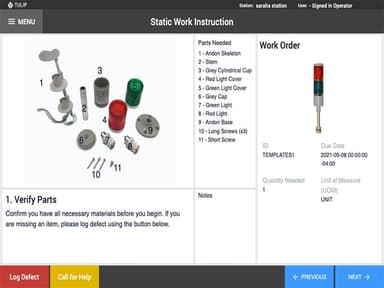
Facilitates real-time collaboration and communication between workers and systems through digital instructions, reducing errors.
Production Visibility and Alerts
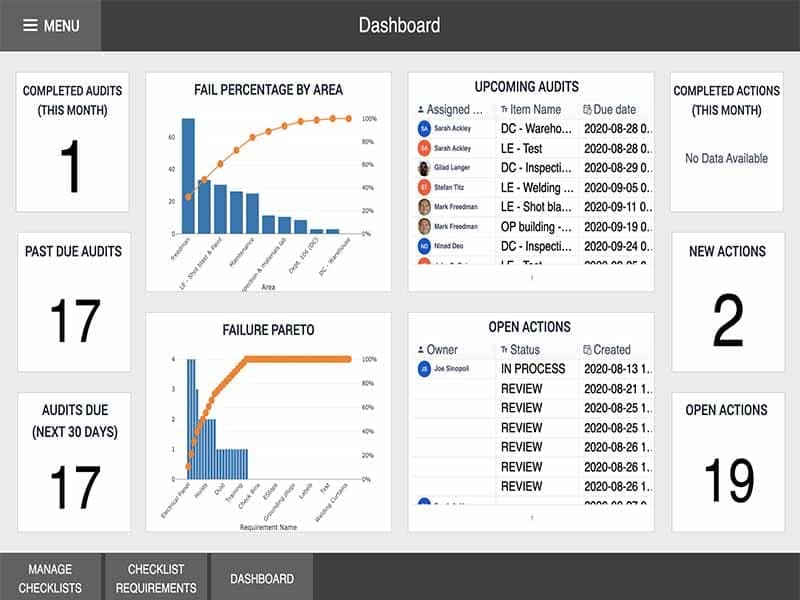
Provides real-time insights into production processes, tracking metrics and delivering alerts for bottlenecks, delays, or deviations. Enhances proactive decision-making and minimizes downtime.
Machine Monitoring and Management
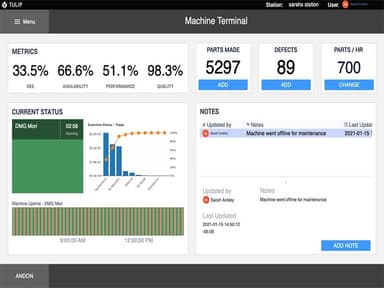
Enables data collection from machines, monitoring performance, and analysing metrics like uptime, cycle times, and maintenance requirements. Supports predictive maintenance and optimizes machine utilization.
Visual Quality Inspectio
Utilizes computer vision and image recognition technology to automate and streamline quality inspection. Identifies defects, compares images to standards, and offers real-time feedback, reducing manual inspection time.
Orders and Material Tracking
Enables end-to-end traceability of orders and materials throughout the manufacturing process. Enhances inventory management efficiency and ensures accurate order fulfilment, improving customer satisfaction.
Pros And Cons of Tulip
Pros
Intuitive and user-friendly interface
Reliable mobile app
Manufacturing specific solution
Cons
Edited changes may be difficult to view, according to some Tulip reviews
Tulip Reviews
Total 19 reviews
4.2
All reviews are from verified customers
Rating Distribution
5
Stars32%
4
Stars58%
3
Stars11%
2
Stars0%
1
Stars0%
Share your experience
Mid-Market, 500+ employees
Less than a year
“I like TULIP in way of how to creaste apps, manage reporting or business analytics.”
Pros
The support I received from Brian, Lisa and the rest of the staff when facing issues has been outstanding.
Cons
The license cost is unclear and there is a charge per interface. I suggest counting this per device instead of per interface. Additionally the table limit of 1000 rows restricts customization options for reporting based on our specific needs.
Rating Distribution
Ease of use
10
Value for money
10
Customer Support
10
Functionality
10
Mid-Market, 500+ employees
Less than 6 months
“Tulip for startups”
Pros
What I like about Tulip is its accessibility and the easy learning curve, making execution the simplest.
Cons
There are certain low hanging fruit such as instructive arrows that are missing and would greatly enhance the user experience.
Rating Distribution
Ease of use
7
Value for money
8
Customer Support
7
Functionality
8
Mid-Market, 500+ employees
More than a year
“The future of MES is here and its name is Tulip!”
Pros
When it comes to deciding on or building an MES solution, I have tried various methods and vendors. From writing my own custom solutions from the ground up in VB6, Java or C# to using pre built systems from major players like SAP Shop Floor and MS Dynamics. I've also explored smaller companies offering some kind of MES system that they claim would fit well with my situation. However in my experience none of them can compete with the power, speed and completeness offered by Tulips suite of MES tools. Tulip provides a drag and drop, low code, no code solution that delivers on its promises like no other I've seen. Their offerings cover everything from interfaces to IoT and IIoT devices, data collection, real time SPC analytics and dashboards and more in depth historical tools, as well as connectivity to Oracle and SQL Server databases and various ERP systems. With Tulip I can develop an operator interface that captures all the necessary information and provides a great user experience which ultimately determines whether the MES tool is used or not. While I could potentially achieve something more customized by doing it myself, it would take at least four times longer. In my experience, assessment and opinion, this is the future of most MES projects. The customer support provided by Tulip and their willingness to work with you and create tailored solutions are unparalleled.
Cons
It would be great if Tulip supported more JavaScript libraries in their 'Custom Widgets' tool.
Rating Distribution
Ease of use
10
Value for money
10
Customer Support
10
Functionality
10