Comparison
TimeSuite Vs QuickBooks: Comprehensive Comparison Guide
7 mins read
Last Updated

Writer
Most SMBs struggle to keep projects and finances aligned. Tasks progress, schedules shift, and resources are deployed, but budgets and reports often lag. As a result, businesses waste hours fixing numbers that should have been right the first time.
This is exactly where the right software makes all the difference. TimeSuite and QuickBooks both tackle this issue, just from different angles. TimeSuite links daily operations with accounting for real-time project insights, while QuickBooks emphasizes structured financial control and company-wide reporting to support broader financial oversight.
Our guide breaks down how each system works, so you can invest in the one that genuinely fits your business needs.
Features | TimeSuite | QuickBooks |
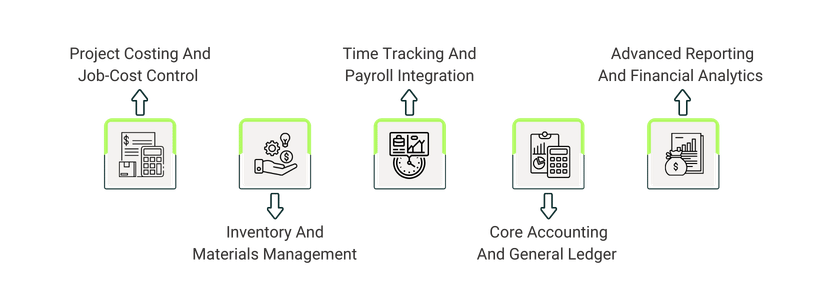
Project Costing And Job-Cost Control | Percentage of Completion (POC) projection logs, over/under billing adjustments, automatic contract summaries, and quick budget updates. | Job cost allocation to specific tasks, job profitability reports, real-time project performance tracking. |
Inventory And Materials Management | Labor cost capture, material cost capture, equipment cost tracking, Work In Progress (WIP) updates, cost-plus billing, time-and-materials billing. | Serial number tracking, purchase order management, sales order tracking, multi-level location tracking (e.g. bin, shelf, row). |
Time Tracking And Payroll Integration | Geo-verified mobile timecards, direct posting to jobs and cost codes, integrated payroll, automatic budget updates. | Payroll management with tax calculations and direct deposits, time tracking via QuickBooks Time Elite add-on. |
Core Accounting And General Ledger | Project-level accounting, budget alignment with ongoing projects. | General Ledger, chart of accounts, complex transaction support, Accounts Payables (A/P) and Accounts Receivables (A/R) management, period closing workflows. |
Advanced Reporting And Financial Analytics | Project reports, real-time budget vs actuals, estimates tracking. | 200+ built-in reports, financial summaries, profit-and-loss statements, job profitability analysis, cash flow and account balances. |

TimeSuite is a construction-focused Enterprise Resource Planning software (ERP) that specifically helps contractors who need real-time project cost alongside labor visibility. Compared with QuickBooks, it gives construction firms faster insights into the costs and resource usage, so they can manage numerous active projects simultaneously.
While its reporting is primarily project-focused only, its relational architecture helps manage contracts, time-and-materials billing, and order changes, all without switching programs. These capabilities are especially important in the construction businesses since they rely on timely cost tracking in order to stay on budget and schedule.
Unique Features Of TimeSuite
- On‑Screen Takeoffs - Converts digital plans (PDFs or plan drawings) into precise material quantities and estimates. This helps contractors to prepare accurate bids within the tool
- Mobile Field Access - Users can access project documents and update tasks from the job site. Geo-tagged timecards can be submitted on the go
- Real-Time Job Costing - Tracks project costs in real-time, including labor and materials. It also updates budgets automatically for accurate financial visibility
TimeSuite Pros And Cons
Pros | Cons |
|
|

QuickBooks is an accounting and business management platform catering to small to mid-sized businesses. Installed locally, it includes several features – such as accounting, payroll, and job costing - all in one location. Compared with TimeSuite, it excels in multi-project reporting, report-based dashboards that provide clear and flexible financial analytics.
The software serves contractors, professional services, and accountants, thereby supporting project management and job cost tracking. However, advanced time tracking such as mobile punch-ins and real-time labor updates are not fully native to the app, for those you need an integration with QuickBooks Time software. Overall, the tool capabilities – including cloud hosting – offer value to contractors and professional services that require cross-projects reporting and complete financial management.
Unique Features Of QuickBooks
- Advanced Inventory – Track every item in multiple locations with serial numbers, barcode scanners, and bin/shelf locations
- Integrated Payroll And Time Tracking – Manage payroll with tax calculations and direct deposits. It also links employee hours or billable time to invoices for accuracy in payroll
- Job Costing And Project Accounting – Assign every cost, labor hour, and dollar of income to individual projects, while attaining clarity with real-time profit reports, and track upcoming expenses
QuickBooks Pros And Cons
Pros | Cons |
|
|
To help you choose with confidence, here’s how both platforms differ across each feature.
QuickBooks Desktop Enterprise offers a clear annual subscription model. This provides clear cost predictability, which is good for budgeting.
The plans include:
- Gold - Starting at $2,210/year (annual subscription)
- Platinum - Starting at $2,717/year (annual subscription)
- Diamond - Starting at $5,363/year (monthly subscription)
Disclaimer: The pricing is subject to change.
In contrast, TimeSuite operates on a custom-quoted pricing model. This implies that the final cost is determined by the company's specific requirements and may require an initial setup investment. This approach bundles comprehensive project management, job costing, and accounting into one unified system.
Picking between TimeSuite and QuickBooks comes down to what drives the business. TimeSuite combines project costing, time tracking, payroll, and resource management in one system, offering real-time budget and workflow visibility with a custom-based pricing model.
QuickBooks focuses on accounting, payroll, and reporting, with multi-company tools, customizable analytics, and a predictable pricing model. It suits businesses seeking modular, enterprise-level financial control with transparent pricing.
In the end, choose TimeSuite when the goal is one system that connects all operations. QuickBooks for flexible financial management with modular features and transparent costs. Each platform serves different business types and workflows, so the best choice depends on what your business needs the most.