
Article
What Is SCORM? A Complete Guide To SCORM Files, Packages, And Compliance For E-Learning
6 mins read
Last Updated

Writer


Article
6 mins read
Last Updated
Writer

Have you ever wondered what SCORM is and why it is essential for e-learning? SCORM, or Sharable Content Object Reference Model, is the industry standard that ensures e-learning content integrates seamlessly with Learning Management Systems (LMS). It enables organizations to create, share, and track training programs effortlessly across platforms, providing a consistent and efficient learning experience.
In this blog, we’ll explore everything you need to know about SCORM – what it is, how it works, and why it’s essential for modern e-learning. Whether you’re a content creator, LMS administrator, or someone curious about e-learning standards, this guide has you covered.

The Shareable Content Object Reference Model (SCORM) is a set of technical standards for e-learning software that ensures content is compatible with different learning management systems. SCORM is not content itself, nor is it software — it is simply the format that packages content. Before SCORM, every company used its own proprietary format, which meant content built for one LMS would not work on another. Then, Advanced Distributed Learning (ADL), a research group under the U.S. Department of Defense, developed SCORM 1.0 in 2000 to establish a universal standard for the industry.
It basically tells how to make a course that works well with any platform. Simply put, it gives a detailed description of the course structure and how it interacts with LMS. A SCORM course contains multiple pieces, such as quizzes, lessons, or modules. Each piece is called a Shareable Content Object, or SCO. An LMS can track each one separately and reuse them across any course.
Plus, SCORM is not limited to interactive content only. Static formats such as PDFs and plain text documents can also be packaged in SCORM format.
Now that you know SCORM's meaning, let's move on to how it works. SCORM works by providing technical standards across three main categories that dictate how the courses should be packaged, delivered, and tracked.
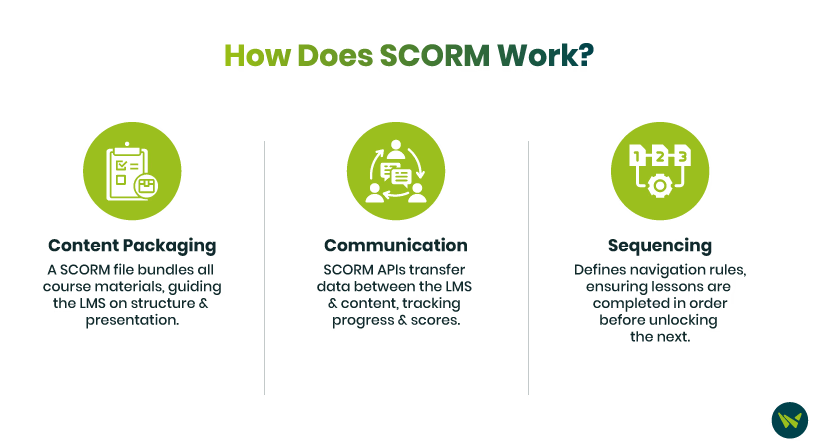
Whenever a learner takes a SCORM course, a conversation happens in the background between the course and the LMS. The course monitors what the learner is doing and sends that data to the LMS, which stores it and displays it to the administrator. This is what SCORM tracks:
SCORM records the learner's current position in the course. If a learner leaves the course midway, they can resume from exactly where they stopped next time.
Suspend Data and Lesson Location work together, but are not the same thing. Lesson Location only saves where the learner stopped in the course. Suspend Data saves exactly what the learner was doing at that moment — for example, which answer was selected in a quiz, where a timer was, and what was filled in a form. Without Suspend Data, a learner can resume on the right page, but everything they were doing at that point is lost.
SCORM tracks the learner's course completion state, but how it does this depends on the version. SCORM 1.2 uses a single lesson status field with six possible values: passed, failed, completed, incomplete, browsed, and not attempted. SCORM 2004 improves on this by splitting the field into two — completion status, which tracks whether the learner finished the course, and success status, which tracks whether they passed. This separation gives administrators a clearer and more accurate picture of where each learner stands.
SCORM also tracks whether, when a learner opens a course, they are properly taking it (credit mode) or just viewing it without any record being kept (no-credit mode). In credit mode, the learner's progress, score, and completion are all recorded in the LMS. In no-credit mode, no data is recorded and no completion is counted. This matters in compliance training where proof is required that the learner actually completed the course.
Mastery score is the minimum passing threshold set by the course designer. If the learner meets that threshold, they are marked passed; if not, they are marked failed. Based on this score, the LMS can automatically assign certificates or badges without the administrator having to do anything manually. Some LMS platforms also allow administrators to change the course designer's set mastery score directly within the LMS without republishing the course.
SCORM records each learner's actual numerical score achieved in a quiz or assessment and sends it directly to the LMS. This raw score is then compared against the mastery score — a passing threshold set by the administrator — to determine whether the learner passed or failed.
SCORM tracks two separate time data points — how much time was spent in the current session, and how much total time has been spent on the course across all sessions. This data tells course designers whether learners are spending appropriate time on the material and whether the course length itself needs adjustment.
Interactions record every individual learner activity — quiz answers, button clicks, drag and drop responses. This is granular data that specifically shows where a learner is struggling, so course content can be improved accordingly. One practical thing to keep in mind — not all LMS platforms display interaction-level data in their reporting, even when SCORM is sending it. Before choosing an LMS, verify that interaction data is actually visible to administrators and not just stored in the background.
A SCORM file, also known as SCORM package, SCORM course, or SCORM module, is a ZIP file that includes e-learning content in the form of JavaScript, HTML, and multimedia elements. It uses a standardized SCORM file type to ensure compatibility with LMS. A SCORM file type also contains a manifest file, which specifies the structure and behavior of the content.
Every SCORM package should include these key components:
By adhering to the SCORM file format, e-learning modules can be seamlessly imported, launched, and tracked.
SCORM compliance and standards form the foundation of modern e-learning by ensuring interoperability, consistency, and efficiency in delivering content. Here is everything you need to know about SCORM compliance:
SCORM compliance means your course adheres to the industry standard for communicating between learning management systems and e-learning content. In simple words, SCORM compliance states that your e-learning content meets the SCORM standard. It ensures that courses can be delivered, tracked, and measured across any SCORM-compliant LMS.
A SCORM compliant LMS is a platform that can import, launch, and track SCORM packages. Any SCORM course, regardless of which authoring tool created it, is designed to run and report learner data within that platform — though actual behavior may vary depending on how each vendor has implemented the standard. When you are ready to deliver online courses, you might need an LMS, but choosing the best fit can be daunting.

TalentLMS
TalentLMS is a versatile platform that supports SCORM-compliant courses, making it easy for businesses and educators to upload, manage, and track training programs. Its user-friendly interface and extensive features cater to organizations of all sizes.
Traliant
Known for its focus on compliance training, Traliant supports SCORM standards to deliver engaging and interactive e-learning content. It offers tracking and reporting capabilities to meet regulatory requirements.
Skyprep
Skyprep is a cloud-based LMS designed to simplify employee training. Its SCORM compliance ensures easy integration with various e-learning content formats, enabling smooth delivery and detailed performance tracking.
Skillsoft
Skillsoft specializes in offering a vast library of pre-built SCORM-compliant courses. Its platform allows businesses to implement scalable training solutions and track learner progress efficiently.
There are plenty of benefits of SCORM, which is why it is among the most adopted technical standards in the e-learning industry. Here are a few of them:

SCORM's development began in the late 1990s. At that time, learning happened on computers with stable internet connections, and courses were completed on an LMS.
Today, learning has evolved. People learn on mobile while on the move, even without internet access. And when an LMS is not available, learning still happens through workshops, on-the-job training, and simulations.
But SCORM is still designed for an earlier generation of e-learning. It has not evolved as much as learning has.
That is why there are certain limitations of SCORM:
A common misconception among organizations is that SCORM tracks learning in every situation. In reality, it only works when the learner is online. SCORM's architecture was designed assuming a real-time internet connection, and that has not changed since it was built. If a learner is out in the field in a low-connectivity area, even if they complete the course at that point, their record will not be updated in the LMS.
SCORM compliant does not mean a course will display perfectly on every device or that the experience will be seamless. Compliant simply means both the content and the LMS are following the SCORM standard so that data exchange works correctly. SCORM was built for desktop browsers, and by the time mobile became mainstream, the standard was already so widely adopted that changing it was not practically possible.
Mobile has a different screen size, a different touch interface, and different browser behavior — all of which can cause content to display incorrectly and tracking to be missed.
Many organizations believe SCORM is capturing their complete training picture. That is not true. SCORM's entire model is LMS-centric because when it was built, learning was exclusively formal and LMS-based. Whatever training happens outside the LMS – workshops, on-the-job training, simulations – does not exist for SCORM. There is no record of it.
A SCORM-compliant course does not mean it will work perfectly on every LMS. SCORM is just a standard; it cannot enforce correct implementation. Every LMS vendor codes that standard in their own way, and there is no enforcement mechanism to verify whether it was implemented correctly. The same SCORM course can behave differently across LMS platforms — tracking may work perfectly on one and miss data on another.
And because SCORM has no enforcement, the course creator often has no way of knowing whether the problem is in the course or in the LMS, which makes debugging difficult.
SCORM does not provide detailed behavioral analytics. It tracks completion, score, and time spent, and that has not changed since it was built. SCORM 2004 made some basic improvements, like separating completion from pass/fail and adding question-level tracking, but deep behavioral analytics are still absent.
Which concept a learner revisited repeatedly, where they stopped, what they skipped, how they actually engaged with the content — this behavioral data is limited in SCORM.
SCORM is not the only e-learning standard. In fact, the Aviation Industry Computer-Based Training Committee (AICC) actually predates SCORM. It was built in 1993 for the aviation industry. Technically, it was different from SCORM. It communicated through HTTP, and its packaging was loosely defined, which made connecting content and LMS complex and slow. SCORM's communication through a JavaScript API was faster, and content packaging was clearly defined in ZIP format. So, the industry gradually shifted to SCORM.
Then in 2013, Experience API (xAPI) — also known as Tin Can API — arrived. It removed SCORM's biggest limitation: that learning was only trackable when a learner was inside the LMS, taking a course. xAPI can track a learner watching a YouTube video, attending a workshop, or even reading something offline. All of it can be recorded.
Later in 2016, cmi5 arrived, essentially a combination of SCORM and xAPI. It takes SCORM's packaging structure (ZIP file, manifest) and combines it with xAPI's tracking capabilities, like offline learning. So, in cmi5, a course is packaged like SCORM but tracked like xAPI.
Here is a detailed feature comparison across all five:
Feature | AICC | SCORM 1.2 | SCORM 2004 | xAPI | cmi5 |
Released | 1993 | 2001 | 2004 | 2013 | 2016 |
Communication Method | HTTP | JavaScript API | JavaScript API | HTTP/REST | HTTP/REST |
Content Packaging | Not standardized | ZIP file | ZIP file | No fixed format | ZIP file |
Tracks inside LMS | ✓ | ✓ | ✓ | ✓ | ✓ |
Tracks outside LMS | ✗ | ✗ | ✗ | ✓ | ✓ |
Offline Tracking | ✗ | ✗ | ✗ | ✓ | ✓ |
Mobile Support | Not supported | Not compatible | Not compatible | Native compatible | Compatible with sync |
Analytics Depth | Basic | Basic | Moderate | Rich | Rich |
Sequencing | ✗ | ✗ | ✓ | ✗ | ✓ |
Separate Completion + Pass Status | ✗ | ✗ | ✓ | ✓ | ✓ |
Hosting | LMS only | LMS only | LMS only | Anywhere | Distributed |
Industry Adoption | Largely obsolete | Very high | Moderate | Growing | Progressive |
Implementation Complexity | Complex and rigid | Simple but rigid | Moderate but rigid | Complex and flexible | Balanced |
SCORM compliance is crucial for LMS platforms because it ensures seamless functionality and compatibility across different systems. With SCORM-compliant content, organizations can switch LMS providers without losing access to their learning materials, as these modules are designed to work universally. This flexibility also allows content to be reused across various departments, saving time and resources.
Additionally, SCORM compliance guarantees a consistent and standardized learning experience for users, regardless of the platform. Furthermore, SCORM-compliant LMSs track learners’ progress and performance, providing valuable insights into course completion rates and learner engagement, which are essential for optimizing training strategies.
There are three versions of SCORM, and they include:
SCORM 2004
It is the latest version of the standard that is used today. This version has improved reporting variables, capabilities, and sequencing. It has four editions, and each edition refined the sequencing specification because the original implementation was inconsistent across platforms. One of the drawbacks is that a few LMS vendors support it due to its complexity.
SCORM 1.2
This is the most commonly supported version of SCORM, mainly because it is easy and simple to work with.
Feature | SCORM 1.2 | SCORM 2004 |
Suspend Data Limit | 4,096 characters | 64,000 characters |
Separate Completion + Success Status | No | Yes |
Interaction Tracking | Limited | Detailed |
Sequencing Support | No | Yes |
Multiple SCOs | Yes | Yes |
Partial Score Sequencing | No | Yes |
LMS Compatibility | 90%+ | Under 50% |
Authoring Tool Compatibility | 90%+ | Under 50% |
Ease of Implementation | Simple | Complex |
Maintenance | Straightforward | Complex |
Feedback to Learner | Final score only | Detailed feedback |
Memory/Capacity | Limited for long courses | Better for long courses |
Two things determine which version to use:
First, how complex your course is. If it is a straightforward linear course, SCORM 1.2 is the best fit. If your course requires branching, where the learner's next step changes based on their quiz responses, SCORM 2004 is the appropriate choice.
Second, what your LMS supports. SCORM 1.2 is supported by almost every LMS. SCORM 2004 support is limited, so verify first whether your LMS fully supports it or only partially. Partial support means advanced sequencing may not work as expected, even if the course uploads successfully.
A range of third-party tools and platforms use the SCORM standard to create SCORM-compliant content, and some tools use this standard to track learner progress. Popular tools include Articulate 360, Adobe Captivate, and iSpring Suite, which enable course designers to create engaging SCORM-compliant courses with ease.
Moreover, platforms such as TalentLMS, Moodle, and Docebo support the seamless integration, tracking, and reporting of SCORM packages. As far as cloud-based solutions are concerned, tools like SCORM Cloud facilitate the testing and distribution of SCORM content across various LMS environments, ensuring compatibility and functionality. These tools and platforms empower organizations to efficiently manage and deliver high-quality e-learning experiences.
Beyond authoring tools and LMS platforms, SCORM Engine and SCORM Driver are two additional tools built around the SCORM standard. SCORM Engine makes an LMS SCORM compliant, and SCORM Driver enables an authoring tool to produce SCORM-compliant output.
Ready to get started with SCORM? Explore SCORM-compliant LMS platforms today and transform your e-learning strategy.
SCORM Cloud is a useful tool that helps ensure the e-learning content is effective and easily accessible to provide an enriching experience. This cloud-based platform hosts, tests, and distributes SCORM packages to make sure that the learning content is operable across different platforms.
SCORM course creation used to be complex — only programmers could do it. Today, modern authoring tools have made it possible for anyone to create one without any coding. Here is how you can practically create a SCORM course:
When choosing an authoring tool, first check whether it exports in both SCORM 1.2 and SCORM 2004 formats. If your LMS only supports 1.2 and the tool only exports 2004, the course will not work on your LMS. It is also worth testing the tool's output on your specific LMS before committing — technically valid SCORM can still behave inconsistently depending on how the LMS has implemented the standard.
Before building, decide whether you need sequencing or not. If the learner's path should change based on their quiz responses, work in SCORM 2004. If the course is linear, SCORM 1.2 is sufficient. Make this decision before building because switching versions mid-build may require restructuring the course logic, republishing the package, and any learner data collected during testing will not carry over.
Use the authoring tool's built-in SCORM packager, which automatically generates a SCORM-compliant ZIP file. When exporting, you have to select an LMS profile — SCORM 1.2 or SCORM 2004. If you select the wrong profile, the LMS will not recognize the course even if the ZIP file is correctly built.
Upload to SCORM Cloud and specifically track completion status and score, just checking that the course launches is not enough. Many times, a course launches, but the score does not track, and this only becomes apparent after learners have already taken the course.
SCORM implementation varies because authoring tools and developers involved differ, and LMS platforms are not the same across organizations. When these three do not align perfectly, issues appear in SCORM. Most of these issues are avoidable if they are detected during the process before deployment.
Issue | Why It Happens | How To Fix It |
Missing or Invalid Manifest File | The manifest file is the core of a SCORM package — the LMS reads it to understand the course structure. If any error occurs during the export process or the file gets corrupted, the LMS will either fail the import entirely or import the package but fail to launch it | Before uploading, extract the ZIP and verify that imsmanifest.xml is present in the root folder and correctly structured |
Incorrect File Paths | If file names in the authoring tool contain spaces, special characters, or wrong capitalization, links break. Windows and Mac handle capitalization differently, so something that works on one system may not work on the other | Before exporting, keep file names simple, use underscores instead of spaces, and use relative paths instead of absolute paths |
SCORM Version Mismatch with LMS | Content was published in SCORM 2004 but the LMS only supports SCORM 1.2, or the reverse. The LMS does not recognize the course and it does not display. This mistake happens when the LMS's supported version is not checked before publishing | Before publishing in the authoring tool, check your LMS documentation to confirm which SCORM version is supported. Then export in that version only |
Data Loss During Package Update | When an existing SCORM package is updated and the file name or course identifier changes, the LMS treats it as a new course. Previous learner data, including completions, scores, and progress, remains attached to the old course record and will not appear in reporting for the updated course | When updating a package, keep the same file name and same course identifier. Only change the content and never change the identifiers |
