


Last Updated
Overview
ConsignmentTill is a robust POS designed for seamless inventory management, vendor tracking, and efficient checkouts. Built for consignment businesses, it ensures accurate payments and smooth operations. Reports lack customization flexibility, but the system's ease of use and robust features make daily management effortless and reliable.
ConsignmentTill Specifications
- Sales Orders
- Invoicing
- Sales Tracking
- Customer Management
ConsignmentTill Features
Remote Backup
ConsignmentTill automates daily data backups to a secure web server, ensuring data protection. The platform allows manual backups at any time. An online portal lets consignors track sales and inventory. It enables downloads and scheduling of automatic backups.
Reports/Output
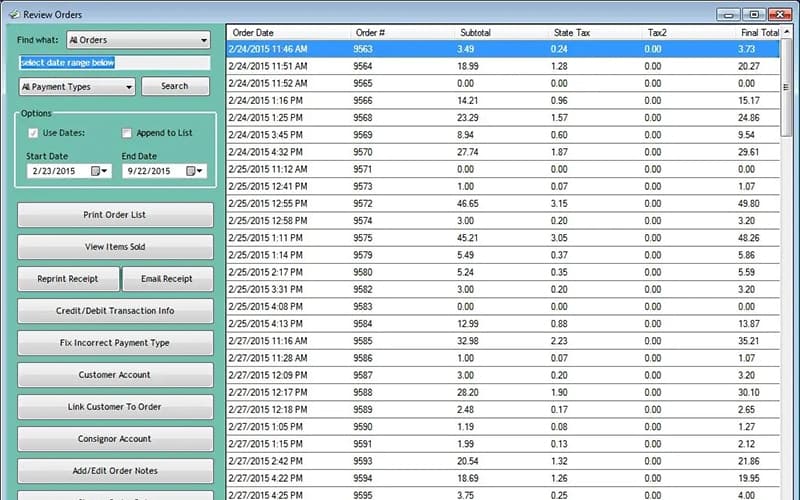
The software generates detailed reports, including inventory, sales, taxes, and profits. ConsignmentTill prints checks, receipts, and barcode labels. The software enables batch emails or mail-outs to consignors and customers. Reports track tax totals and monitor unsold items.
Inventory Management
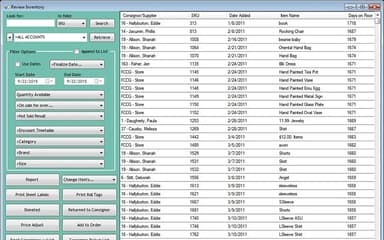
ConsignmentTill facilitates easy inventory searches by category, brand, or size. The platform provides low-stock alerts and automatic discounts for aging items. It enables automatic SKU generation and ownership transfers. The system supports price adjustments at checkout.
Settlements
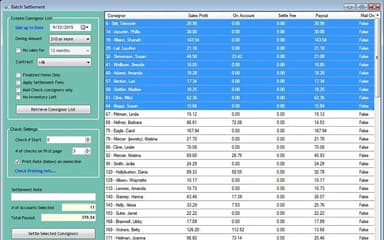
ConsignmentTill automates consignor payouts with optional settlement fees. The platform tracks booth rentals and multiple payment methods. It allows batch or individual settlements. Configurable category-based consignment shares splits and cash payment discounts apply.
Point Of Sale
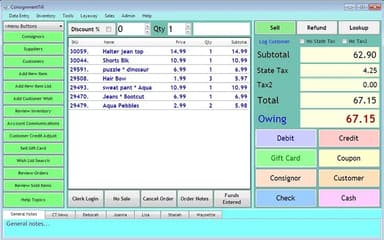
This robust feature offers touch-screen compatibility and tax customization. ConsignmentTill displays inventory images at checkout. The platform includes low-stock alerts and out-of-stock restrictions. Secure credit card processing and real-time discounting enhance transactions.
Pros And Cons of ConsignmentTill
Pros
Barcode scanning for fast and accurate checkout
Vendors can access sales and inventory online
No Wi-Fi is required for work operations
Easy to use with a minimal learning curve
Cons
No spell check for quick entries, especially for antiques
Requires previewing reports to see included details
ConsignmentTill Reviews
Total 5 reviews
4.8
All reviews are from verified customers
Rating Distribution
5
Stars80%
4
Stars20%
3
Stars0%
2
Stars0%
1
Stars0%
Share your experience
Sherine
Retail, 1-10 employees
Less than 6 months
“A total upgrade from what I had”
Pros
The support they offer is simply the best. The one assisting me was so patient, walking me through all the steps of setting it up and always available to come up with creative ways to use the software to meet our unique needs. Also it is great being able to talk directly to the developer who actually knows what he is talking about! The barcode labels really sped up the checkout process. Our distributors loved being able to check their daily sales through the online portal. It was also quite convenient to email reports to everyone at once.
Cons
There are many versions available for most reports but they are just labeled with letters e.g., Items List E. The only way to know what's included in a report is to preview it. I feel like it would be great to have the option to create custom reports.
Rating Distribution
Ease of use
10
Value for money
10
Customer Support
10
Functionality
10
Natashia
Retail, 11-50 employees
Less than a year
“Love it for events and sales”
Pros
It does not need a WiFi connection to work and we can easily process a simple entry for each customer. My rep and I also figured out how to keep tickets on hold in case customers change their minds or keep shopping. Plus this program allows any connected computer to reopen that customer's ticket and process it.
Cons
When entering a clerking on the fly item, there is no spell check. Some of my employees struggle especially when dealing with antiques. Also it would be helpful to have an option to correct spelling before printing the reports. We don't inventory our estate sales, so being able to quickly enter items is really important especially when we are processing hundreds of customers in just a few hours.
Rating Distribution
Ease of use
10
Value for money
10
Customer Support
10
Functionality
10
Linda
Retail, 1-10 employees
More than a year
“Couldn't ask for a better tool”
Pros
I have been using Consignment Till for over 9 years and I cannot imagine switching to anything else. It is easy to use, I never run into problems and when I did need help setting it up, the rep was always available and made it so easy. I am also a part of a consignment group on Facebook and after reading about all the issues other programs have. I am so happy I use Consignment Till. It's not only easy and functional but it is also one of the most affordable options out there. I recommended it to a friend who started her own boutique and she loves it too!
Cons
Honestly there is absolutely nothing. I have been sitting here trying to think of a con but there really is not one for this program.
Rating Distribution
Ease of use
10
Value for money
10
Customer Support
10
Functionality
10
Frequently Asked Questions
Does ConsignmentTill have a mobile app?
ConsignmentTill does not offer a mobile application.
Does ConsignmentTill offer an API?
No, ConsignmentTill does not offer API access.
What language does ConsignmentTill support?
ConsignmentTill supports English.
Who are the typical users of ConsignmentTill?
ConsignmentTill is a user-friendly POS solution for consignment, resale, and thrift shops.
What level of support does ConsignmentTill offer?
ConsignmentTill provides email, phone, and remote desktop assistance support.
What types of pricing plans does ConsignmentTill offer?
The ConsignmentTill cost model provides four flexible solutions, including a Full Version local install for $895, a Lite Version for $495, a cloud-based subscription at $100/month, and Remote Backup with Online Consignor Sales Access for $180/year, with pricing quotes available upon request.
What other apps does ConsignmentTill integrate with?
ConsignmentTill integrates with third-party platforms like Shopify and Worldpay, optimizing e-commerce functionality and payment processing efficiency.