

MicroBiz Cloud POS
Last Updated
Overview
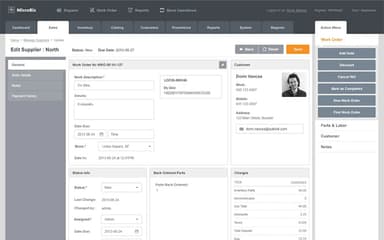
MicroBiz Cloud POS helps retailers run their businesses efficiently. Although some helpful reports are not yet available, the system remains highly customizable for specific business needs. It automates inventory, simplifies multi-store operations, and speeds up transactions, allowing businesses to work smarter, reduce manual effort, and focus on growth.

MicroBiz Cloud POS Specifications
- Sales Orders
- Invoicing
- Sales Tracking
- Customer Management
MicroBiz Cloud POS Features
Point Of Sale
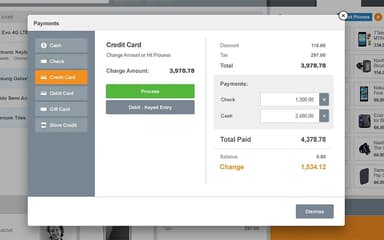
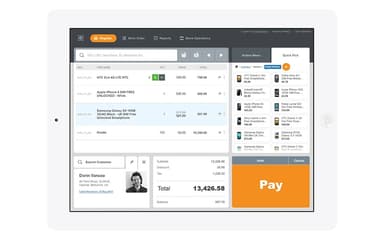
Point of sale feature speeds up transactions with barcode scanning, price checks, and an easy discount application. Its user-friendly design helps staff train quickly, allowing businesses to provide seamless customer checkout experiences.
Inventory Management
This powerful feature assists retailers to track stock, create purchase orders, and manage multiple locations effortlessly. It prints barcodes and generates smart reports, helping businesses optimize inventory levels and avoid overstocking or shortages.
Multi-Store
This important feature centralizes store management, synchronizing inventory, pricing, and promotions across locations. It enables smooth store transfers and real-time performance tracking, giving businesses better control over operations.
Order Management
Order management by MicroBiz Cloud POS organizes phone orders, layaways, and special requests. Moreover, a centralized dashboard helps staff sort pickups, deliveries, and shipments, ensuring accurate order processing and on-time fulfillment.
Customer Management
This feature helps users track customer details and purchase history, enabling businesses to personalize marketing and improve service. Furthermore, it strengthens customer relationships, strengthens loyalty, and boosts repeat purchases.
Reporting & Analytics
This advanced feature delivers real-time sales data, trends, and employee performance reports. It also assists users with customizable reports, providing businesses with clear, actionable insights and helping them make smart decisions and drive growth.
Purchasing & Receiving
MicroBiz Cloud POS offers this feature that automates purchasing with reorder points and backorder tracking. It simplifies receiving shipments and prints barcodes, ensuring accurate inventory management and smooth stock replenishment.
Pros And Cons of MicroBiz Cloud POS
Pros
Cloud-based, allowing access from anywhere
Graphs and pie charts provide useful financial insights
Highly customizable to meet specific business needs
Continuous updates and improvements enhance functionality
Cons
Some helpful reports are not yet available, according to some software users
Accessing old invoices requires too many steps
Certain advertised functions do not work properly
MicroBiz Cloud POS Reviews
Total 2 reviews
5
All reviews are from verified customers
Rating Distribution
5
Stars100%
4
Stars0%
3
Stars0%
2
Stars0%
1
Stars0%
Share your experience
Sporting Goods, 1-10 employees
Less than a year
“Responsive customer support”
Pros
Getting sales associates started takes just minutes which has made adoption really quick. The cloud-based system is a major step up from QBPOS desktop. Setting up the product matrix is especially important for managing inventory styles that come in multiple sizes and colors. Support has been outstanding too-very responsive, detailed, patient and genuinely willing to help.
Cons
There are still a few reports that would be useful to have although they are not essential. That said, the support team and management have been very open to feedback, willing to create workarounds and receptive to adding more reporting options in the future.
Rating Distribution
Ease of use
10
Value for money
8
Customer Support
8
Functionality
8
Automotive, 1-10 employees
Less than 6 months
“Implementation support was fantastic”
Pros
The support team was outstanding throughout implementation. We needed some customization to fit the way we work and they got it done correctly on the first try.
Cons
Since we were replacing QB POS, getting up to speed on all the features took longer than we originally expected. That was really due to an internal personnel issue on our side, not a problem with the software.
Rating Distribution
Ease of use
10
Value for money
10
Customer Support
10
Functionality
8
Frequently Asked Questions
Does MicroBiz Cloud POS have a mobile app?
No, MicroBiz Cloud POS does not have a dedicated mobile app.
What other apps does MicroBiz Cloud POS integrate with?
MicroBiz Cloud POS integrates with QuickBooks Online and WooCommerce.
Who are the typical users of MicroBiz Cloud POS?
Typical users of MicroBiz Cloud POS include online retailers, independent retailers, service-based retailers, multi-store retailers, and specialty retailers.
What types of pricing plans does MicroBiz Cloud POS offer?
MicroBiz Cloud POS offers two pricing plans, i.e., Standard Plan at $60/month and Enterprise Plan at $90/month; furthermore, customized pricing is offered for businesses with more than five stores.
What language does MicroBiz Cloud POS support?
MicroBiz Cloud POS supports only the English language.
What level of support does MicroBiz Cloud POS offer?
MicroBiz Cloud POS supports phone, live chat, email/helpdesk, FAQs, and knowledge base support.
Does MicroBiz Cloud POS offer an API?
No, MicroBiz Cloud POS does not offer an API.