


Last Updated
Overview
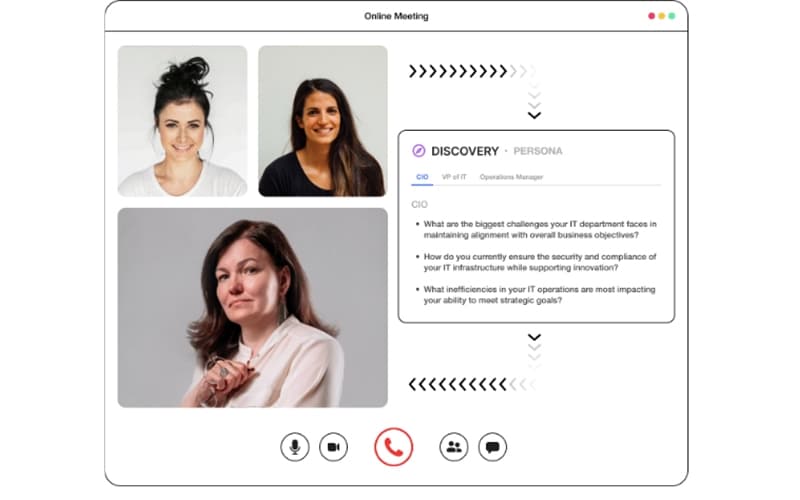
Aircover is an in-call assistant tool that gives sales reps real-time talking points and answer prompts on screen during live customer calls. Although its automated notetaker occasionally joins calls late, the platform's heads-up display delivers instant coaching and technical answers during live conversations, helping reps handle objections smoothly and keep deals moving forward.

Aircover Specifications
- Lead Management
- Sales Automation
- Activity Tracking
- Reporting And Analytics
Aircover Features
In-Call Guidance
This feature delivers an interactive, context-aware overlay directly on a sales representative’s screen during live meetings. By parsing conversation audio in real time, the system automatically detects buyer signals, competitive mentions, and technical objections, surfacing relevant discovery prompts, battlecards, and talk tracks instantly. Account executives can respond to complex questions and handle pushback on the fly without breaking eye contact or searching through external playbooks.
Conversation Intelligence
Acting as an on-demand sales engineering assistant, this capability analyzes deep technical queries during live customer calls and delivers precise product specifications and architecture answers directly to the rep. Beyond real-time assistance, the feature analyzes call transcripts across the entire revenue team to highlight recurring objection trends, track competitor mentions and evaluate message adoption. This allows account executives to manage technical discussions independently and reduces reliance on dedicated sales engineers for routine discovery calls.
AI CRM Sync
This feature automates post-call data entry by extracting structured key insights from customer interactions and mapping them directly to CRM records. The AI automatically categorizes buyer responses into standardized qualification frameworks such as MEDDPICC, BANT, or SPICED, while updating custom opportunity fields and deal stages. Account executives maintain high CRM data hygiene without manual data entry, providing revenue operations leaders with accurate pipeline visibility.
AI-Generated Meeting Notes
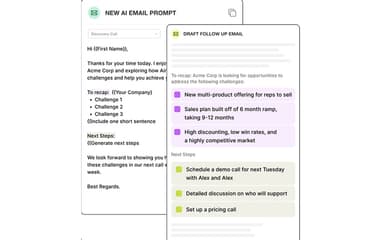
Immediately after a call ends, this feature compiles transcript data into structured meeting summaries, highlighted key takeaways, and assigned action items. It also automatically generates tailored follow-up email drafts based on the specific commitments made during the meeting. Account executives can review, edit, and send follow-up communications within minutes, ensuring rapid post-call execution while capturing every critical interaction detail.
Pros And Cons of Aircover
Pros
Post-call analysis gives users detailed meeting notes
Highlights important notes, making it easier to track action items
Highly organized system makes cataloging easier
Cons
Requires a stable high-speed internet connection for real-time processing
Effectiveness depends heavily on the quality of the initial playbook setup
Aircover Reviews
Total 1 reviews
5
All reviews are from verified customers
Rating Distribution
5
Stars100%
4
Stars0%
3
Stars0%
2
Stars0%
1
Stars0%
Share your experience
Justin J.
Enterprise, 500+ employees
“Incredible software!”
Pros
One of the best parts is the post-call analysis especially how it transcribes the entire meeting. That's been incredibly useful because I can quickly go back and review any part of the conversation whenever I need to confirm details or clear up something from an earlier discussion. I also really appreciate how it organizes key insights into clear sections. It pulls out important moments and sorts them by category so it's simple to understand what was covered and which action items still need follow-up. It honestly feels like having a personal assistant on every call :))
Cons
The only small drawback I've noticed is that the notetaker tends to join the call around two minutes after it starts. It's not really a problem since those opening minutes are usually just casual small talk anyway but it would still be nice if it could be there from the very beginning. Even so the brief delay doesn't affect anything important so it's barely an issue.
Rating Distribution
Ease of use
10
Value for money
9
Customer Support
10
Functionality
10
Frequently Asked Questions
What other apps does Aircover integrate with?
Aircover integrations include Zoom, Twilio, Salesloft, and Genesys.
Who are the typical users of Aircover?
Typical users who benefit from Aircover features include businesses across various industries and sectors, such as automotive, finance and insurance, hospitality, and travel.
What language does Aircover support?
Aircover supports English primarily.
What level of support does Aircover offer?
Aircover offers product assistance via email and a dedicated resource hub for technical support.
Does Aircover have a mobile app?
No, but Aircover offers mobile-responsive features and can be installed as an extension.
What types of pricing plans does Aircover offer?
Aircover pricing is estimated at $150–$450/user/month, with additional costs for onboarding, integrations, and advanced features. Overall cost varies by team size, configuration, and contract terms. Reach out for a custom Aircover cost quote.
Does Aircover offer an API?
Yes, Aircover features an API for custom CRM integrations and data exports.