


Last Updated
Overview
Along helps revenue teams accelerate deals through centralized digital sales rooms, AI-powered buyer engagement insights, and structured mutual action plans. While advanced templates for niche use cases are limited, the platform excels in deal transparency and collaboration. Overall, it suits B2B sales and customer success teams managing complex pipelines.
Along Specifications
- Sales Pipeline Management
- Activity Tracking
- Reporting and Analytics
- Performance Tracking
Along Features
Digital Sales Rooms
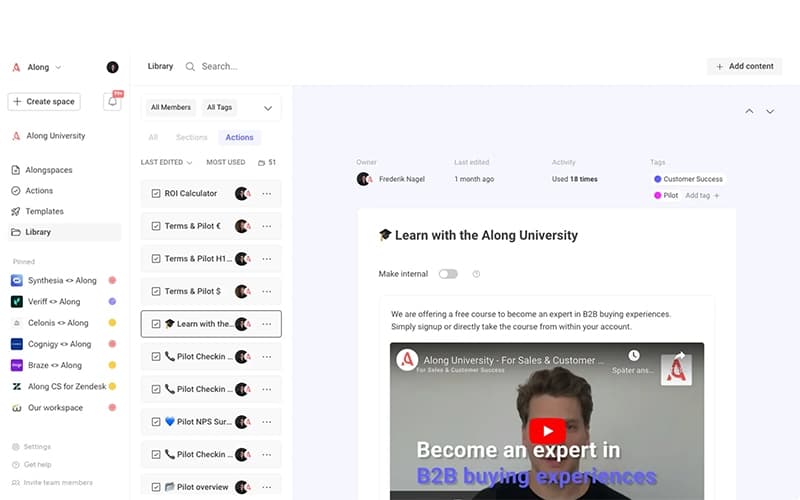
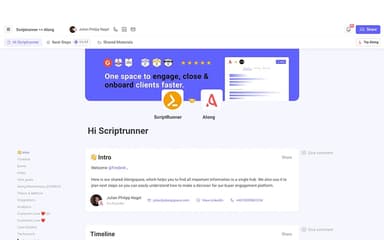
Along provides centralized digital sales rooms that bring together content, stakeholders, timelines, and communication in one shared workspace. This structure reduces fragmented communication and keeps buyers aligned throughout the deal lifecycle. Teams can customize rooms per opportunity, ensuring buyers always access relevant and up-to-date information.
Buyer Engagement Tracking
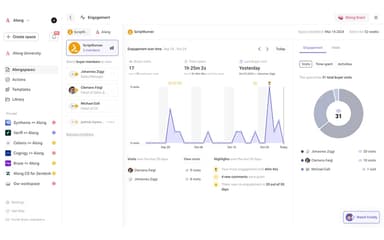
The platform delivers real-time insights into how buyers interact with shared content, helping teams identify interest signals and prioritize follow-ups. These engagement metrics support better forecasting and timely deal interventions. By understanding buyer behavior, teams can take more informed actions to advance opportunities.
Mutual Action Plans
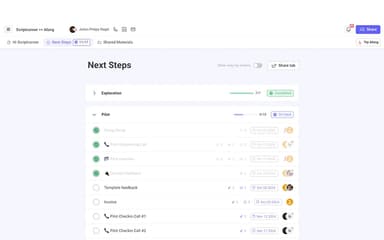
Along enables teams to create clear, shareable mutual action plans that outline tasks, owners, and timelines for both buyers and sellers. This shared visibility improves accountability and alignment across stakeholders. As a result, deals move forward with fewer delays and clearer expectations.
AI Deal Co-Pilot
The AI Deal Co-Pilot analyzes buyer engagement data and highlights recommended next steps to keep deals progressing. It helps teams identify stalled opportunities and engagement gaps early. By reducing guesswork, it allows sellers to focus on high-impact actions.
Pros And Cons of Along
Pros
AI-driven deal insights
Strong buyer engagement visibility
Centralized deal collaboration
Cons
Limited niche templates
Analytics depth varies
Along Reviews
Total 10 reviews
4.8
All reviews are from verified customers
Rating Distribution
5
Stars80%
4
Stars20%
3
Stars0%
2
Stars0%
1
Stars0%
Share your experience
Beatriz D.
Small Business, 11-50 employees
“Engaging modules with rich visuals”
Pros
Working with and editing modules feels very easy and I really appreciate the visual touches like emojis. It also helps a lot that I can add videos, photos and interactive elements such as follow-ups with deadlines.
Cons
A few modules feel a bit rigid and the options for colors and fonts are fairly limited. Uploading videos from external tools can also be restrictive at times because of the file size limits.
Rating Distribution
Ease of use
8
Value for money
7
Customer Support
7
Functionality
9
Sophie T.
Small Business, 11-50 employees
“lead tracking that really helps”
Pros
Keeping track of lead engagement has been really useful especially for the prospects we've already had sales conversations with.
Cons
Something I'd still like to see is the option to add two contact people per space or share spaces especially when my co-founder and I are both working the same leads.
Rating Distribution
Ease of use
9
Value for money
10
Customer Support
10
Functionality
10
Radhika N.
Small Business, 11-50 employees
“Positive experience”
Pros
Getting started took me a bit of time because I didn't fully understand the product at first but after digging into it and asking plenty of questions before buying, their team (especially Fred) was incredibly helpful and easy to talk to. Once I got familiar with it, the UI felt simple and accessible and I really appreciated having everything organized in one place for quick access. The feature that stood out most to me was the customer status tool since it gives my sales team the right data to pitch more effectively and close deals with better timing. Also the support team is responsive and the product keeps improving which made me feel confident about investing in this tool. Zapier integration is definitely a nice bonus as well. Implementation was a bit of a struggle at the beginning but after I understood the process, it became easy and didn't take much time as long as the resources and plan were ready.
Cons
A mobile app would be a valuable addition and having a live chat feature for customers would make the platform even more useful.
Rating Distribution
Ease of use
10
Value for money
10
Customer Support
9
Functionality
10
Frequently Asked Questions
What level of support does Along offer?
Along provides support through the customer portal.
What other apps does Along integrate with?
Along integrates with third-party tools such as Salesforce, HubSpot, Pipedrive, Slack, Google Workspace, and Zapier.
Who are the typical users of Along?
Typical users who benefit from Along features include businesses across various industries and sectors, such as SaaS, professional services, and technology.
Does Along offer an API?
Yes, Along offers API access as part of its higher-tier plans, allowing custom workflows and advanced automation.
What types of pricing plans does Along offer?
The vendor offers multiple price plans, including Starter (Free), Premium ($69/user/month), and Full Suite with custom pricing. Get in touch for a tailored Along cost estimate.
Does Along have a mobile app?
No, Along does not currently list a dedicated mobile app.
What languages does Along support?
Along software is primarily available in English.