

DIGIDECK
Last Updated
Overview
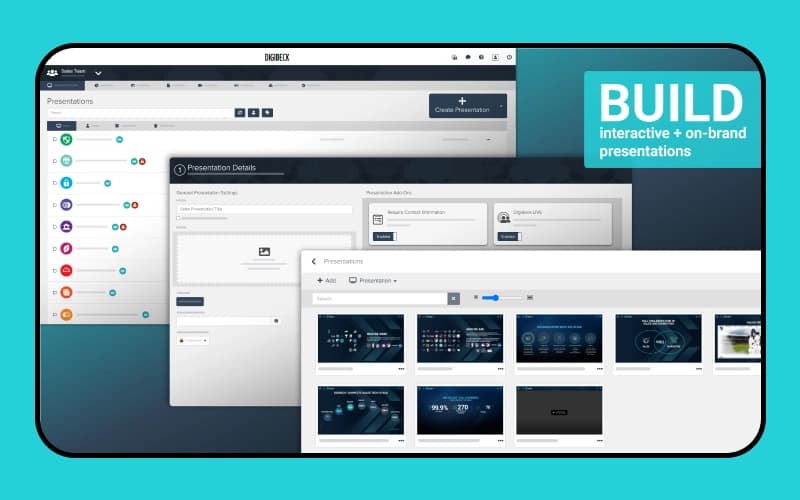
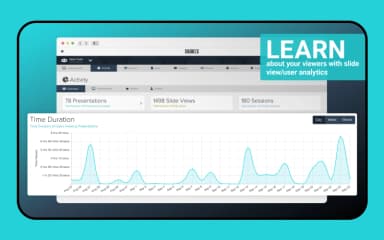
DIGIDECK software powers interactive, trackable presentations for sales, marketing, and sponsorship teams through CRM integrations, automation, and engagement analytics. While layout flexibility may feel constrained for specific custom designs, it is well-suited for mid-market and enterprise organizations prioritizing consistent, data-driven presentation workflows across industries.

DIGIDECK Specifications
- Activity Tracking
- Reporting And Analytics
- Document Management
- Collaboration Tools
DIGIDECK Features
Sales Presentations
DIGIDECK backs interactive sales presentations with design, CRM driven automation, and real-time analytics. It helps sales teams build personalized decks quickly, engage prospects, track viewership behavior, streamline content management, and accelerate pipeline momentum across devices.
Marketing
DIGIDECK supports marketing and demand generation through customizable presentations, lead-capture forms, rich multimedia storytelling, brand-controlled templates, and continuous outreach. This enables teams to convert leads, strengthen pipeline growth, and maintain consistent messaging across audiences.
Ticketing
The software enhances ticketing experiences through automated renewals, personalized presentations, and trackable campaigns. It allows sports organizations to manage membership sales, group sales, and event communications efficiently while capturing fan preferences and engagement across global virtual channels.
Sponsorship
The platform powers sponsorship decks with scalable customization, immersive visuals, and analytics. This helps teams sell sponsorships, onboard partners, track engagement in real time, deliver performance recaps, and present new opportunities through media-rich presentations globally.
DMO Bid Books
DIGIDECK enables immersive Destination Marketing Organization (DMO) bid books using interactive presentations, 360-degree visuals, multimedia storytelling, automated content curation, and engagement tracking. Destination organizations can attract events, tourism, business opportunities, and revenue through compelling, data-driven experiences.
Pros And Cons of DIGIDECK
Pros
Easy link-based presentation sharing
Intuitive navigation for most users
Enables hyper-customized customer presentations
Cons
Templates are difficult to change
Switching layouts often requires rebuilding slides
DIGIDECK Reviews
Total 1 reviews
1
All reviews are from verified customers
Rating Distribution
5
Stars0%
4
Stars0%
3
Stars0%
2
Stars0%
1
Stars100%
Share your experience
Information Technology and Services, 101-500 employees
More than a year
“rigid workflow and weak analytics”
Pros
Presentations can come out looking fairly polished as long as I stay within the built-in default patterns. I also found the basic Viewer-level tracking somewhat useful for getting at least a limited sense of engagement.
Cons
What I noticed is that DIGIDECK feels impressive during demos but once I started building actual decks, the process became very rigid. I couldn't safely swap templates on a slide so even minor layout updates often turned into full rebuilds on my end. In addition, I found the text formatting overly sensitive and I frequently had to clear styles just to fix issues which created even more cleanup work for me. Another frustration was the PDF export which felt inconsistent and often had to be regenerated after edits so my handouts were constantly behind the latest version of the deck. I also felt the analytics were too limited to really help me plan meaningful follow-ups. On top of that, offline support was lacking because as a Mac user I didn't have access to a full editor. Considering the cost and the time it took me to get up to speed, I honestly expected a lot less friction and a lot more flexibility. For me it ultimately did not deliver.
Rating Distribution
Ease of use
2
Value for money
2
Customer Support
2
Functionality
2
Frequently Asked Questions
Does DIGIDECK have a mobile app?
Yes, DIGIDECK offers a dedicated mobile application for iOS devices.
Does DIGIDECK offer an API?
Yes, DIGIDECK offers an API.
What language does DIGIDECK support?
DIGIDECK primarily supports the English language.
What types of pricing plans does DIGIDECK offer?
DIGIDECK follows a tiered pricing model, with the Standard plan priced from $1,620/month when billed annually, and a Custom option available upon request. Get a detailed DIGIDECK price breakdown for your organization today.
What level of support does DIGIDECK offer?
DIGIDECK offers support through phone, email, chat, blog, FAQs, webinars, and podcasts.
Who are the typical users of DIGIDECK software?
DIGIDECK caters to a variety of industries, including sports, venues and entertainment, enterprise, hospitality, media, real estate, and education.
What other apps does DIGIDECK integrate with?
DIGIDECK integrates with various third-party applications, including Salesforce, HubSpot CRM software, Marketo Engage software, Microsoft Dynamics 365, KORE Sponsorship, SponsorCX, and BombBomb.