


Last Updated
Overview
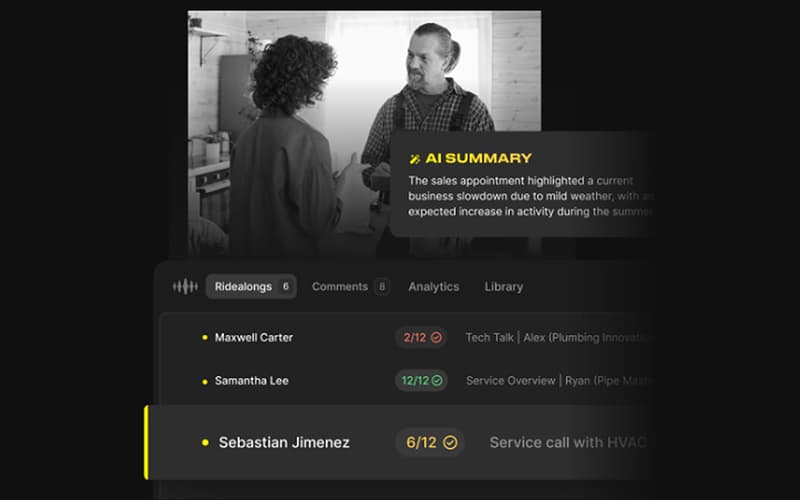
Rilla software provides an innovative virtual ridealong experience, significantly enhancing field sales coaching and visibility. While initial setup and script mapping takes time, its AI-driven analysis consistently boosts close rates. Overall, Rilla’s ability to digitize in-person interactions makes it a powerful asset for growing field teams.
Rilla Specifications
- Sales Automation
- Activity Tracking
- Reporting and Analytics
- Performance Tracking
Rilla Features
Virtual Ridealong Automation
Sales managers conduct remote reviews of in-home appointments, significantly reducing travel time. The AI generates concise summaries, allowing leaders to evaluate an hour-long interaction in minutes. This feature provides complete visibility into field activities, ensuring consistent performance across the entire sales team.
Complete Conversation Visibility
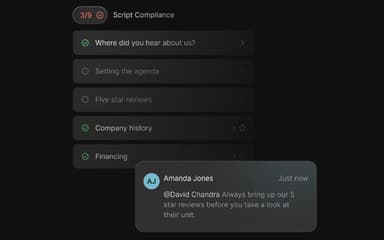
Sales leaders utilize AI to monitor every interaction field representatives have with their customers. By capturing recordings, transcriptions, and summaries from every visit, managers can effectively review performance, provide specific comments, and highlight key moments to drive consistent organizational growth.
Rapid Coaching Efficiency
Management teams leverage artificial intelligence to coach their teams with extreme efficiency, reaching speeds up to eight times faster than traditional methods. This allows leaders to provide daily feedback to all representatives and manage double the standard workforce volume effectively.
AI Intelligence Insights
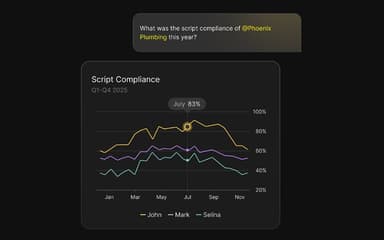
Business owners access sales intelligence at scale, analyzing thousands of conversations simultaneously to uncover powerful market insights. This data-driven approach allows for identifying successful patterns and extracting actionable information to significantly improve close rates and overall company equity value.
Pros And Cons of Rilla
Pros
Real time coaching from actual customer conversations
Helps managers review reps without ride alongs
Detailed speech analytics and performance insights
Cons
Voice transcription accuracy could be improved
Does not separate multiple speakers clearly
Rilla Reviews
Total 19 reviews
4.9
All reviews are from verified customers
Rating Distribution
5
Stars89%
4
Stars11%
3
Stars0%
2
Stars0%
1
Stars0%
Share your experience
Xavier M.
Construction, 51-100 employees
Less than 6 months
“Coaching and call notes help”
Pros
Recording both scheduled appointments and walk-ins has made a big difference because it lets me stay focused on the customer instead of worrying about taking notes in the moment and then I can quickly upload everything into the CRM afterward. It's also been really valuable for coaching since my sales manager listens to 2-3 of my appointments each week and leaves feedback on what I'm doing well and where I can improve. As someone who's still fairly new to sales, that kind of guidance has been incredibly useful. On top of that the support team has always been quick to respond whenever I've needed assistance.
Cons
After using it for the past two months, I really don't have any major complaints because it's been helpful overall. If I had to point out one thing, I'd say the transcription could be more accurate. Sometimes it misses certain parts of my conversations with clients which can end up lowering my score and every now and then it also throws random swear words into the transcript.
Rating Distribution
Ease of use
9
Value for money
9
Customer Support
8
Functionality
10
Matt S.
Real Estate, 11-50 employees
Less than 6 months
“Sales conversations feel much better”
Pros
It has helped me sharpen my sales pitch. I can revisit my conversations and see where I need to improve which has been really useful for converting more prospects.
Cons
My only concern is that some people seem uneasy when I ask for their permission to be recorded.
Rating Distribution
Ease of use
10
Value for money
9
Customer Support
10
Functionality
9
Anonymous
Environmental Services, 51-100 employees
Less than 6 months
“AI roleplay with real context added”
Pros
Practicing with the AI agents is a really cool feature especially when they bring in objections and considerations pulled from my past meetings or even conversations my coworkers have had.
Cons
At times though it doesn't feel fully grounded in reality. Some of the objections it raises just don't make sense and since it seems to rely entirely on previous meeting recordings, there are often logical gaps in how it responds.
Rating Distribution
Ease of use
7
Value for money
7
Customer Support
8
Functionality
9
Frequently Asked Questions
What types of pricing plans does Rilla offer?
The Rilla price is customized according to the needs of the organization. Request a personalized Rilla pricing quote for your business.
What language does Rilla support?
Rilla is primarily available in English.
Does Rilla offer an API?
No, Rilla does not offer an API.
What other apps does Rilla integrate with?
The software supports integration with multiple CRM platforms, such as HubSpot, Salesforce, Dynamics 365, and Lasso.
What level of support does Rilla offer?
Rilla offers support through phone, email, contact form, and FAQs.
Does Rilla have a mobile app?
Yes, Rilla has a mobile app for Android and iOS.
Who are the typical users of Rilla?
Typical users include industries like real estate, logistics, automotive, HVAC and plumbing.