Last Updated

Overview

Zoho Sign helps businesses handle document approvals faster with secure e-signatures, audit trails, reusable templates, and bulk sending tools. While it offers limited document creation tools, the platform still provides secure and efficient document handling for everyday business use. Overall, it is a practical solution for teams managing digital agreements.

Be the first one to leave a review!

No review found

vendorReviewSummaryStar icon
Starting Price
$12

per user per month
Zoho Sign Specifications

  • E-signature Capabilities
  • Collaboration Tools
  • Customizable Dashboards
  • Reporting and Analytics
View All Specifications

What Is Zoho Sign?

Zoho Sign is a cloud-based electronic signature software built to help businesses sign, send, and manage documents digitally. It helps organizations reduce dependency on paper-based approvals while improving document turnaround times and record management. With features like generative AI, bulk sign, and branding, Zoho Sign can be used for agreements, contracts, onboarding forms, approvals, and other business documentation pro

What Is Zoho Sign Best For?

The platform stands out for its AI-powered document intelligence feature built through integrations with Zoho's native AI assistance (Zia) and OpenAI's ChatGPT. This feature helps summarize lengthy agreements, extract key clauses, auto-detect fields, and generate contract content directly within signing workflows. It results in reduced manual efforts along with improved speed and accuracy.

How Much Does Zoho Sign Cost?

Zoho Sign price starts at $12/user/month for its Standard plan. Notable features include 25 envelopes/user/month, sign using non-Zoho DSC, recipient authentication and identification, AI assistant, and witness signing. Oher plans include:

  • Free: $0
  • Professional: $20/user/month
  • Enterprise: $28/user/month
  • Custom plan

A 14-day free trial is also available. In addition to the base subscription cost, organizations should also account for additional expenses. These include:

  • Tailored Onboarding And Training: Approximately $300 to $1,500 for SMBs (one-time) and $7,500 to $25,000 for enterprises (one-time)
  • Web And Mobile SDK Licensing: $1,000–$5,000 per year, depending on usage volume and degree of support required; applies on top of Enterprise plan credits
  • Identity Verification And QES Signing: $0.20–$1.80/signing activity depending on provider
  • White Label And OEM/ISV Licensing: Ranging from $10,000–$50,000+ annually for embedded or partner deployments
  • Payment Collection (Zoho Checkout): Enterprise plan only; standard payment processing fees apply (~1.5%–2.9% + $0.30/transaction)
  • Add-Ons: $0.10/credit for Zoho Sign Credits
  • API Plans: $0.5/envelope
Request a personalized Zoho Sign pricing quote for your business today!

Disclaimer: The pricing is subject to change.

Zoho Sign Integrations

The platform integrates with apps within the Zoho ecosystem. It also supports integrations with various third-party systems, including;

How Does Zoho Sign Work?

Here’s how you can access the platform and its features:

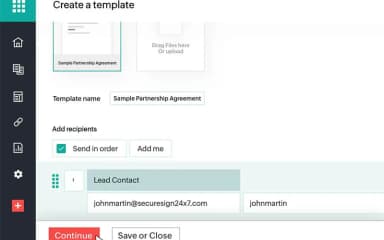
  • Create a document by uploading files or selecting templates to prepare agreements, contracts, or forms for signing
  • Configure signer details by adding recipients, defining signing order, and assigning roles for each participant
  • Set up fields such as signature, date, and text boxes by placing them directly onto the document pages
  • Send documents for signature through email or shared links so recipients can review and sign electronically
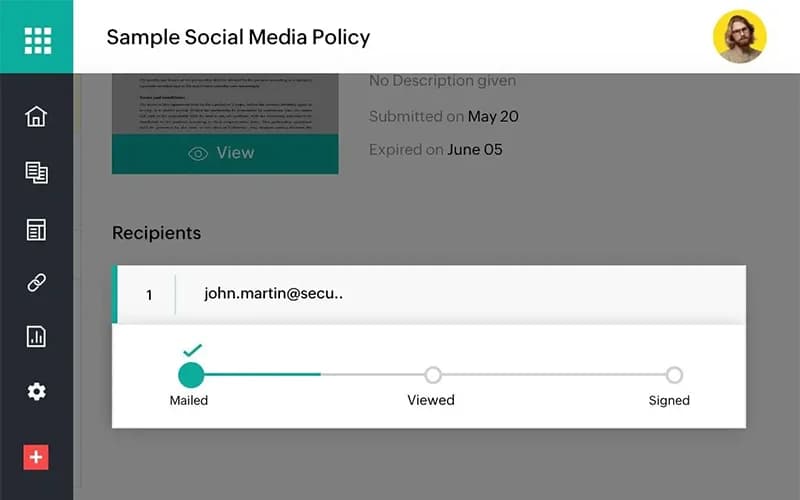
  • Track document status to monitor who has viewed, signed, or is still pending completion in real time
  • Manage signed documents by storing completed files securely and organizing them for future access or reference
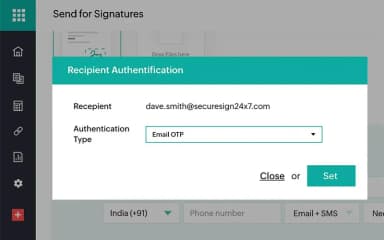
  • Configure authentication options like OTP or identity checks to add verification steps for selected recipients
  • Export or download finalized documents once all signatures are completed for external storage or recordkeeping
Schedule a free Zoho Sign demo to learn more about its capabilities.

Who Is Zoho Sign For?

Zoho Sign is ideal for a wide range of industries and sectors, including:

  • Healthcare
  • Nonprofit
  • Real estate
  • Retail

Zoho Sign Use Cases

Based on our analysis of Zoho Sign's current tools and offerings, we have identified the following key business scenarios where it is well suited:

HR Teams Managing Employee Onboarding And Documentation

HR teams often rely on Zoho Sign to manage onboarding documents such as offer letters, employment contracts, and policy acknowledgments. The platform helps HR staff send documents to new hires and track completion without relying on manual follow-ups or printed paperwork. It is especially useful when hiring across multiple locations or onboarding employees remotely.

Legal Teams Handling Contract Approvals And Sign-Offs

Legal departments use Zoho Sign to manage contracts that require multiple levels of review and approval before execution. Uses can set a sequence to send documents to different stakeholders. This helps keep the entire process structured and transparent. This setup works well for organizations that deal with frequent contract cycles and need clear documentation of every approval stage.

Sales Teams Managing Client Agreements

Sales teams often use Zoho Sign when sending proposals, quotations, and service agreements to clients for quick approval. Instead of waiting for manual signatures or printed documents, teams can send contracts digitally and track their status in real time. This helps reduce delays during deal closure and keeps communication more organized.

Finance And Procurement Teams Handling Vendor Documents

Zoho Sign is used by finance and procurement teams to process vendor agreements, purchase approvals, and compliance-related paperwork. Its structured signing process ensures documents move through the right internal approvals before final execution. This is especially useful in organizations that regularly manage supplier onboarding and recurring procurement agreements.

Is Zoho Sign Right For You?

Zoho Sign is a practical choice if your business regularly deals with documents that need to be signed, approved, or tracked in a structured way. It tends to work particularly well for teams that want to keep their signing process organized without relying on manual coordination or paper-based workflows. The platform also benefits businesses already using Zoho products due to its native ecosystem connectivity.

Trusted by renowned names, such as Paragpn and ProEd, it ensures all documents are stored with different levels of security. The platform is HIPAA, ISO-27001, and GDPR compliant.

Still doubtful if Zoho Sign is the right fit for you? Connect with our customer support staff at (661) 384-7070 for further guidance.

Zoho Sign Features

Branding

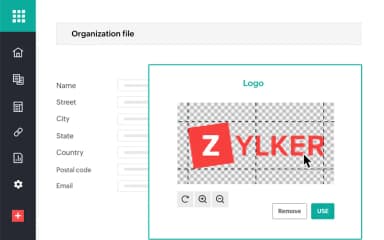
The software lets organizations personalize the entire document signing experience, so it feels consistent with their own identity. Businesses can add their logo, company details, and even send emails using their own domain instead of a default system address. Users can also adjust their own profile settings such as signatures, initials, stamps, and regional preferences like time zone and date format.

See How It Works
Bulk Sending

Zoho Sign supports bulk document distribution for organizations handling large-scale signing requests. Teams can upload a list of recipients and distribute the same agreement in a single action instead of sending it individually. This works well for situations like onboarding employees, collecting policy acknowledgments, or sharing standard forms with customers.

See How It Works
SignForm

This feature allows businesses to create a secure, shareable URL for collecting signatures through a self-service process without any coding or technical setup. Users can convert existing templates or build new ones into SignForms and share them via email or embed them on websites to gather signed responses.

See How It Works
Multiple Portals

Zoho Sign enables users to access and manage several organization accounts using a single login through this feature. This makes it easy for enterprises to handle documents across different departments or business units. Administrators can create separate organization accounts for functions like HR, sales, marketing, or support while maintaining centralized access control under one credential.

See How It Works

Pros And Cons of Zoho Sign

Pros

  • Works smoothly across devices and browsers

  • Strong document security and record management

  • Facilitates quick document signing and sharing process

  • Can be customized for forms and signature fields

  • Helps reduce paperwork and manual back-and-forth

Cons

  • Template editing could be more intuitive

  • Limited font and signature styling choices

  • Can slow down when handling multiple documents

Zoho Sign Pricing

Professional

eye

View Price

What's Included

  • All Standard features, plus:

  • Signer attachments

  • Unlimited envelopes

  • Branding & customization

  • Reports

  • Unlimited templates

  • Multi-language support

Free

eye

View Price

What's Included

  • Reminders & notifications

  • Audit trail

  • Cloud storage import & export

  • Sign using Zoho's DSC

  • Mobile & desktop apps

  • 5 envelopes/month

  • Signature workflows

Standard

eye

View Price

What's Included

  • All Free features, plus:

  • 25/envelopers/user/month

  • Advanced Electronic Signatures

  • Deliver envelopes via SMS

  • AATL-enabled certificates

  • Recipient authentication & identification

  • Integration with WhatsApp Business

  • AI assistant

  • Delegate signing

  • Integration with popular apps

Enterprise

eye

View Price

What's Included

  • APIs & webhooks

  • All Professional features, plus:

  • In-person signing

  • Bulk send & bulk sign

  • Qualified Electronic Signatures (QES)

  • Custom, conditional, & formula fields

  • Web & mobile SDKs

  • Payment collection

  • Blockchain timestamping

  • White label

API

eye

View Price

What's Included

  • Audit trail & certificate of completion

  • Deliver envelopes via email & SMS

  • Embedded signing

  • Templates

  • Signature, approval, & manager workflows

  • Recipient authentication & identification

  • Automatic field addition

  • Document & folder management

  • Embedded sending

  • Custom, conditional, & formula fields

Custom Plan

eye

View Price

What's Included

  • Tailored onboarding and training

  • Suitable for high-volume automated workflows

  • Custom envelope limits

  • Flexible user count

Disclaimer: The pricing details were last updated on May 15, 2026 from the vendor's website. Please contact us for a tailored pricing list.

Zoho Sign Reviews

no-reviews

No reviews yet!

Be the first to review this product

Frequently Asked Questions

Does Zoho Sign offer an API?

Yes, it offers an API.

Who are the typical users of Zoho Sign?

Zoho Sign features are used by businesses across multiple sectors and industries, including retail, legal, healthcare, and accounting.

What other apps does Zoho Sign integrate with?

Zoho Sign integrates with different third-party systems such as Microsoft Teams, Google Drive, Dropbox, Box, OneDrive, and HubSpot.

What languages does Zoho Sign support?

Zoho Sign software is available in multiple languages, including English, French, German, and Spanish.

Does Zoho Sign have a mobile app?

Yes, it offers a mobile app for Android and iOS devices.

What types of pricing plans does Zoho Sign offer?

The vendor offers multiple plans. These include Free, Standard ($12/user/month), Professional (20/user/month), Enterprise (28/user/month), and Custom Plan. The vendor also offers API plans, including API ($0.5/envelope) and Custom. Get in touch for a tailored Zoho Sign cost estimate.

What level of support does Zoho Sign offer?

Zoho Sign offers customer support through email, web, and phone.