


Alteryx Designer
Last Updated
Overview
Alteryx Designer redefines data preparation and analysis with a simple interface and powerful tools. Although it requires a powerful hardware setup, Alteryx Designer ensures faster data processing speeds for efficiency. A multitude of professionals trust Alteryx Designer as it empowers users to automate workflows, handle complex datasets, and deliver insights.
Alteryx Designer Specifications
- Data Visualization
- Customizable Dashboards
- Data Analysis and Reporting
- Scheduled Reporting
What Is Alteryx Designer?
Alteryx Designer is a comprehensive AI analytics platform developed for a variety of professionals working in diverse business setups and industries. It is helpful in refining data preparation, blending, and analytics with a user-friendly drag-and-drop interface and advanced automation functionalities. It streamlines handling large datasets efficiently while supporting seamless workflow creation and insightful decision-making. Alteryx Designer empowers users to save time, optimize processes, and transform complex data into actionable insights with ease.
Alteryx Designer Pricing
Designer Cloud
- Professional: starting at $4,950/user/year
- Enterprise: Custom Pricing
Designer Desktop: starting at $5,195
The software also offers a free trial. Moreover, you can request a custom Alteryx Designer cost for your business.
Disclaimer: Prices are subject to change.
Alteryx Designer Integrations
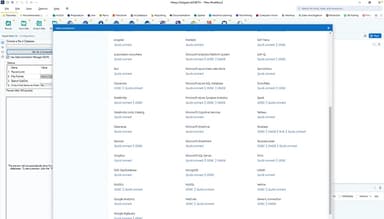
Alteryx Designer has integration arrangements with more than 65 apps, including
- Salesforce
- Google Analytics
- Amazon S3
- HubSpot
- Shopify
- MailChimp
- Zendesk
Who Is Alteryx Designer For?
Alteryx Designer serves various industries, such as:
- Financial Services
- Healthcare
- Manufacturing
- Oil and Gas
- Public Sector
- Retail
- Insurance
- Education
Is Alteryx Designer Right For You?
Alteryx Designer software is a reliable choice for teams that intend to streamline data analysis. It helps automate processes, identify overlooked insights, and integrate data from various sources, all while being user-friendly and accessible for both technical and non-technical users. Its cutting-edge features help professionals like business and analytics leaders, data analysts, IT professionals, and data scientists working in customer experience, finance, marketing, operations, sales, HR, and supply chain departments. Due to its extensive scalability, Alteryx Designer is a go-to choice for several leading businesses, such as Netflix, IBM, and Nestle.
Still unsure about Alteryx Designer? Contact our support staff at (661) 384-7070 for further expert guidance.
Alteryx Designer Features
Designer
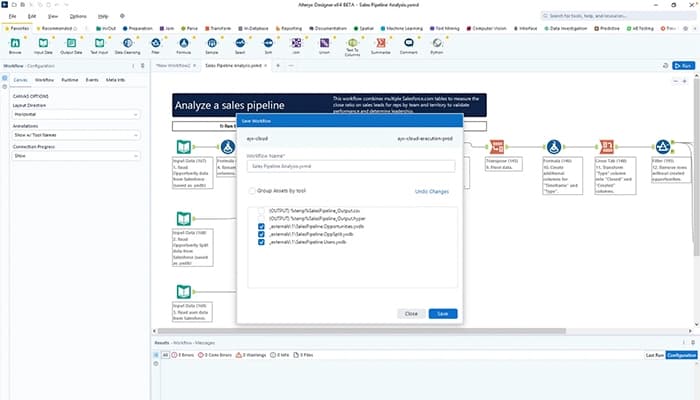
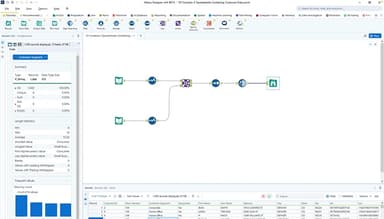
The feature automates the entire analytics process, from data preparation to prediction. You can easily work with any data source and create repeatable workflows using over 300 drag-and-drop tools with low-code, no-code options.
Machine Learning
It makes data insights faster with automated machine learning (AutoML). Moreover, it helps users build models easily, uncover hidden patterns, and quickly create trusted models using pre-built feature libraries, empowering experts across your business.
Designer Cloud
The software transforms data into actionable insights with a unified cloud platform. You can access and automate data preparation anytime, create workflows, and seamlessly integrate with modern cloud systems to boost analytics productivity.
Auto Insights
Now, users can quickly discover key data insights and exceptions, highlighting important patterns that can otherwise go unnoticed. It enables teams to act faster and make better business decisions with automated data storytelling.
Location Intelligence
Alteryx Designer utilizes cloud-based geospatial analytics to turn spatial data into valuable insights. It enriches location-based data, optimizes operations, and improves decision-making by enabling sharing and collaborating on geospatial insights across your organization.
Server
It helps share, govern, and scale analytic workflows and models. The software automates reporting, manages data access, and empowers teams to collaborate on analytics, supporting consistent and efficient processes across your organization.
Connect
Users can easily organize, find, and access all data, workflows, and analytics tools in one place. The feature streamlines collaboration across departments while maintaining organized and governed data for better business decisions.
Pros And Cons of Alteryx Designer
Pros
Effective for large dataset handling
Automated workflows save manual effort
Offers advanced analytics options
Faster data processing speeds
Cons
Requires powerful hardware setup
Initial training is required to become a proficient user, according to some software users
Alteryx Designer Reviews
Total 13 reviews
4.8
All reviews are from verified customers
Rating Distribution
5
Stars77%
4
Stars23%
3
Stars0%
2
Stars0%
1
Stars0%
Share your experience
Human Resources, 500+ employees
More than a year
“Excellent no-code solution for data cleaning and analysis”
Pros
Alteryx is a great no-code solution for both beginners and advanced users. It's simple to learn the basics, such as data cleaning (sorting, grouping, filtering, etc.), without needing to learn a programming language. At the same time, it offers advanced options like macros, geocoding, and Python tools for more experienced users.
Cons
In terms of visualizations, while there are better tools available, the maps and graphs seem outdated, almost like something from a decade ago. It would be great if the team could enhance the reporting tools and map features.
Rating Distribution
Ease of use
8
Value for money
10
Customer Support
10
Functionality
9
Accounting, 500+ employees
More than a year
“Data handling made easier”
Pros
It's a fantastic product that significantly aids with data analysis, preparation and cleansing. It's incredibly useful for ETL processes and offers a wide range of additional analysis tools, particularly from a geospatial perspective.
Cons
The main challenge with it being widely adopted is likely its cost.
Rating Distribution
Ease of use
10
Value for money
8
Customer Support
10
Functionality
10
Automation, 500+ employees
More than a year
“Love it! Excellent tool”
Pros
With over 8 years of experience using Alteryx Designer, I've found it to be a game-changer in reducing workload. Its intelligent tools efficiently streamline complex data analysis tasks. Thanks to the intuitive drag-and-drop interface and a comprehensive library of tools, I can automate repetitive tasks and easily handle complex data transformations. This not only saves time but also boosts the accuracy and consistency of my analyses. Alteryx excels at managing large datasets, allowing me to process and analyze vast amounts of data in seconds, a task that was once tedious and time-consuming. Overall Alteryx has helped me work more efficiently, allowing me to focus on extracting valuable insights and making data-driven decisions, rather than being bogged down by manual data processing. Its intuitive approach to data preparation and analysis has become an essential part of my daily workflow, significantly enhancing both productivity and decision-making.
Cons
While it handles large datasets efficiently, running complex workflows or dealing with extensive data operations can put a strain on your computer's resources. To ensure optimal performance, having good hardware may be necessary.
Rating Distribution
Ease of use
10
Value for money
10
Customer Support
10
Functionality
10
Frequently Asked Questions
What kinds of support does Alteryx Designer offer?
Alteryx Designer offers support through phone, community, a knowledge base, documentation, an academy, a learning marketplace, and training sessions.
Who are the main users of Alteryx Designer?
Usually, the main users of Alteryx Designer include roles like analytics and business leaders, data analysts, data scientists, IT leaders, and other IT professionals working in marketing, sales, finance, operations, HR, customer experience, and supply chain departments. Furthermore, it covers industries like healthcare, higher education, insurance, CPG and retail, financial services, public sector, oil and gas, and manufacturing.
What third-party apps does Alteryx Designer integrate with?
Alteryx Designer integrates with several apps, such as Salesforce, Shopify, MailChimp, Amazon S3, Google Analytics, HubSpot, and Zendesk.
What types of pricing plans does Alteryx Designer offer?
The Alteryx Designer cost is available in the following two editions: the Designer Cloud edition and the Designer Desktop edition. Designer Cloud edition offers two plans: the Professional plan starts at $4,950/per user/year, and the Enterprise plan provides customized pricing. The Designer Desktop edition is priced at $5,195. Alteryx Designer software comes with a 30-day free trial option.
What language does Alteryx Designer support?
Alteryx Designer supports English, German, French, Spanish, Portuguese, and Japanese languages.
Does Alteryx Designer have a mobile app?
Yes, Alteryx Designer has a mobile app.
Does Alteryx Designer offer an API?
Yes, Alteryx Designer offers an API.