


Redash
Last Updated
Overview
Redash is a business intelligence solution for data visualization and analytics. It connects to sources like PostgreSQL, MySQL, and MongoDB. Despite lacking a built-in visual report generation, it allows users to build dashboards with drag-and-drop features and share insights. The platform also excels at analyzing smaller datasets efficiently.
Redash Specifications
- Data Visualization
- Customizable Dashboards
- Data Analysis And Reporting
- Scheduled Reporting
Redash Features
Query Editor And Collaboration
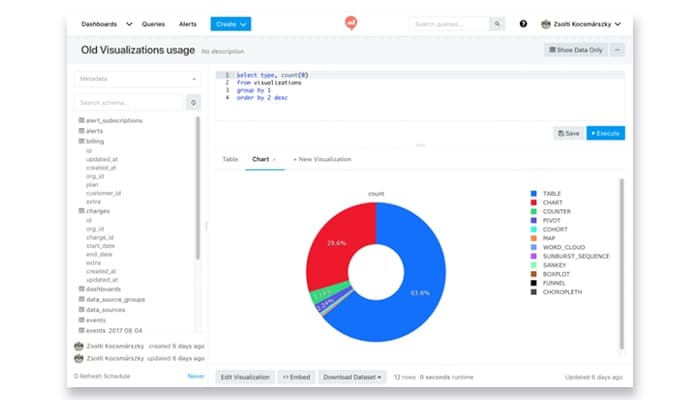
Redash features a powerful query editor that is designed to support smooth collaboration. Users can write SQL queries, explore database schemas, use auto-complete and shortcuts, cache results, schedule query runs, and join data across multiple sources.
Visualization And Dashboard Creation
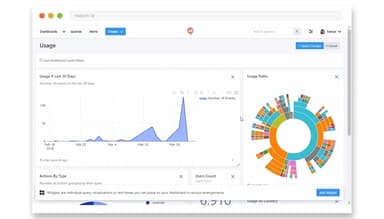
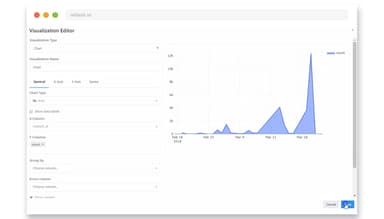
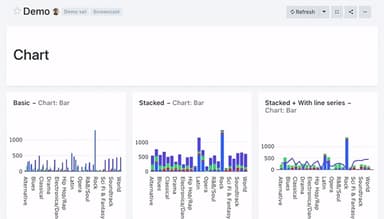
This feature enables users to build a wide range of visualizations, including charts, maps, tables, word clouds, and sunbursts diagrams. It also supports combining multiple data sources into thematic dashboards that can be easily shared via links or embedded in other tools for broader collaboration.
Alerts And Notifications
The platform allows users to configure alerts based on specific data conditions or thresholds for specific data events, ensuring timely notifications. When conditions are met, the system sends notifications, keeping teams informed, and enabling proactive decision-making based on real-time insights.
API Access
Redash features a flexible API for efficient integration and customization, allowing users to interact with the platform programmatically. It supports automation, integration with other systems, and customization of workflows based on business needs.
User Management And Security
The platform includes user management features such as role-based access control and Single Sign-On (SSO) support. These capabilities help organizations manage permissions securely and support structured team collaboration.
Pros And Cons of Redash
Pros
Allows creation of feature-specific dashboards
Supports multi-user and role-based access
Speeds up report generation, saving time compared to traditional scripting
It supports SQL-based querying with good flexibility for data analysis
Cons
Lacks strong visual report generation features
Dashboard refresh status and updates can be confusing or unclear at times
Redash Reviews
Total 9 reviews
4.3
All reviews are from verified customers
Rating Distribution
5
Stars56%
4
Stars22%
3
Stars22%
2
Stars0%
1
Stars0%
Share your experience
Marketing, 11-50 employees
More than a year
“Comprehensive solution”
Pros
Since Redash is an online analytical tool, I have found it to have many unique features. One of the best features is the ability to share my queries with other team members, allowing them to modify them. This enables me and my team to work on a single dashboard in parallel, enhancing collaboration and efficiency.
Cons
One downside I've noticed with Redash is its user interface, which I find less intuitive. Also, when working with large sets of data, the performance can degrade. If the database is too large, it either takes an excessive amount of time to load or simply throws an error on the screen.
Rating Distribution
Ease of use
7
Value for money
8
Customer Support
8
Functionality
8
Marketing, 500+ employees
Less than a year
“Outstanding and highly useful tool”
Pros
I consider Redash to be very efficient software. It provides precise and useful data information on the go. For accessing large amounts of data, it is the best tool, and the customization options are also top-notch, making it a highly effective choice.
Cons
I absolutely love this platform. There is nothing that I dislike about it.
Rating Distribution
Ease of use
9
Value for money
10
Customer Support
10
Functionality
10
Marketing, 500+ employees
More than a year
“Great tool, UX needs Improvement”
Pros
It is simple and gets straight to the point. Its main feature is handling SQL requests to my database, and it does this perfectly, making the process easy and smooth.
Cons
I think Redash could benefit from improved query management to make it easier to find saved queries.
Rating Distribution
Ease of use
6
Value for money
8
Customer Support
8
Functionality
8
Frequently Asked Questions
Does Redash offer an API?
Yes, Redash provides API access.
What language does Redash support?
Redash supports the English language.
Does Redash offer a mobile app?
No, Redash does not currently offer a dedicated mobile app. However, its web-based platform is responsive and can be accessed via mobile browsers.
What other apps does Redash integrate with?
Redash software integrates with various platforms, including Google Analytics, Google Spreadsheets, Jira, JSON, Python, Salesforce, Hive, and Greenplum.
What types of pricing plans does Redash offer?
Redash pricing starts at approximately $20/user/month to $120/user/month, according to industry benchmarks for business intelligence and analytics solutions. Users can request a detailed analysis of the Redash price today!
Who are the typical users of Redash?
Redash is tailored to support a range of professionals, including data analysts, data scientists, business intelligence experts, and marketing professionals.
What level of support does Redash offer?
Redash provides support through email and the GitHub discussion board.