


Dust
Last Updated
Key Takeaways
Generated from the text of customer reviews
Dust connects business teams with company information and external tools through AI agents. Users value its ability to create agents without technical expertise and having control over the data those agents can access. Most criticism is focused on areas for further product refinement. In 2026, Dust added new integrations and updated its agents with improvements tool discovery, agent building, and agent control, including Discover Tools, Sidekick, Discover Skills, and Steering.
Our Verdict
Dust is worth considering for growing organizations that want to use AI in recurring business processes. It can suit technology, professional services, consulting, and customer support teams that handle large amounts of business information. Smaller organizations may find the pricing easier to manage, while larger deployments should factor in seat counts and usage. Dust is recommended for organizations that need customizable AI agents connected to company information and business tools.
Overall Rating
Based on 20 users reviews
4.5
Rating Distribution
Positive
85%
Neutral
15%
Negative
0%
Starting Price
$30
per user per month

Dust Specifications
- Natural Language Dialogue
- Smart Data Discovery
- Automation
- Bot Design & Deployment
What Is Dust?
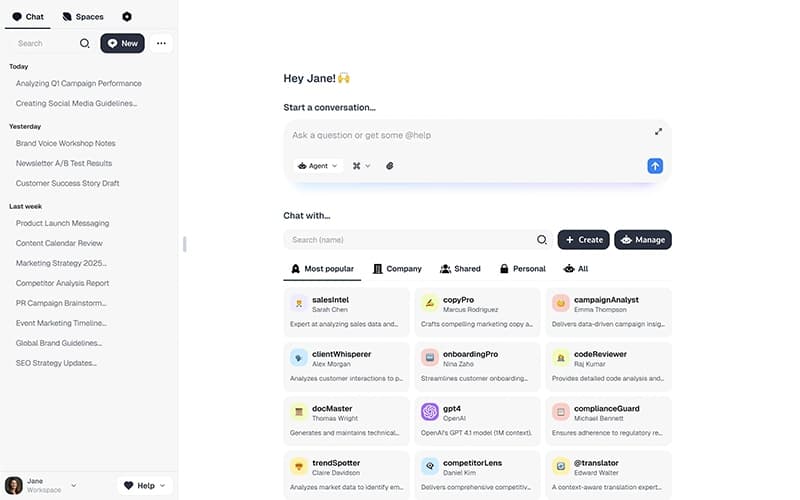
Dust is enterprise software for creating and managing AI agents for business tasks. Agents can be set up without coding by choosing a language model and entering instructions in plain language. Administrators can also define what information each agent can access and which actions it can perform.
Agents can answer questions, search for information, analyze data, and carry out assigned tasks. Their instructions and access rules can vary based on the work they handle. Administrators can also oversee how agents are used throughout the organization.
What Is Dust Best For?
Dust stands out for its custom agent builder. Teams can set up an agent for a specific task by selecting a model and writing plain-language instructions. Each agent can also have access to selected company information and tools. This approach lets teams create separate agents for different types of work instead of relying on one assistant for every request.
How Much Does Dust Cost?
Dust pricing starts at $30 per user per month for the Pro plan. A free plan is also available. Other paid plans include:
- Max: $150/user/month (40,000 credits/seat/month)
- Enterprise: Custom pricing
Final costs may depend on the following additional costs:
- Credit Overages: Additional programmatic usage costs $0.01/credit. Pro and Max users can continue using credits beyond their included allowance when workspace overage is enabled
- Implementation And Onboarding: Enterprise setup can cost $5,000–$20,000+ one time for agent configuration, permissions, data connections, and workflow deployment
- Custom Integrations: Connecting internal systems through custom MCP servers or APIs can cost $2,000–$10,000+/integration
Disclaimer: The pricing is subject to change.
Dust Integrations
The software supports integration with many systems, such as:
- Notion software
- Slack software
- GitHub
- Google Drive
How Does Dust Work?
Here is how you can access Dust and start creating and using AI agents:
- Log in to your Dust account using your credentials to access your workspace
- Create an agent for a specific business task by choosing a model and defining its instructions
- Connect relevant company data sources so the agent can access the information needed for its assigned task
- Configure the agent's knowledge and permissions to control what information it can access and use
- Add tools when the agent needs to retrieve information, search data, run code, or take actions
- Test the agent with relevant tasks and refine its instructions, knowledge, or tools based on the results
- Share the completed agent with team members so they can use it for recurring tasks and workflows
Who Is Dust For?
Dust is ideal for a wide range of industries, sectors and business functions, including:
- Marketing and sales
- Legal
- E-commerce
- Information Technology (IT)
- Financial services
- Retail
- Customer support
Dust Use Cases
Based on our analysis of user reviews and Dust’s current capabilities, we have identified key scenarios where this software is a good fit:
Sales Teams Preparing For Complex Customer Reviews
Before a major customer review, sales teams may need details from finance, product, compliance, and earlier customer conversations. Finding all of that information can take time when each team keeps its own records. Dust brings those details together so the sales team can review the account history and prepare for the discussion.
Support Teams Dealing With Repetitive Internal Questions
Support and operations teams may deal with the same questions about policies, processes, and earlier cases. When the answer is already documented, Dust can take care of the first response. Staff can then spend their time on requests that require more context or judgment.
Engineering Teams Investigating Recurring Technical Issues
Engineers can spend a fair amount of time looking into bugs, incidents, and similar technical questions. Teams dealing with these issues regularly may find Dust useful for setting up agents around this type of work. This can be particularly helpful when answers depend on internal documentation and development information.
Marketing Teams Handling Recurring Content Workflows
Marketing teams tend to repeat certain tasks when launching campaigns, adapting content, reviewing results, or preparing briefs. Dust can fit these workflows when they follow a familiar process and depend on company-specific information. Teams can set up agents for this recurring work instead of starting from scratch each time.
Organizations Struggling To Access Scattered Company Knowledge
As companies grow, useful information can end up in documents, conversations, business systems, and with individual teams. Employees may know the information exists but still have trouble finding it. For organizations dealing with this problem, Dust can provide a way to organize company knowledge around the work teams handle regularly.
Is Dust Right For You?
Dust can work well for organizations moving AI agents beyond individual teams. Enterprise customers get unlimited connectors and MCP servers along with pooled credits, SCIM, audit logs, custom data retention, and single-tenant deployment. These controls become more relevant as employee numbers and connected business systems grow. Dust is SOC 2 Type II certified and supports US and EU data residency. Vanta, Clay, and Assembled are among the companies using Dust. Before choosing Enterprise, consider expected usage, integrations, and deployment requirements.
Still doubtful if Dust is the right fit for you? Get in touch at (661) 384-7070, and we will help you make an informed decision.
Dust Features
Company Knowledge And Search
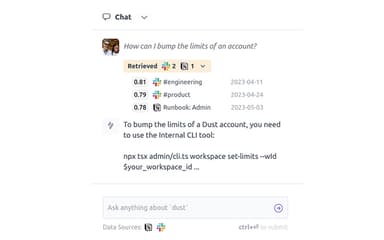
Dust agents can search information from company sources while working on a task. This can include documents, conversations, and other connected sources. The information gives agents the business context they need for tasks that depend on internal knowledge.
Multi-Agent Workflows
Dust lets teams use different agents within the same workflow, with each one handling a specific part of the process. One agent can gather information while another analyzes it or handles the next step. This setup suits workflows that involve several types of tasks.
Agent Skills And Tools
Agents can use skills and tools to search for information, analyze data, run code, or take actions in connected systems. Teams can assign these resources based on what an agent needs to do. The tools used can therefore vary from one workflow to another.
Human-Agent Collaboration
Dust supports work where employees and agents contribute to the same task. People can provide instructions, review results, and make decisions while agents handle specific parts of the work. Shared conversations, files, tasks, and context keep the work connected.
Model Flexibility
Dust provides access to more than 20 models from providers such as OpenAI, Anthropic, Google, Mistral, and DeepSeek. Users can select a model for a particular workflow and change it when their requirements differ. Different workflows can therefore use different models instead of relying on one model for every task.
Pros And Cons of Dust
Pros
Easy to set up and use with minimal configuration
Highly flexible for building custom AI agents
Smooth integration with popular tools
Makes company information easier to search and access
Helps handle recurring HR and policy questions
Cons
Some collaboration features may need configuration time
Responses sometimes include unnecessary details
Some tools do not have direct integrations
Dust Pricing
Free | Pro | Max | Enterprise |
|---|---|---|---|
$0 | $30 per seat per month | $150 per seat per month | Custom Pricing |
|
|
|
|
Disclaimer: The pricing details were last updated on Sep 25, 2026 from the vendor's website. Please contact us for a tailored pricing list.
Dust Reviews
Total 20 reviews
4.5
All reviews are from verified customers
Rating Distribution
5
Stars65%
4
Stars20%
3
Stars15%
2
Stars0%
1
Stars0%
Share your experience
Small Business, 11-50 employees
“centralized AI agents that boost workflows”
Pros
Having this software in place helped us bring different data sources and tools into one hub and build agents that make our daily work more efficient. The platform is easy to use and the onboarding process with their team went really well. Our product and engineering teams were able to start building agents quickly without needing technical help. For example our support agent connects Zendesk and Notion to handle recurring questions on its own, the Jira/Slack agent creates and assigns tickets automatically when someone reports a bug in a channel and our data agent uses Mixpanel plus Notion to add product context to metrics. It has cut down a lot of the back and forth between separate tools.
Cons
A limitation is that the output quality is very dependent on how clean and organized the source data is so we had to spend quite a bit of time cleaning things up beforehand. Pulling information from large datasets can also be somewhat unreliable. In heavily used Google Drive spaces we've seen cases where the agent failed to surface information that was definitely there. It's not a constant problem but it does happen from time to time.
Rating Distribution
Ease of use
8
Value for money
7
Customer Support
8
Functionality
8
Small Business, 11-50 employees
“all-in-one platform”
Pros
Build agents connected to multiple MCPs and skills being all in one place is really valuable! It brings everything together nicely and makes the setup feel much more capable.
Cons
One downside is that the agent doesn't really learn from its mistakes on its own. If something goes wrong you still have to go into the instructions manually and fix it yourself.
Rating Distribution
Ease of use
10
Value for money
10
Customer Support
10
Functionality
10
Mid Market, 51-100 employees
“frustrating reliability”
Pros
Compared with Zapier this saves me from a lot of painful manual automation work and in some cases it can handle things that just aren't possible for us because of the way our G Suite access is set up. Creating new agents is quick and after using both Zapier and n8n this feels much less time consuming and less prone to mistakes.
Cons
A lot of the newer features feel like they're offered when they're only about 75% finished while older issues still don't get fixed. We keep running into strange recurring Google Drive access requests and the Sidekick app being the default text box while editing an agent is confusing. Then when I ask it to edit an agent it says it can't access the instructions or instead of making 2-3 small replacements, it suggests replacing the whole instruction set which is really irritating. It has also been down more often than it has been reliably working. The Instructions text box is another problem area because it doesn't properly support XML. If you format something in XML and copy paste it in, it strips out all the tags and nesting. There are also tiny quality of life fixes we've been asking for over months like folders for agents or making the sorting button stay sticky instead of resetting to the least useful option every time. I understand there are lots of new features and opportunities they want to pursue but I'd much rather see the team spend more time polishing the current product and making it less buggy, less laggy and more dependable. On top of that the initial onboarding support from them was pretty weak. Instead of understanding our basic tool stack and helping us configure everything properly they often couldn't answer simple setup questions and pushed bug workaround discussions back onto our IT team to solve themselves. That's especially disappointing because we're not using anything unusual just common tools like G Suite, Notion, Okta and Zendesk.
Rating Distribution
Ease of use
5
Value for money
6
Customer Support
6
Functionality
6
Frequently Asked Questions
Does Dust offer an API?
Yes, Dust offers an API.
What other apps does Dust integrate with?
Dust integrates with different platforms, including Slack, Notion, and GitHub.
Who are the typical users of Dust?
Dust features are used by a wide range of departments and industries, including sales, engineering, customer support, and IT.
What types of pricing plans does Dust offer?
Dust pricing starts at $30/user/month for Pro, with a free plan available; Max costs $150/user/month, while Enterprise has custom pricing. Get a detailed Dust cost breakdown tailored to your specific requirements.
Does Dust have a mobile app?
No, Dust does not offer a dedicated mobile app.
What language does Dust support?
Dust primarily supports the English language.
What level of support does Dust offer?
Dust offers support through email, online documentation, brand resources, and a Slack community.