


Bay-Master
Last Updated
Overview
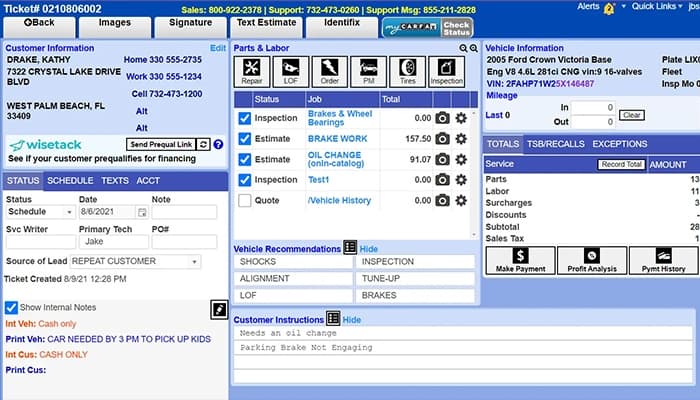
Bay-Master software offers a cloud-based SaaS solution for auto repair shops, streamlines repair orders, and controls inventory and scheduling. Its automated text messaging facilitates appointment confirmations and approvals, while a timecard system tracks labor efficiently. Although some features are missing in the online version, regular updates incorporate user feedback for ongoing improvements.
Bay-Master Specifications
- Invoicing & Billing
- Accounting & Payroll Integration
- Inventory Management
- Online Parts Ordering
Bay-Master Features
Credit Card Processing
The system features seamless credit card processing with competitive rates, allowing payments to be accepted over the phone. Fully integrated for streamlined reconciliation, it enhances transaction efficiency while reducing manual errors and simplifying business financial management.
Labor Tracking
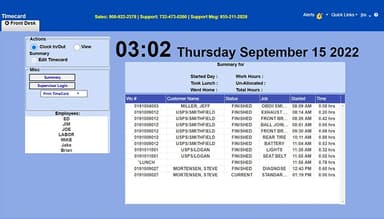
Bay-Master's labor tracking system allows technicians and service writers to be assigned predefined billable rates and costs. It links tasks to work orders for accurate monitoring, while detailed reports compare billable and actual hours, ensuring precise profitability analysis.
Scheduling
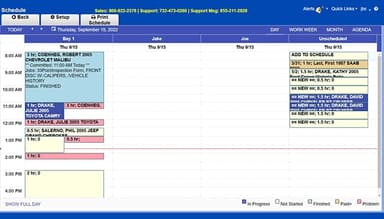
The scheduling module enhances organization and efficiency by managing work orders seamlessly. It helps define shop hours and closures, name service bays, and color-code tickets by status. Bay-Master allows users to view schedules by day, week, or month, ensuring streamlined workflow management.
Service History
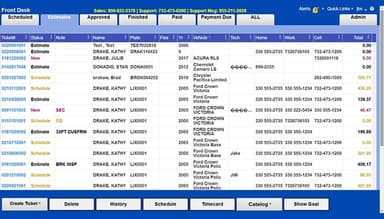
Service history allows access to past work orders at any time. It provides a detailed view of previous services and enables searches by name, ticket, plate, VIN, model, fleet ID, status, or date. Tickets can be viewed, printed, or emailed directly from the system, ensuring efficient record-keeping and easy retrieval of essential information for reference or customer communication.
Reporting
Bay-Master's reporting feature offers flexible processing of completed and paid tickets while generating key accounting reports. It provides summaries of daily labor, payments, sales trends, reconciliations, deliveries, item movements, taxes, profits, and cost analysis.
Pros And Cons of Bay-Master
Pros
Easy-to-use interface with quick access to service history
Efficient invoicing with clear, accurate reports
The cloud-based version allows remote access and easy backups
Offers high level of customization and functionality
Cons
The new vehicle selection menu is less user-friendly than the older version
Customer service can be slow or difficult to reach
Bay-Master Reviews
Total 5 reviews
4.6
All reviews are from verified customers
Rating Distribution
5
Stars60%
4
Stars40%
3
Stars0%
2
Stars0%
1
Stars0%
Share your experience
Mid-Market, 500+ employees
“Simple shop software”
Pros
If you're a repair shop looking to boost your productivity and profits, I highly recommend Bay-masteR. It's packed with features that really help you maximize your earnings. I'm really happy with how the system is designed and all the tools it offers.
Cons
It can be a bit slow at times, especially when printing. There's usually a delay of several seconds before the printer actually starts. I've also run into some glitches here and there which means I've had to call tech support a few times to get things sorted out.
Rating Distribution
Ease of use
8
Value for money
8
Customer Support
8
Functionality
8
Small-Business, 11-50 employees
“Suits our medium-sized shop well”
Pros
The screens are super easy to use. Honestly, they're way better than the spreadsheet layouts I've used in the past. Much more user-friendly!
Cons
Reporting features could definitely use some improvement. There are only about 15 reports available, so it's a little limited.
Rating Distribution
Ease of use
8
Value for money
10
Customer Support
10
Functionality
10
Small-Business, 11-50 employees
“Can't find a better software than this”
Pros
The marketing features are awesome, especially the texting option. It's easy to use and the support team is super friendly and knows their stuff. They really make the whole experience smooth.
Cons
The support hours aren't ideal since they're only open from 9 AM to 6 PM Eastern. Also, when texting with them, I noticed the number comes from an NJ area code, which feels a little strange.
Rating Distribution
Ease of use
10
Value for money
10
Customer Support
10
Functionality
10
Frequently Asked Questions
What level of support does Bay-Master offer?
Bay-Master offers support via email, help desk, live chat, phone, knowledge base, FAQs/forum, and 24/7 live representatives.
What pricing plans does Bay-Master offer?
The Bay-Master pricing model offers three feature-rich pricing plans—Essentials, Traditional, and High Performance—with pricing available upon request. Users can request an in-depth analysis of the Bay-Master cost structure.
Who is Bay-Master typically used by?
Bay-Master is extensively used in the automotive sector, especially by auto repair shops.
What languages does Bay-Master support?
Bay-Master supports English.
Does Bay-Master have a mobile app?
No, Bay-Master does not have a dedicated mobile app but is accessible through a web-based interface on all devices.
Does Bay-Master have an API?
No, Bay-Master does not offer an API.
What other apps does Bay-Master integrate with?
Bay-Master integrates with leading third-party applications, such as QuickBooks, but a comprehensive list of integrations is not yet available.