


Microsoft Teams Phone
Last Updated
Overview
Collaborative calling by Microsoft Teams Phone transforms team communication by enabling seamless call handling and forwarding, fostering teamwork across environments. While mastering advanced admin features can take time, its intelligent call features, PSTN connectivity, and integration with Teams enhance productivity for mid-sized to large enterprises.
Microsoft Teams Phone Specifications
- IVR
- CRM Integration
- Reporting Dashboards
- Call Recording
Microsoft Teams Phone Features
AI-Generated Summaries And Insights
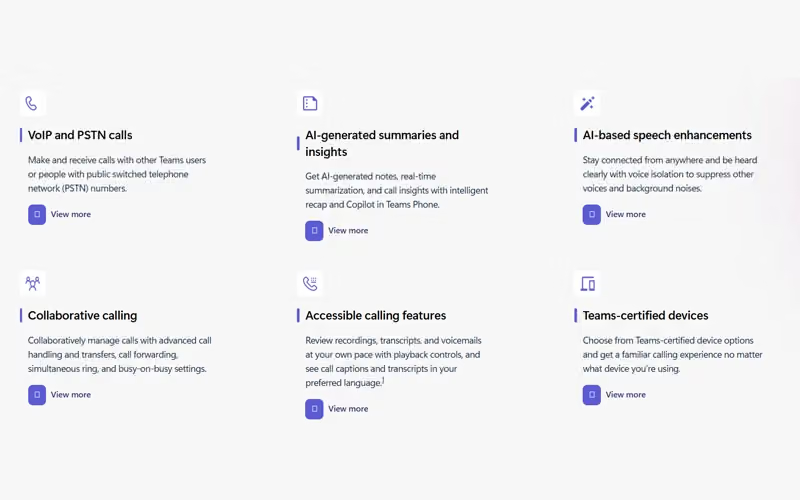
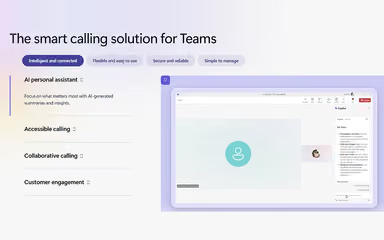
With the platform’s intelligent recap and Copilot service, you can get AI-generated notes, a real-time summary, and call analytics. This helps improve context retention and boost response efficiency.
Call Queues And Auto Attendants
Microsoft Teams Phone features call queues and auto attendants to route calls automatically to the relevant person or department, reducing waiting times. It helps streamline customer interactions for better service outcomes.
Call Quality Dashboard
Use the insights from the call quality dashboard to optimize your network for calling, enabling IT teams to monitor quality metrics. It proactively optimizes communication reliability and provides insights into customer interactions.
Voice Over Internet Protocols
Use public switched telephone network (PSTN) numbers offered by the Microsoft Teams Phone software to make and receive calls with other users. It enables flexible telephony without the constraints of traditional phone hardware.
Direct Routing
To use your own operator, connect your session border controllers (SBC) to this software, allowing businesses to leverage preferred operators. It even extends telephony capabilities with existing telecom infrastructure.
Pros And Cons of Microsoft Teams Phone
Pros
Easy setup and deployment
Robust VoIP and calling support
Reduces waiting time with call queue management
Cons
Limited advanced call center tools
No 24/7 native support
Microsoft Teams Phone Reviews
Total 1467 reviews
4.5
All reviews are from verified customers
Rating Distribution
5
Stars58%
4
Stars34%
3
Stars6%
2
Stars2%
1
Stars0%
Share your experience
Information Technology and Services, 11-50 employees
More than a year
“Keeps teams connected”
Pros
Across our organization, it has really helped tighten up communication and collaboration between teams. It's highly customizable, puts everything together in one shared workspace and makes it much easier to stay aligned. We also use it to manage surveys and share files securely. Also, it has made streaming presentations and recording sessions for future reference much more practical.
Cons
This has been very reliable overall but it does depend on a stable internet connection and that may not be available to everyone.
Rating Distribution
Ease of use
9
Value for money
9
Customer Support
7
Functionality
8
Health, Wellness and Fitness, 11-50 employees
More than a year
“all-in-one teamwork hub”
Pros
This tool really stood out to me because it kept everything in one place. I was able to join virtual meetings, chat with coworkers, share files and collaborate without constantly jumping between different apps. Throughout both my studies and work, it helped me stay organized and kept me from missing important conversations or updates. I also liked how smoothly it connected with Microsoft Word, Excel and PowerPoint which made working with others much more productive.
Cons
The platform is extremely comprehensive which is great for overall workflow integration... but new users should be prepared for an initial learning curve to navigate the many features.
Rating Distribution
Ease of use
9
Value for money
9
Customer Support
9
Functionality
6
Computer Software, 11-50 employees
More than a year
“Mobile alerts come in handy”
Pros
Whether the team is in the office or working remotely, it keeps everyone connected. We can set up meetings with customers, give them direct access to support and because we use it alongside other Microsoft products, everything fits together smoothly. The connectors are especially useful since we get Teams alerts whenever a customer submits a support ticket and the mobile app means we can stay connected wherever we are.
Cons
Video calls can be fairly resource intensive and every now and then our headsets stop working when we answer a call so we have to unplug them and plug them back in before they work again.
Rating Distribution
Ease of use
9
Value for money
9
Customer Support
7
Functionality
9
Frequently Asked Questions
Does Microsoft Teams Phone offer an API?
The vendor has shared information regarding its API.
What types of pricing plans does Microsoft Teams Phone offer?
The Microsoft Teams Phone price includes Standard, Pay-as-you-go, Calling Plan, and Domestic and International plans. Request a personalized Microsoft Teams Phone pricing quote for your business.
What level of support does Microsoft Teams Phone offer?
It provides support via FAQs and the support center.
What language does Microsoft Teams Phone support?
Microsoft Teams Phone is primarily available in English and multiple other languages.
Does Microsoft Teams Phone have a mobile app?
Yes, it supports calls via the Teams mobile app across devices.
Who are the typical users of Microsoft Teams Phone?
Typical users include IT firms, healthcare providers, financial institutions, educational organizations, and retail operations.
What other apps does Microsoft Teams Phone integrate with?
It integrates with Outlook, SharePoint, Dynamics 365 Contact Center, Power BI, and more.