


Zoom Contact Center
Last Updated
Overview
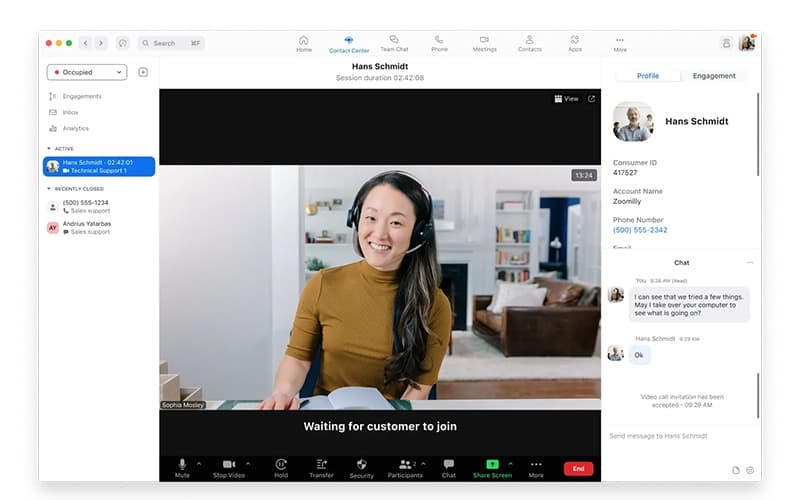
Zoom Contact Center empowers agents with rich customer context and seamless routing, leading to faster resolution times. While video engagement features are unique, report customization options are limited. Overall, it is a unified solution for businesses seeking a modern, scalable contact center.

Zoom Contact Center Specifications
- Omnichannel Support
- Call Routing
- Call Recording
- Call Monitoring
What Is Zoom Contact Center?
Zoom Contact Center is a call center solution designed to streamline customer interactions and enhance agent productivity across various digital channels. It utilizes sophisticated routing capabilities to ensure customers are connected to the most appropriate agents, minimizing wait times and improving satisfaction. The tool also preserves customer context to help agents personalize support experiences and build long-lasting relationships with clients.
Zoom Contact Center Pricing
Zoom Contact Center price plans are as follows:
- Essentials: $69/user/month
- Premium: $99/user/month
- Elite: $149/user/month
Disclaimer: The pricing is subject to change.
Zoom Contact Center Integrations
Zoom Contact Center integrates with the following tools and platforms:
- Zendesk Suite
- ServiceNow
- Salesforce
- Dynamics 365
Who Is Zoom Contact Center For?
Zoom Contact Center is suitable for organizations across various sectors and industries, including:
- Financial services
- Retail
- E-commerce
- Healthcare
- Education
- Technology
Is Zoom Contact Center Right For You?
If you are an organization focused on delivering personalized and seamless client experiences, then Zoom Contact Center provides an AI-first, omnichannel solution designed to elevate customer service. Its standout functionality is being a cloud contact center platform optimized for video, along with support for voice, chat, SMS, and email. This helps businesses streamline and scale their support processes with ease.
Still doubtful if the Zoom Contact Center software is the right fit for you? Connect with our customer support staff at (661) 384-7070 for further guidance.
Zoom Contact Center Features
Employee Empowerment
The platform delivers essential tools and resources that enable agents to perform effectively and stay engaged. Features include real-time performance monitoring, integrated coaching, and workforce management tools that optimize scheduling and resource allocation for peak efficiency.
Analytics And Reporting
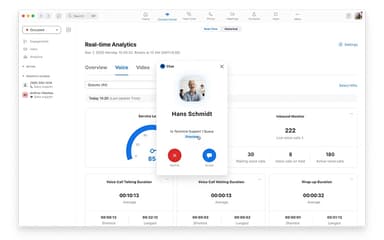
Zoom Contact Center offers comprehensive reporting dashboards and advanced analytics to track key performance indicators (KPIs) and operational efficiency. Organizations can gain deep insights into agent performance, customer sentiment, and channel usage to inform strategic decisions and continuous service improvement initiatives.
Support Orchestration
The system facilitates the seamless connection of contact center functionality with broader business applications and systems. This enables sophisticated routing and workflow automation across the entire organization, improving business processes and service consistency for better customer outcomes.
Connected Journeys
Zoom Contact Center provides a unified view of the customer across all channels, enabling agents to handle voice, video, chat, and SMS interactions seamlessly. This capability ensures a smooth transition between communication methods, maintaining context from one touchpoint to the next for efficient service delivery and minimal repetition.
Pros And Cons of Zoom Contact Center
Pros
Fast and straightforward implementation
Provides a user-friendly interface
Helps organize information for agents
Cons
Transferring calls can take longer than expected
There can be occasional lags in the system
Zoom Contact Center Reviews
Total 11 reviews
5
All reviews are from verified customers
Rating Distribution
5
Stars100%
4
Stars0%
3
Stars0%
2
Stars0%
1
Stars0%
Share your experience
Not Specified, 11-50 employees
“Makes it simple to connect with customers”
Pros
It makes it simple to stay connected with customers without any hassle. I can handle traditional voice calls, SMS, live web chat and social messaging all in one place. The standout features for me are the Zoom virtual agent and the automated self-service flows, those have been genuinely helpful for both customer support and internal employee self-service across web, mobile and voice channels.
Cons
Call drops are extremely rare but I do feel there's still some room to tighten things up even further.
Rating Distribution
Ease of use
10
Value for money
8
Customer Support
10
Functionality
10
Outsourcing/Offshoring, 101-500 employees
“High quality calls”
Pros
The calls sound really high quality and getting started feels simple. Pricing also seems fair for what you get. Since it's cloud-based, it fits both small teams and larger businesses well. I've also noticed the call quality is better than what I experienced on other platforms and the newer AI integration makes it even more useful.
Cons
Call performance can be affected by your ISP so your experience will vary depending on the internet connection. The free plan has pretty limited time though it isn't unbearable.
Rating Distribution
Ease of use
10
Value for money
10
Customer Support
10
Functionality
8
Consumer Services, 11-50 employees
“helps customer support run better”
Pros
Best part for me is how friendly the interface feels and how much simpler it is to manage customer conversations. It makes it easier to handle calls and communicate with customers quickly and that keeps my day more organized and productive. I also really value the call management tools, the navigation flow and the way it integrates with other tools, everything stays connected so I'm not constantly switching apps or losing track of tasks. Overall it comes across as a dependable option that helps customer support run better, benefiting both agents and customers.
Cons
During heavier traffic performance isn't always as responsive as I'd like. When things get busy and I'm juggling multiple customer interactions, moving between features can feel a little sluggish at times. On top of that some of the advanced settings and reporting options could be a bit clearer for new users. If they tighten up speed under load and make those controls more user-friendly, it would be an even more efficient and smooth platform for day-to-day support work.
Rating Distribution
Ease of use
10
Value for money
8
Customer Support
9
Functionality
9
Frequently Asked Questions
Does Zoom Contact Center have a mobile app?
Yes, Zoom Contact Center offers a dedicated mobile app.
What language does Zoom Contact Center support?
Zoom Contact Center supports English, French, Spanish, German, Japanese, Italian, Korean, Dutch, Polish, Russian, Chinese, Vietnamese, Swedish, and Indonesian languages.
What other apps does Zoom Contact Center integrate with?
Zoom Contact Center integrates with Zendesk Suite, ServiceNow, Salesforce, and Dynamics 365.
What types of Zoom Contact Center pricing plans are available?
The vendor offers three Zoom Contact Center price plans: Essentials ($69/user/month), Premium ($99/user/month), and Elite ($149/user/month). Receive a personalized Zoom Contact Center cost estimate specific to your organization.
Who are the typical users of Zoom Contact Center?
Zoom Contact Center features support organizations in the financial services, retail, e-commerce, healthcare, education, and technology industries.
Does Zoom Contact Center offer an API?
Yes, Zoom Contact Center offers an API.
What level of support does Zoom Contact Center offer?
Zoom Contact Center offers support via phone and live chat.