


Booqable
Last Updated
Key Takeaways
Generated from the text of customer reviews
Our Verdict
Overall Rating
Based on 64 users reviews
4.8
Rating Distribution
Positive
97%
Neutral
2%
Negative
2%
Starting Price
$35
per month
Booqable Specifications
- Dashboards
- Mobile Access
- Document Management
- Asset Management
Booqable Features
Rental Business Assistant
Booqable’s Bo assistant answers questions about orders and payments using account data. It identifies overdue returns, booking conflicts, top-performing products, and repeat customers. Rental businesses can use its reports and market research to assess pricing and purchasing decisions. Bo is included with all Booqable plans at no extra cost.
Inventory And Availability Tracking
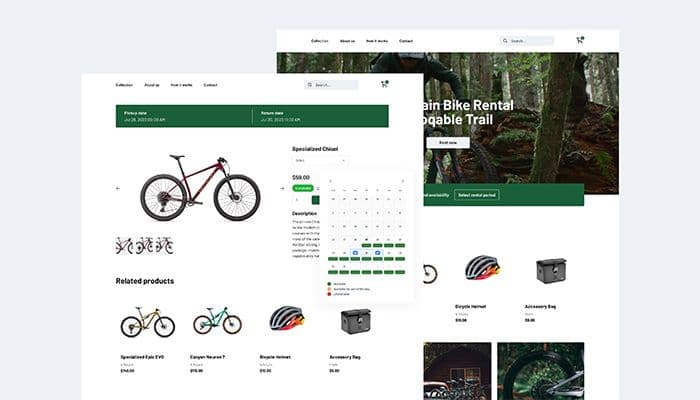
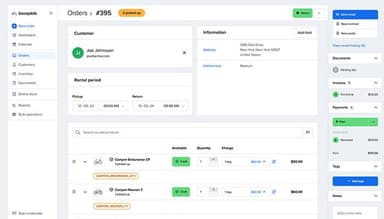
Booqable tracks individual items and bulk stock alongside rental bookings. Staff can check the availability calendar before confirming an order and see which products are already reserved or out with customers. Product history also shows equipment movements from pickup through return.
Downtime Scheduling
When equipment needs repairs or goes missing, staff can block it from future bookings for a set period. Booqable records scheduled downtime and shows upcoming or overdue periods on the dashboard. Rental managers can see which items are unavailable before assigning stock to another order.
Online Booking And Website Integration
Booqable lets businesses take reservations through its hosted booking page or website builder. They can also add booking features to an existing website. Customers can check availability and place orders online while staff manage incoming reservations through the back office.
Rental Quotes, Contracts, And E-Signatures
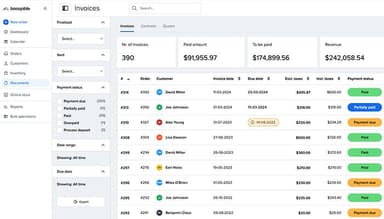
Staff can prepare quotes and rental contracts using order details instead of creating each document from scratch. Customers can sign eligible documents electronically. Customizable email templates also support booking confirmations and reminders. E-signatures are available on the Grow plan and higher tiers.
Barcode Scanning And Mobile POS
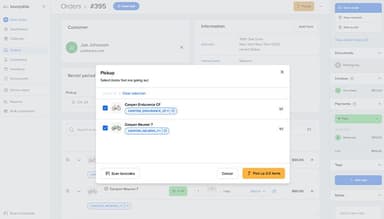
Booqable features mobile apps that let staff manage orders and accept in-person payments away from a desk. Barcode scanning helps them check equipment in and out during collection and return. This makes it easier to confirm that the correct items have been handed over or returned.
Reporting And Product Performance
Booqable reports on rental activity and revenue to show which products bring in income. When purchase costs are recorded, businesses can also assess product return on investment. Managers can use these figures to decide which items deserve more stock, and which may no longer justify the investment.
Pros And Cons of Booqable
Pros
Customers can book rentals online after business hours
Rental calendars show upcoming bookings and return dates
Digital quotes and invoices cut down on order paperwork
Stock records help staff check availability before confirming orders
Mobile access lets staff check orders away from the office
Cons
Custom booking rules may be difficult to set up
Website customization may not suit specialized storefronts
Complex delivery arrangements may need workarounds
Booqable Pricing
Start | Grow | Scale |
|---|---|---|
$35 per month | $87 per month | $187 per month |
|
|
|
Disclaimer: The pricing details were last updated on Sep 23, 2026 from the vendor's website. Please contact us for a tailored pricing list.
Booqable Reviews
Total 64 reviews
4.8
All reviews are from verified customers
Rating Distribution
5
Stars89%
4
Stars8%
3
Stars2%
2
Stars0%
1
Stars2%
Share your experience
Food & Beverages, 1-10 employees
Less than 6 months
“Perfect for our Slushy business!”
Pros
This software is simple ease to set up, truly one of the best onboarding experiences I've had. Booqable provides all the functionality we need for our small rental business, including reservations, customer management, and invoicing. It's very pleasant to use, and the support team responds quickly to all questions.
Cons
The app has potential; it would be great to manage the business fully from a smartphone. Billing could be smoother, but it seems they're planning improvements like Tap to Pay.
Rating Distribution
Ease of use
10
Value for money
10
Customer Support
10
Functionality
9
Events Services, 1-10 employees
Less than 6 months
“Great Application with even better costumer support”
Pros
Easy to use application with a professional feel. The booking system is simple for customers, and the app for employees makes our lives much easier.
Cons
I miss having the option for customers to pay with cash instead of card in the webshop.
Rating Distribution
Ease of use
10
Value for money
10
Customer Support
10
Functionality
9
Consumer Services, 1-10 employees
Less than a year
“Booqable sets us apart.”
Pros
I like that Booqable allows our company to have a unique website image compared to other party event rental businesses. Our website and booking process are very distinctive and prevent us from falling into the "cheesy" event party rental category, while still being easy to navigate.
Cons
I would prefer to view the calendar layout for an entire month without having to scroll.
Rating Distribution
Ease of use
10
Value for money
10
Customer Support
9
Functionality
10
Frequently Asked Questions
Can Booqable handle late returns and rental extensions?
Staff can extend a rental and check whether the new dates conflict with another booking. Before choosing the software, businesses should also check how overdue charges are calculated and applied.
Does Booqable support security deposits and damage charges?
Booqable supports configurable deposit rules, including fixed amounts and percentages. Staff can also handle deductions for damaged or missing items through the available payment workflow.
Can Booqable manage rental packages and seasonal rates?
Booqable supports product bundles and rental rates based on duration. These options suit businesses that offer weekend hires or equipment packages. Companies with more complex seasonal pricing should test their pricing rules before switching.
Can Booqable add rental bookings to an existing website?
Yes. Booqable can add booking functionality to websites built with services such as WordPress, Shopify, and Squarespace. Businesses can keep their current website while allowing customers to browse rental products and place orders online.
Can staff review rental requests before confirming an order?
Booqable supports quote-based workflows that let staff review a request before moving ahead. This can be useful for high-value equipment or orders that need delivery planning.
Does Booqable support more than one rental location?
Yes. Businesses can manage inventory by location and check availability at different branches. Those with frequent transfers or returns at a different branch should confirm how these workflows operate before committing.
What reports can businesses use to assess rental performance?
Booqable provides reports on product performance and rental activity. Buyers should check whether these reports cover the figures they rely on, such as asset utilization and revenue by product. If maintenance costs or detailed financial analysis matter, they should confirm whether additional reporting tools are needed.