


Last Updated
Overview
Brightly Asset Essentials is a facilities management solution and a key part of the IWMS technology suite, designed for educational institutions and diverse industries. While some users experience notification issues for high-priority work orders, the platform effectively streamlines daily maintenance tasks and enhances organizational workflows.
Brightly Asset Essentials Specifications
- Work Order Management
- Maintenance Logs
- Purchasing
- Incident Management
Brightly Asset Essentials Features
Predictive And Preventive Maintenance System
Brightly Asset Essentials boosts asset performance with proactive maintenance planning, cutting operational costs significantly. Its preventive maintenance features enable timely inspections, repairs, and servicing, reducing unexpected failures. By shifting from reactive to proactive strategies, it extends asset lifespan, minimizes downtime, and enhances workforce efficiency.
Asset Inventory Software
The software ensures the availability of essential parts through effective maintenance inventory management. Tracking frequently used components prevents shortages and delays. Data-driven inventory control enhances procurement decisions, aligning stock levels with operational demands and reducing unnecessary expenses.
IoT Remote Monitoring
IoT technology enables real-time monitoring of asset conditions for early failure detection. Automatically generated maintenance reports streamline issue resolution, minimizing downtime. Continuous tracking enhances long-term performance, reduces major repair costs, and improves workforce allocation efficiency.
GIS Mapping Integration
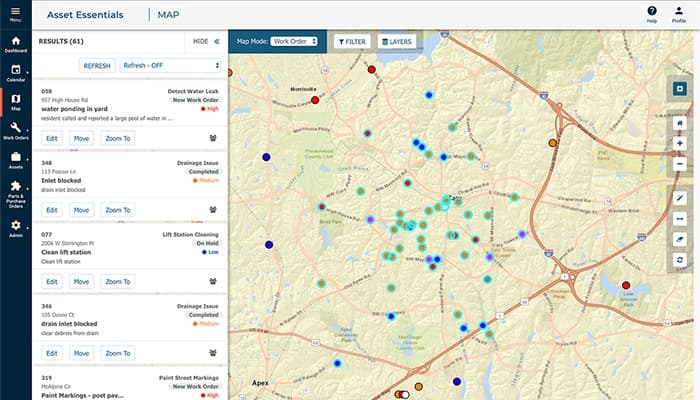
Geographic information system (GIS) integration enhances work order management and asset tracking. Its location-based monitoring improves visibility across multiple sites, ensuring precise resource allocation. Mapping infrastructure assets streamline planning, reduces technician travel time, and supports data-driven maintenance strategies.
Easy-to-view Reporting And Analytics
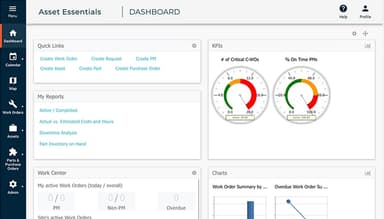
Brightly Asset Essentials' advanced reporting tools provide valuable insights with over 100 predefined reports and dashboards. Its key performance indicators measure maintenance efficiency, resource allocation, and budget planning. Predictive analytics enhance operational strategies, ensuring informed decisions for future maintenance schedules and financial management.
Pros And Cons of Brightly Asset Essentials
Pros
Offers real-time maintenance request tracking
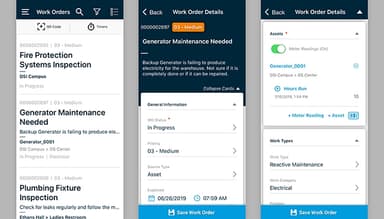
The mobile app enhances accessibility and work assignment
Easy implementation and user-friendly interface
Quick return on investment (ROI), often within three months
Cons
Limited capabilities for free users
There is no built-in feature for operators to enter simple daily PMs and asset-specific checks
Brightly Asset Essentials Reviews
Total 11 reviews
5
All reviews are from verified customers
Rating Distribution
5
Stars100%
4
Stars0%
3
Stars0%
2
Stars0%
1
Stars0%
Share your experience
Joe
Food & Beverages, 11-50 employees
Less than a year
“Allows us to manage assets in one place”
Pros
It is the best as it allows us to manage all assets in one place.
Cons
The mobile app needs improvements so it becomes easy to use. Also I feel like it would be much better if it was a real app instead of just a website link.
Rating Distribution
Ease of use
9
Value for money
10
Customer Support
10
Functionality
9
Michael
Chemicals, 11-50 employees
More than a year
“Definitely worth recommending”
Pros
Setting it up was very quick and easy. The team knew their stuff and walked us through everything. Also it is really user-friendly, has all the features we need and comes at a great price.
Cons
One issue I have noticed is that users who can only submit maintenance requests have very limited viewing options.
Rating Distribution
Ease of use
10
Value for money
10
Customer Support
9
Functionality
10
Timothy
Business Supplies and Equipment, 51-100 employees
Less than a year
“Works as promised!”
Pros
The reports I can generate are great. Also there is so much useful data available to gather and analyze.
Cons
Well it does not allow me to import my parts list from a CSV file, which is frustrating.
Rating Distribution
Ease of use
8
Value for money
9
Customer Support
9
Functionality
9
Frequently Asked Questions
What pricing plans does Brightly Asset Essentials offer?
he Brightly Asset Essentials pricing model is tailored to accommodate each business's unique requirements and scale. Please click Get pricing for a customized cost structure.
Who is Brightly Asset Essentials typically used by?
Brightly Asset Essentials software is utilized across various industries and sectors, including education, government, manufacturing, healthcare, senior living, clubs, and associations.
What languages does Brightly Asset Essentials support?
Brightly Asset Essentials supports English.
Does Brightly Asset Essentials support mobile devices?
Yes, Brightly Asset Essentials offers a mobile app for iOS and Android devices.
Does Brightly Asset Essentials have an API?
Yes, Brightly Asset Essentials offers an API.
What other apps does Brightly Asset Essentials integrate with?
Brightly Asset Essentials supports integrations with a variety of third-party applications, such as ESRI, SeeClickFix, myDevices, MS Dynamics, Arbiter Sports, School Pay, MySchoolBucks, BlueBeam, LaserFiche, and Carma.
What level of support does Brightly Asset Essentials offer?
Brightly Asset Essentials offers support via phone, email/help desk, chat, a knowledge base, and FAQs/forums.