


The Asset Guardian
Last Updated
Overview
The Asset Guardian (TAG) is a comprehensive EAM solution that integrates with Microsoft Dynamics 365 Business Central but can function independently. It enhances asset management, monitors maintenance, and improves cost efficiency. While full implementation may challenge small organizations, the system supports various complexities and industry-specific needs.
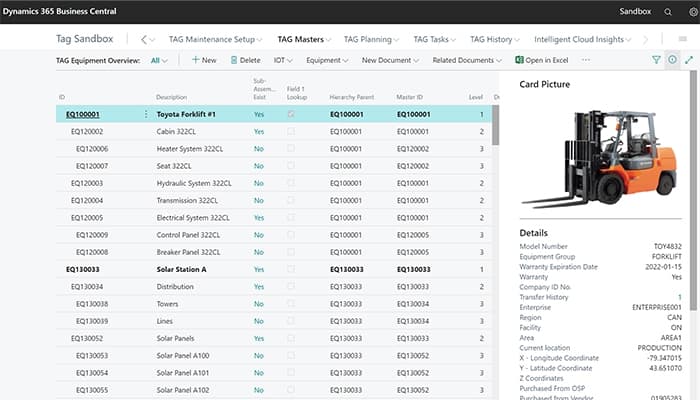
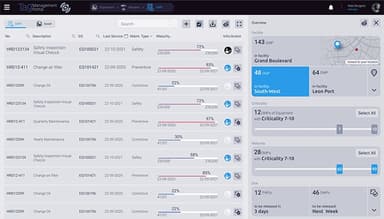
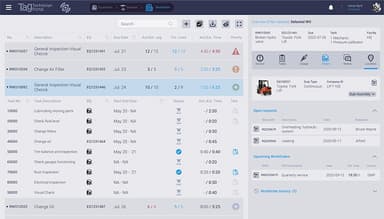
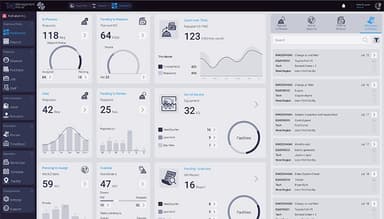
The Asset Guardian Specifications
- Work Order Management
- Maintenance Logs
- Purchasing
- Incident Management
The Asset Guardian Features
Asset Health Management
TAG's asset health index management enables informed decision-making by identifying and prioritizing maintenance for critical assets. It calculates a percentage score using configurable formulas from various sources, including lifecycle data, condition monitoring, fault history, work orders, task associations, and IoT sensor readings.
Linear Asset Management
Linear asset management enhances maintenance planning by identifying the impact of maintenance on production lines. It automates shutdowns, manages asset dependencies, and handles junctions where multiple lines intersect, ensuring efficient scheduling and risk mitigation across interconnected assets.
Capital Project
The capital project feature supports managing large-scale maintenance projects, ensuring CAPEX budgets and timelines are met. It helps in budgeting, scheduling, forecasting, risk management, and tracking costs against budgets, benefiting capital-intensive industries like rail, oil, and mining.
Cloud-Based Maintenance
Cloud-based TAG software eliminates upfront IT costs by offering hosted solutions with no server hardware maintenance required. It provides 99.9% uptime, data protection, disaster recovery, and mobile access for global users, ensuring seamless updates, security, and flexibility.
Health And Safety Management
The platform’s health and safety management system simplifies incident reporting, certification tracking, and document management. It enhances compliance, automates alerts, and strengthens safety protocols. Key features include digital forms, work permits, and skill management, ensuring safer and more efficient operations.
Pros And Cons of The Asset Guardian
Pros
Streamlines back-office and field service processes
The system has a strong understanding of industry-specific needs
Maintenance processes provide complete visibility across teams
Offers enhanced work order and preventive maintenance process
Cons
Limited global support
The full implementation and objectives may be challenging for small organizations
The Asset Guardian Reviews
Total 8 reviews
4.4
All reviews are from verified customers
Rating Distribution
5
Stars38%
4
Stars63%
3
Stars0%
2
Stars0%
1
Stars0%
Share your experience
Electrical/Electronic Manufacturing, 51-100 employees
Less than a year
“Makes our job simple”
Pros
The Asset Guardian made it so much easier for us to organize and manage our equipment maintenance. It integrates smoothly with our ERP system, which was a key factor in choosing a CMMS.
Cons
I do not use it myself, but I haven't heard any complaints from actual users, so there is nothing specific I can point out.
Rating Distribution
Ease of use
10
Value for money
10
Customer Support
10
Functionality
10
Environmental Services, 51-100 employees
Less than 6 months
“It is fine!”
Pros
It is highly customizable. And I can already see the potential of it for tracking assets and equipment in different ways. Just needs a bit of tweaking. About to test it live right now.
Cons
The TEMP/DMP module for managing work procedures is really bad. It definitely needs improvement. With some tweaks, I seriously think this could be a great product. And although the interface is user-friendly but it feels like a maintenance person was not involved in designing this part at all.
Rating Distribution
Ease of use
6
Value for money
6
Customer Support
8
Functionality
8
Construction, 11-50 employees
Less than a year
“Good fit for us”
Pros
Since we knew Microsoft NAV/BC was strong, adding TAG for CMMS was an easy and proven perfect fit for us.
Cons
This seems more like a process issue as we update our services. We do both testing and maintenance, but not every customer who tests equipment needs maintenance. We're still working on the best way to set up and manage the data.
Rating Distribution
Ease of use
8
Value for money
6
Customer Support
8
Functionality
8
Frequently Asked Questions
What pricing plans does The Asset Guardian offer?
The Asset Guardian price structure varies based on the business's scope and size. Please click Get pricing for a customized The Asset Guardian pricing plan.
Who is The Asset Guardian typically used by?
The Asset Guardian software is utilized across various industries, including manufacturing, food and beverage, power and utility, facility management, and renewable energy.
What languages does The Asset Guardian support?
The Asset Guardian supports Spanish, French, Chinese (Traditional), and English.
Does The Asset Guardian support mobile devices?
Yes, The Asset Guardian (TAG) is accessible via the TAG Mobile App, for iOS devices and Android devices.
Does The Asset Guardian have an API?
Yes, The Asset Guardian offers an API.
What other apps does The Asset Guardian integrate with?
The software integrates with several third-party applications, such as Microsoft Dynamics 365 Business Central, Microsoft Azure, Microsoft SSO, Microsoft Power BI, DocStash, and Wormhole.
What level of support does The Asset Guardian offer?
The Asset Guardian provides support via phone, FAQs/forums, chat, and email/help desk.