


Last Updated
Overview
Covideo is a video messaging platform that helps sales teams and dealerships stand out with personalized video emails. Though its browser extension can experience occasional syncing delays, its strong mobile app and custom branding options make it a powerful tool for boosting engagement and cutting through inbox clutter.
Be the first one to leave a review!
No review found

Starting Price
Custom
Covideo Specifications
- Real-Time Communication
- File Sharing & Management
- Integration with Other Tools
- Automation & Workflow
What Is Covideo?
Covideo is a specialized video messaging platform that helps businesses record, send, and track personalized video emails. Users can capture themselves, their screen, or both to create engaging content that builds trust and drives action. Popular in automotive and sales, it’s used to showcase products and explain complex details. Covideo embeds videos with animated thumbnails for higher click-through rates and offers detailed analytics to optimize follow-ups and engagement.
Covideo Pricing
Covideo pricing is customized and based on user needs and requirements.
Covideo Integrations
Covideo integrates with many software, including:
- Salesforce
- HubSpot
- Elead CRM
- DealerSocket
- VinSolutions
- Zoom
- iPacket
Who Is Covideo For?
Covideo is ideal for professional in the following sectors:
- Automotive dealerships
- Sales and business development
- Real estate
- Customer support
- Education
- Marketing agencies
Is Covideo Right For You?
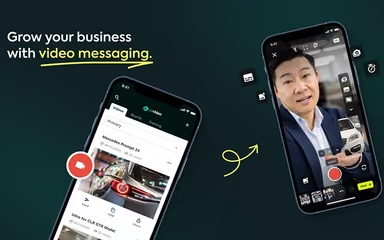
Covideo is best suited for sales teams, particularly in the automotive and real estate sectors, who need a high-touch, personal way to engage leads. It is particularly effective for professionals who want to replace plain text emails with face-to-face video messages to build rapport quickly. Covideo features a mobile app which makes it ideal for on-the-lot car walkarounds or property tours.
However, businesses looking for advanced video production tools or complex marketing automation workflows might find it too focused on direct messaging. It fits best for teams prioritizing relationship-building and higher response rates over high-end video production.
Still not sure about Covideo? Contact our support team at (661) 384-7070 for further guidance.
Covideo Features
Recording And Editing
Covideo enables users to create engaging video messages in minutes using webcam, screen, or dual-camera recording. It includes a suite of editing tools such as trimming, merging clips, noise reduction, and an on-screen teleprompter to ensure polished, professional delivery from any device.
Sharing And Hosting
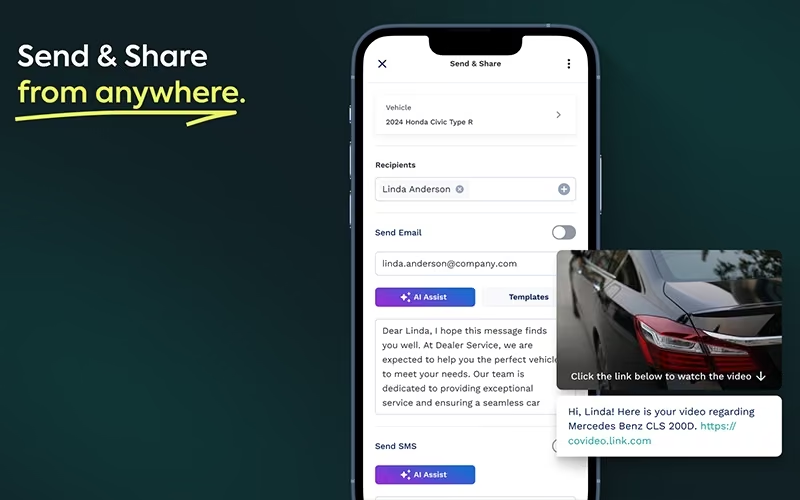
This feature allows users to easily send and store videos directly on the platform. Users can share content via email, SMS text, social media, or CRM, and benefit from unlimited video hosting and scheduling capabilities to ensure messages reach the right audience at the right time.
Customization And Branding
Covideo helps businesses increase brand recall by personalizing the viewer experience. Users can design branded landing pages, customize the video player's look and feel, and use website overlays to keep the focus on their brand identity throughout the customer journey.
Notifications And Reporting
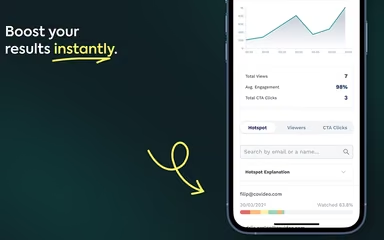
Users can stay on top of their performance with dynamic dashboards and lead notifications. The platform offers real-time engagement alerts, deep video analytics, and custom reports to track views, clicks, and buyer interest for smarter follow-ups.
Engagement And Interactions
To drive customer action, Covideo provides interactive tools like customizable calls-to-action, video replies, and emoji reactions. These features transform passive viewing into two-way communication, allowing recipients to respond, approve repair orders, or navigate content via chapters.
Pros And Cons of Covideo
Pros
Quick and easy to record personalized videos
Helps increase response rates and appointments
Excellent customer support and implementation help
Robust mobile app for recording on the go
Cons
Browser extension can be buggy or hard to navigate
Corporate firewalls may block video playback
Lacks advanced editing tools and filters
Covideo Reviews

No reviews yet!
Be the first to review this product
Frequently Asked Questions
What level of support does Covideo offer?
Covideo provides comprehensive support via phone, email, and live chat, along with a dedicated knowledge base and video tutorials.
Does Covideo offer an API?
Yes, Covideo software offers an API.
Who are the typical users of Covideo?
Covideo is ideal for automotive dealerships, sales and business development teams, real estate professionals, customer support teams, educators, and marketing agencies.
What language does Covideo support?
The platform currently supports English.
What types of pricing plans does Covideo offer?
Covideo pricing is fully customized based on your business needs, and you can request a personalized Covideo cost quote to get accurate pricing.
What other apps does Covideo integrate with?
Covideo integrates with platforms such as Salesforce, HubSpot, Elead CRM, DealerSocket, VinSolutions, Zoom, and iPacket.
Does Covideo have a mobile app?
Yes, Covideo offers a mobile app.