


GReminders
Last Updated
Overview
GReminders automates scheduling with customizable reminders via SMS, email, and voice, reducing no-shows and saving time. It integrates with Google and Outlook calendars for seamless use but may require initial setup time to align with specific workflows. Overall, it is ideal for professionals seeking to streamline their processes.
GReminders Specifications
- Real-Time Communication
- File Sharing & Management
- Document Management
- Task & Project Management
GReminders Features
No-Show Reschedule Automation
This feature automatically identifies no-shows and sends rescheduling options to clients, reducing the time spent manually following up. It ensures that missed appointments are quickly recovered, enhancing efficiency and minimizing disruptions to workflows.
Opportunity Automation
Opportunity automation identifies gaps in client engagement and helps schedule follow-ups or additional appointments. This keeps your pipeline active and improves client retention by ensuring timely interactions without missing crucial opportunities.
Appointment Scheduling
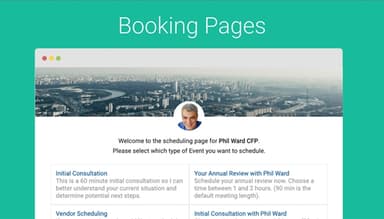
GReminders simplifies appointment scheduling by allowing clients to book directly through a shared link. It syncs with calendars, making coordination seamless while saving time and improving customer satisfaction through a streamlined booking process.
SMS/Email/Voice Reminders
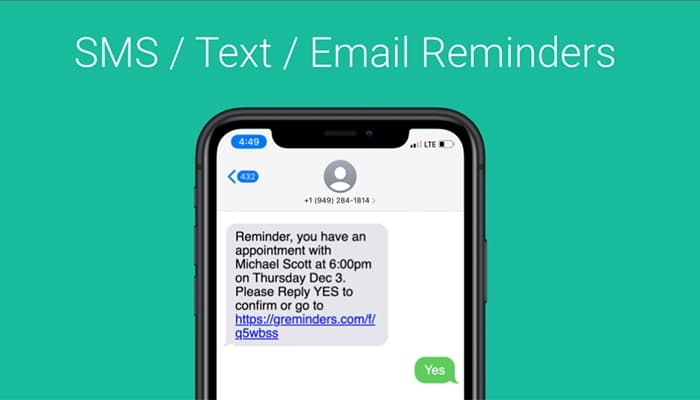
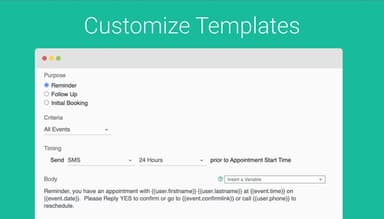
Automated reminders are sent through SMS, email, or voice calls, keeping clients informed about upcoming appointments. This reduces no-shows, enhances client engagement, and builds trust with reliable and consistent communication.
Reminder Sync with Calendar and CRM
This feature integrates reminders with calendars and CRMs, ensuring all appointments and follow-ups are aligned. It eliminates double bookings, keeps client records up-to-date, and enhances productivity by centralizing all scheduling tasks in one system.
Pros And Cons of GReminders
Pros
Intuitive interface that simplifies appointment scheduling and reminders
Works seamlessly with platforms like Zoom
Helps improve client communications with timely reminders
Ensures accessibility and secure data storage
Cons
Plans with large volume of reminders can be expensive
Some text translations could be better, according to software users
Analytics are limited
GReminders Reviews
Total 15 reviews
4.5
All reviews are from verified customers
Rating Distribution
5
Stars60%
4
Stars33%
3
Stars7%
2
Stars0%
1
Stars0%
Share your experience
Healthcare, 1-10 employees
Less than 6 months
“Easy to setup”
Pros
Out of all the similar programs I tried, this one was by far the quickest and easiest for me to set up and understand. Plus there are a lot of features I haven't used yet but I am excited to learn more about them.
Cons
There are so many features I'd love to explore, but some of the terminology can be a bit confusing. However I am pretty sure I did get the hang of it if I had a proper tutorial to guide me.
Rating Distribution
Ease of use
8
Value for money
10
Customer Support
10
Functionality
10
IT, 11-50 employees
Less than a year
“Good, but it has its flaws”
Pros
At first, everything seemed to be working great. We use it to send demo booking reminders to our clients and it has definitely helped improve our show rate. But that's about it.
Cons
I ran into issues when I synced multiple calendars to one admin account as reminders were not being sent to everyone. We have multiple AEs who don't need full access, just their calendars synced so their leads get reminders before their demo. I reached out to GReminders support, and they suggested I turn on a setting to only send reminders from the host. It seemed like it should fix the issue, but after that reminders stopped working altogether. Some people got reminders, some got none. I contacted support again, and they told me to turn off that setting because it was working fine before (which it wasn't). Now most reminders are working, but confirmation messages for demo bookings are still not going out. I've sent three messages to support, and no one has responded. They have totally ghosted me. And I am honestly shocked by the lack of support, especially since we pay a lot for this service. So I'm looking for another solution now.
Rating Distribution
Ease of use
6
Value for money
5
Customer Support
4
Functionality
6
Small Business, 1-10 employees
Less than 6 months
“Does the job for me”
Pros
Well I really love how easy it is to use and how it lets me make changes whenever I need to.
Cons
It was really hard for me to understand how everything worked at first. I had to go back and forth with customer service to figure out what I did wrong, even after watching the tutorials.
Rating Distribution
Ease of use
7
Value for money
9
Customer Support
9
Functionality
8
Frequently Asked Questions
Does GReminders offer an API?
Yes, GReminders offers an API.
What language does GReminders support?
GReminders supports several languages, including English, German, French, and Norwegian.
What other apps does GReminders integrate with?
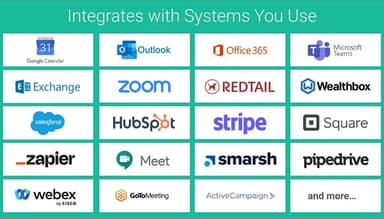
GReminders integrates with Salesforce, HubSpot, and Microsoft Teams.
Does GReminders have a mobile app?
Yes, GReminders has a mobile app.
What type of pricing plans does GReminders offer?
GReminders price starts at $10/month for the Standard plan, $47/month for the Professional plan, and $123/month for the Business plan. Users can also get pricing for a tailormade plan.
Who are the typical users of GReminders?
The typical users of GReminders are in the IT, health, and e-learning industries.
What level of support does GReminders offer?
GReminders offers FAQs, email, phone support, chat, and Knowledge Base.