


Laxis
Last Updated
Overview
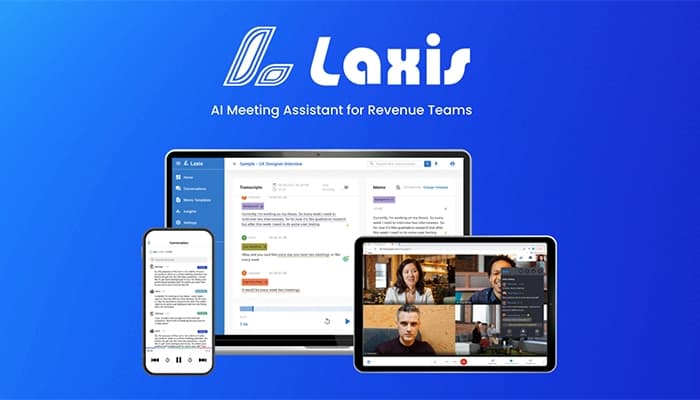
Laxis provides intelligent meeting transcription and note-taking to enhance focus and productivity. While the software significantly boosts efficiency, its reliance on AI can lead to occasional inaccuracies in complex discussions. Overall, Laxis is a solid AI meeting solution, helping businesses generate actionable insights and boost sales.
Laxis Specifications
- Real-Time Communication
- File Sharing & Management
- Document Management
- Task & Project Management
What Is Laxis?
Overview
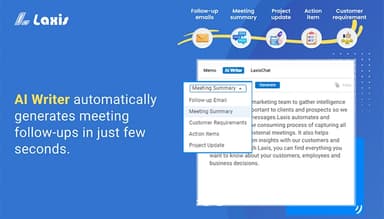
Laxis is a cloud-based software designed to streamline meeting documentation and analysis. It caters to professionals across industries such as sales, consulting, and project management. The variety of its tools offers seamless solutions, such as meeting summaries and follow-ups, for improving overall business productivity. Laxis automates several manual tasks like transcription, which saves trouble from note-taking, lost insights, and inefficient communication. Several users also laud its multilingual support and CRM integration.
Laxis Pricing
The Laxis price ranges in the following four packages:
- Basic: Free
- Premium: $15.99/month
- Business: $29.99/month
- Enterprise: Custom quote
You can request a personalized Laxis cost estimate for your business.
Disclaimer: The pricing is subject to change.
Laxis Integrations
Laxis software seamlessly integrates with many business applications, including:
- HubSpot
- Salesforce
- Wealthbox
- Google Meet
- Zoom
- Webex
Who Is Laxis For?
The software is for businesses of all sizes across different industries, such as:
- Entertainment
- Financial services
- Construction
- Marketing and advertising
- Investing
Is Laxis Right For You?
With its intelligent approach to capturing and organizing conversation data, Laxis is a dependable solution for creating clear action plans and extracting critical insights. As an innovative solution, it stands out for its ability to help users stay focused during meetings while ensuring a comprehensive and secure record through automated transcriptions. For its seamless tools and scalability, Laxis is used by hundreds of leading global organizations, such as Google, Facebook, and Samsung.
Still not sure about Laxis software? Contact our support team at (661) 384-7070 to get assistance regarding any further concerns.
Laxis Features
AI Meeting Assistant
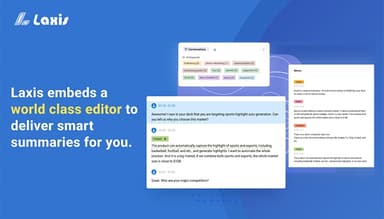
The feature captures conversations during meetings, transcribes them, and organizes key takeaways. It ensures you stay engaged without worrying about manual note-taking. It boosts overall productivity by providing detailed, actionable meeting summaries for improved communication and decision-making.
AI Phone Dialer
Laxis automates call setup and management, integrating with CRM systems to streamline outbound and follow-up calls. It saves time and optimizes efficiency by allowing professionals to focus on conversations instead of dialing logistics.
AI Agents
It enables automatic response handling and data collection during interactions. The software improves customer engagement by ensuring consistent, timely responses while reducing the workload for teams that are managing high volumes of communication.
Real-Time Insights And CRM Integration
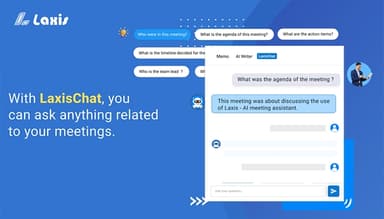
The feature provides real-time insights during meetings, analyzing conversations to highlight key points and trends. Seamless CRM integration ensures that data flows directly into your system, fostering better collaboration and more strategic decision-making.
AI-Powered Note-Taking and Transcription
Laxis automatically records meetings, converting audio to text with high accuracy. It simplifies note-taking to help users retain critical details while maintaining focus. Its organized transcripts and summaries ensure all stakeholders stay aligned and informed.
Pros And Cons of Laxis
Pros
Real-time transcriptions streamline meeting workflows
AI-powered summarization saves time by extracting key points
Intuitive tools to improve preparations for meetings
Offers affordable pricing tiers
Has multilingual transcription capabilities
Cons
Limited customization options for summary outputs
Limited storage options for archiving older transcriptions
Its free version lacks advanced tools
Laxis Reviews
Total 8 reviews
4.3
All reviews are from verified customers
Rating Distribution
5
Stars63%
4
Stars25%
3
Stars0%
2
Stars0%
1
Stars13%
Share your experience
Construction, 1-10 employees
Less than 6 months
“Disappointed!!”
Pros
Idea of it is great but the service is awful and the software does not work properly.
Cons
Finding support was tough, and when I finally did, they were not very helpful. Also the team invitation features did not work at all. After just 12 hours of using it, I switched to Otter and asked for a refund of my $200. They denied my request even though I barely used their broken software. So do not waste your time or money.
Rating Distribution
Ease of use
2
Value for money
1
Customer Support
1
Functionality
1
Education, 51-100 employees
Less than 6 months
“Assistance is always available when needed”
Pros
I use Laxis to transcribe interviews for my qualitative dissertation and it works great. The best part for me has definitely been the customer service. I accidentally went over the minutes in the free trial and thought I'd lost the data. But the Laxis team was amazing as they helped me recover everything and really went the extra mile to assist me.
Cons
I really don't have any negative feedback. As it is honestly a great product.
Rating Distribution
Ease of use
10
Value for money
10
Customer Support
10
Functionality
10
Healthcare, 1-10 employees
Less than 6 months
“Provide exceptional customer service”
Pros
Laxis has completely changed the game for me as taking notes is no longer something I have to worry about. Now, I can focus 100% on my clients and what they are sharing with me. I have also been really impressed with their customer service. I had some concerns about client confidentiality, and they addressed them quickly and with a lot of care. The development team has been super hands-on, making sure everything is handled thoroughly. It gives me a lot of confidence that any other issues that come up will be dealt with just as thoughtfully and professionally.
Cons
The transcription isn't perfect but I use some non-standard language in my consultations, so I am not surprised. A quick review after the consultation usually fixes any issues.
Rating Distribution
Ease of use
8
Value for money
8
Customer Support
10
Functionality
8
Frequently Asked Questions
Does Laxis offer an API?
The official website doesn’t specify whether Laxis provides an API.
What language does Laxis support?
Laxis supports English as its primary language, but there are options to transcribe meetings in over 41 languages for global teams.
What other apps does Laxis integrate with?
Laxis integrates with Salesforce, HubSpot, Webex, Zoom, and several others.
Does Laxis have a mobile app?
Yes, Laxis has a mobile app.
What type of pricing plans does laxis offer?
Besides a free-of-cost Basic plan, the Laxis price starts at $15.99/month for the Premium plan and $29.99/month for the Business plan. You can also request a custom quote for its Enterprise plan.
Who are the typical users of Laxis?
The typical users of Laxis are from the sales, marketing, investment, and finance services.
What level of support does Laxis offer?
Laxis offers support through FAQs, email, phone, personalized training, and a knowledge base.