


Last Updated
Overview
Mural is a visual collaboration platform that empowers teams to ideate and execute strategies, fostering innovation, and improved outcomes. While it can experience performance lag on large boards, its vast library of templates and seamless integration with popular applications make it an ideal tool for dynamic teamwork and strategic planning.
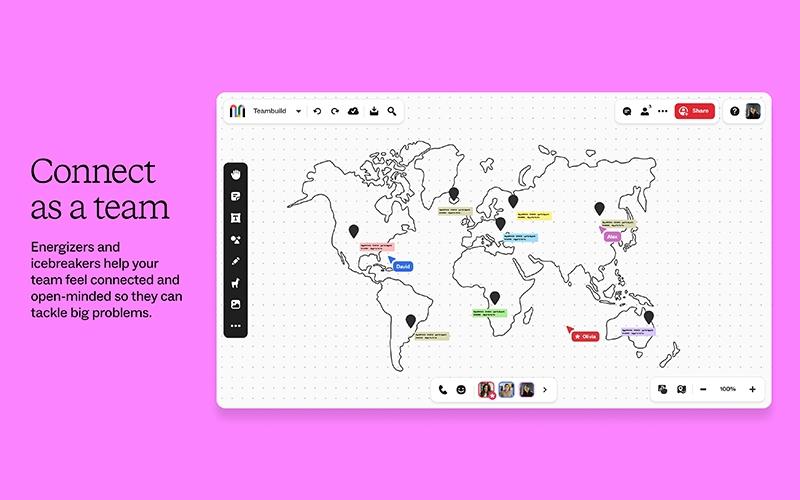
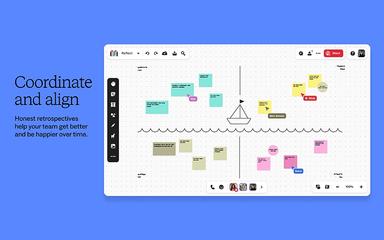
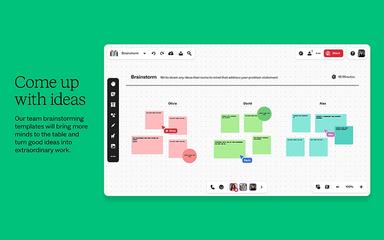
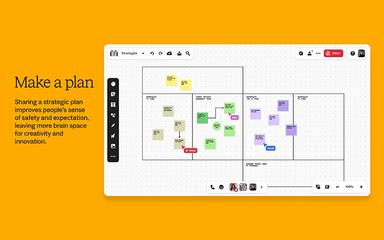
Mural Specifications
- Real-Time Communication
- File Sharing & Management
- Document Management
- Task & Project Management
What Is Mural?
Mural is a leading visual collaboration platform designed to empower teams to ideate, align, and execute strategies more effectively. It provides an intuitive, AI-powered interactive space that transforms how businesses work together. By offering features that streamline daily tasks and workflows, Mural helps organizations of all sizes foster innovation, solve complex problems, and achieve better business outcomes. This platform ensures all team members are on the same page, enhancing clarity and context across projects and breaking down information silos.
Mural Pricing
Mural price plans are designed to be flexible and tailored to suit diverse team and organizational needs. The plans it offers include:
- Free: $0 (for unlimited users)
- Team+: $12/member/month
- Business: $17.99/member/month (billed annually)
- Enterprise: Custom Pricing
Disclaimer: The pricing is subject to change.
Mural Integrations
The platform supports integration with multiple systems and platforms, such as:
- Slack software
- Microsoft Teams
- Jira software
- Google Drive
- Zoom
- Azure DevOps
- Dropbox
Who Is Mural For?
Mural software is ideal for a wide range of industries and sectors, including:
- Engineering and construction
- Information technology (IT)
- Finance
- Gaming
- Manufacturing
Is Mural Right For You?
Are you looking for an efficient visual collaboration platform to help you boost productivity and innovation? If yes, Mural might be the best choice for you. Its intuitive interface and powerful features, like AI capabilities and comprehensive integration options, make it a top choice for teams seeking to streamline workflows and achieve clearer communication.
Mural serves a diverse clientele, including IBM, Jacobs, Microsoft, and Adobe. It has also received significant recognition, including the 2022 Microsoft Apps and Solutions for Microsoft Teams Partner of the Year Award and the 2021 Great Place to Work Certification™.
Are you still not sure about the platform and need expert advice to make an informed decision? Reach out to us at (661) 384-7070 now.
Mural Features
Sticky Notes And Text
Users can rapidly capture ideas, action items, and thoughts using sticky notes or text boxes. These elements are easily customizable with various colors and can be clustered to identify patterns, themes, and innovative solutions, fostering structured brainstorming.
Infinite And Resizable Canvas Options
Mural features an expansive digital workspace with flexible canvas sizes that can be tailored to any collaboration goal. This unlimited space ensures teams have ample room to organize, expand, and connect ideas without constraints, promoting comprehensive visual thinking.
Mapping And Diagramming
The platform enables effortless visualization of complex information through flows, maps, processes, hierarchies, and journeys. Teams can quickly create clear diagrams that simplify intricate concepts, enhance understanding, and facilitate strategic planning and decision-making.
Custom Templates
This feature empowers organizations to standardize and scale their collaborative methods. Teams can design and publish their own custom templates to their workspace, saving significant time, ensuring consistency, and accelerating repeated processes across departments.
Pros And Cons of Mural
Pros
It provides a wide variety of versatile templates for various needs
Mural enhances team brainstorming and ideation sessions effectively
The platform integrates well with many other popular applications
Cons
Requires a constant internet connection for full functionality
Lacks advanced design features found in dedicated tools
Mural Reviews
Total 7 reviews
4.6
All reviews are from verified customers
Rating Distribution
5
Stars71%
4
Stars14%
3
Stars14%
2
Stars0%
1
Stars0%
Share your experience
Anonymous
Information Technology and Services, 500+ employees
Less than a year
“multi-functional tool”
Pros
The digital whiteboard offered by Mural is a versatile tool for collaboration and brainstorming. Also it is perfect for both small and large groups allowing us real-time editing and the inclusion of media files.
Cons
I do not really see any major drawbacks. While it has areas for improvement the tool is always getting better.
Rating Distribution
Ease of use
10
Value for money
10
Customer Support
10
Functionality
10
Sharon
Health, Wellness and Fitness, 500+ employees
Less than a year
“Menu items and functions seem to move a lot”
Pros
Mural is simply the best and overall I find it easy to use.
Cons
The development team is always making changes. As someone who trains people in my organization on how to use it I notice that features I have previously taught are now outdated. For instance changing the canvas color used to be done by right-clicking on the canvas. Now it is in the dropdown menu next to the drawing name. Why was this changed? How does this benefit users? Spoiler It did not. So stop moving things around and leave that behavior to Microsoft.
Rating Distribution
Ease of use
7
Value for money
5
Customer Support
5
Functionality
5
Mor
Information Technology and Services, 51-100 employees
More than a year
“Whiteboard serves as the main hub for planning and results”
Pros
It brought new life to traditional whiteboards making them more interactive and expansive. I also liked how easy it was to review work with Mural as all participants can add their ideas and these can be linked multiple times until we find a solution everyone agrees on. Also the tool is highly efficient in documentation, recording every change including who made it and when. The layout of the boards is simplified with plenty of options for font styles, sizes, arrows and text spaces. Adding images and charts at the right size is also seamless within the same board. Even the connection to data sources is simple keeping boards updated pretty easily. The templates are very helpful too allowing us to create boards and charts that can be easily incorporated into reports or presentations.
Cons
There is not a single feature of it that I dislike. Its constant real time notifications really help speed up responses.
Rating Distribution
Ease of use
10
Value for money
10
Customer Support
10
Functionality
10
Frequently Asked Questions
Does Mural offer an API?
Yes, Mural provides an API.
What level of support does Mural offer?
Mural offers a help center, chat, email, and phone support.
Who are the typical users of Mural?
Typical users of Mural include finance, manufacturing, gaming, IT, engineering, and construction.
Does Mural have a mobile application?
Yes, Mural has native mobile applications for iOS and Android.
What other apps does Mural integrate with?
The software seamlessly integrates with several apps, including Google Drive, Slack, Azure DevOps, Microsoft Teams, Dropbox, Zoom, and Jira.
What language does Mural support?
The platform supports several languages, including English, German, Spanish, etc.
What types of pricing plans does Mural offer?
The platform provides flexible plans suited for teams of all sizes. Options include a Free plan for unlimited users, Team+ at $12/member/month, Business at $17.99/member/month (billed annually), and Enterprise with custom pricing. A free trial is available for the Team+ plan. Request custom Mural cost estimate based on your business needs.Disclaimer: Pricing is subject to change.