


Last Updated
Overview
Sembly AI offers a solution for automating meeting management, including transcription, task identification, and insights. It helps teams focus on what matters most by summarizing key discussions. Although the software may require manual adjustments for complex meetings, it’s a time-saver for larger organizations looking to streamline meetings.
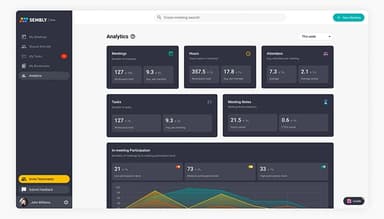
Sembly AI Specifications
- Document Management
- Real-Time Communication
- File Sharing & Management
- Task & Project Management
What Is Sembly AI?
Sembly AI is an agentic solution that turns business conversations into client-ready deliverables. It joins Microsoft Teams, Google Meet, Zoom, and Webex conference and transcribes discussions in 48 languages. It is also equipped to draft client proposals, project briefs, and reports based on the meeting content.
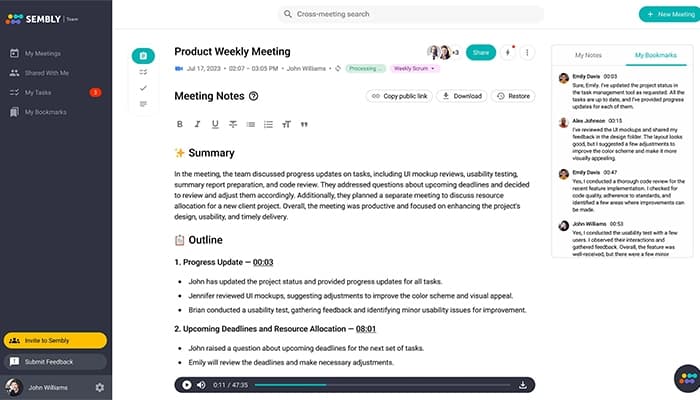
The platform also generates meeting notes, extracts action items with owners, descriptions, and deadlines, flags risks, and surfaces insights across a team's full meeting history.
How Much Does Sembly AI Cost?
The platform offers four plans:
- Basic: $17/month
- Pro: $29/month
- MAX: $39/seat/month
- Enterprise: Custom pricing
Disclaimer: The pricing is subject to change.
Sembly AI Integrations
The software integrates with CRM, project management, product management, analytics, and documentation tools commonly used by teams.
The following applications offer native integrations with Sembly AI:
- Salesforce
- HubSpot
- Notion
- Slack software
- Jira
- Asana
- Monday
- Trello software
- Google Tasks
- Dropbox
It also connects to Claude, ChatGPT, and other AI assistants through Model Context Protocol, alongside additional tools available through Zapier and the Sembly integrations directory.
How Does Sembly AI Work?
Here is how teams use Sembly after signing up:
- Connect your calendar so Sembly joins scheduled meetings automatically
- Invite the Sembly agent to any call on Microsoft Teams, Google Meet, Zoom, or Webex
- Record and transcribe the conversation in 48 languages with speaker identification
- Extract action items, decisions, risks, and key items as the meeting unfolds
- Generate meeting notes, summaries, key items (risks, notable events, achievements), and personalized insights
- Sync action items and decisions to Salesforce, HubSpot, Notion, Slack, Jira, and other tools
- Use Multi-Meeting AI Chat to create a deliverable, query any past meeting, and draft a personalized follow-up email
Who Is Sembly AI For?
Sembly AI is designed for organizations and professionals that rely heavily on meetings, collaboration, and follow-up actions:
- Management Consultancy firms
- Project Management Offices (PMOs)
- Marketing and creative agencies
- IT and technology outsourcing firms
- HR and recruitment teams
- Product development groups
- Venture capital funds and startups
- Freelancers and independent professionals
Is Sembly AI Right For You?
Do you spend significant time in client meetings and even more time drafting client deliverables? Then, Sembly is your top choice. With more than 2,000,000 business conversations captured, processed, and analyzed, Sembly is a go-to solution for 10,000 professional teams. The platform replaces manual workflows with an AI agent that captures conversations and produces the deliverables clients expect.
Moreover, it is SOC 2 Type II compliant, Microsoft 365 certified, GDPR compliant, and offers features such as US and EU data residency, configurable data retention, flexible deployment options, and role-based access controls.
Is Sembly AI software right for you? Get in touch with us at (661) 384-7070 to make a confident decision.
Sembly AI Features
Deliverable Generation
Sembly drafts client-ready documents from meeting content, including proposals, project briefs, status reports, gap analyses, and board summaries.
Multi-Meeting AI Chat
Sembly's AI Chat lets teams query multiple meetings at once, generate reports across conversations, and draft documents from combined context.
AI Insights
Sembly analyzes meeting content to provide personalized recommendations based on your role in the company, discussion trends, and patterns.
Key Items
Sembly identifies and flags key items automatically, including issues, risks, requirements, events, decisions, and notable moments.
Task Extraction
Sembly extracts action items from every meeting automatically, with owners, descriptions, and deadlines assigned where mentioned.
AI Note Taking & Speaker Identification
Sembly transcribes meetings in 48 languages and identifies each speaker automatically.
Collections
Sembly Collections let teams group related meetings together, such as all calls for a specific client, project, or initiative.
Pros And Cons of Sembly AI
Pros
Offers comprehensive actionable insights
Has a useful mobile app
Integrates with popular business applications for seamless collaboration
Meetings can be converted into complete scripts
Ad-hoc meetings can be scheduled via links
Cons
Video segments cannot be captured for easy references
Limited option to select meeting types
Industry-specific acronyms cannot be added
Sembly AI Reviews
Total 11 reviews
4.5
All reviews are from verified customers
Rating Distribution
5
Stars55%
4
Stars36%
3
Stars9%
2
Stars0%
1
Stars0%
Share your experience
Recruitment, 11-50 employees
Less than a year
“Highly beneficial and reasonably priced”
Pros
Sembly AI is a solid product. No bugs, no unnecessary issues. Everything runs smoothly and as a recruiter, I really love it.
Cons
Honestly, nothing to complain about. Everything works great, I mean really well, actually!
Rating Distribution
Ease of use
10
Value for money
10
Customer Support
10
Functionality
10
Content Marketing, 11-50 employees
Less than a year
“Works well for me”
Pros
I like the fact that I can categorize meeting recordings by type which eventually gives me a clear layout of notes and action items. Also it does a pretty good job of picking up my voice and capturing key takeaways and actions.
Cons
I like that it can attend meetings for me, but I wish there was a way to make it less obvious. The automatic messages it sends when joining a meeting feel a bit awkward too.
Rating Distribution
Ease of use
8
Value for money
10
Customer Support
8
Functionality
9
Consultants, 11-50 employees
Less than a year
“Decent software”
Pros
Sembly AI software focus on my meetings and the people involved, along with the results I am aiming for, instead of getting stuck on writing down every little thing.
Cons
There aren't enough meeting types available and most of them seem geared toward software companies. If you are working with a client, for a client or managing a project, the options do not really fit. Sometimes it glitches and does not record anything, so I end up without any notes for a meeting I was relying on it for. It'd be great if I could add custom vocabulary or industry-specific terms and acronyms, so I would not have to manually fix notes afterward. Also, having the choice between detailed and basic notes would help since the notes are not always detailed enough.
Rating Distribution
Ease of use
6
Value for money
6
Customer Support
7
Functionality
6
Frequently Asked Questions
What type of pricing plans does Sembly AI offer?
Sembly offers four plans: Basic: $17/month ($10/month annual) Pro: $29/user/month ($20/user/month annual) MAX: $39/user/month ($30/user/month annual) Enterprise: Custom pricing
Who are the typical users of Sembly AI?
Typical users include: 1) Project Management Offices 2) Marketing and creative agencies 3) IT and technology outsourcing firms 4) HR and recruitment teams 5) Product development groups 6) Venture capital funds and startups 7) Freelancers and independent professionals
What languages does Sembly support?
Sembly transcribes and analyzes meetings in 48 languages, including English, Spanish, French, German, Portuguese, Italian, Dutch, Japanese, Mandarin, Korean, Arabic, and Hindi.
Is Sembly secure and compliant with regulations?
Yes. Sembly is SOC 2 Type II and Microsoft 365-certified, and GDPR-compliant. The platform offers US and EU data residency options, configurable data retention, and role-based access controls. The MAX plan includes HIPAA compliance for healthcare-adjacent teams.
Does Sembly AI have a mobile app?
Yes, Sembly AI has a mobile app for both Android and iOS devices
What tools does Sembly integrate with?
Sembly connects with 50+ tools across every category teams use daily: Project Management: Monday, Notion, Airtable, Asana, Jira, Trello, Wrike, ClickUp, Basecamp, Clockify, Linear Salesforce, HubSpot, Zoho CRM, Copper, Pipedrive, Freshsales, Attio, Capsule CRM, Close CRM Collaboration: Slack, Microsoft Teams, Confluence Document Management: Google Drive, Dropbox, Microsoft OneDrive, SharePoint Personal Productivity: Google Tasks, Microsoft To Do, Todoist Analytics: Google Sheets
Which conference apps can you use with Sembly?
Sembly works with Microsoft Teams, Google Meet, Zoom, and Webex.
What deliverables can Sembly generate from a meeting?
Sembly drafts various documents depending on your industry: Project Management Offices: Status reports, risk logs, decision registers, program updates Product Development: User research summaries, product briefs, release notes IT & Technology Outsourcing: Technical sessions, SOWs, post-implementation reports Marketing & Creative Agencies: Campaign briefs, client proposals HR & Recruitment: Candidate summaries, interview notes Startups & Venture Funds: Investment memos, pitch decks