


Mayday
Last Updated
Overview
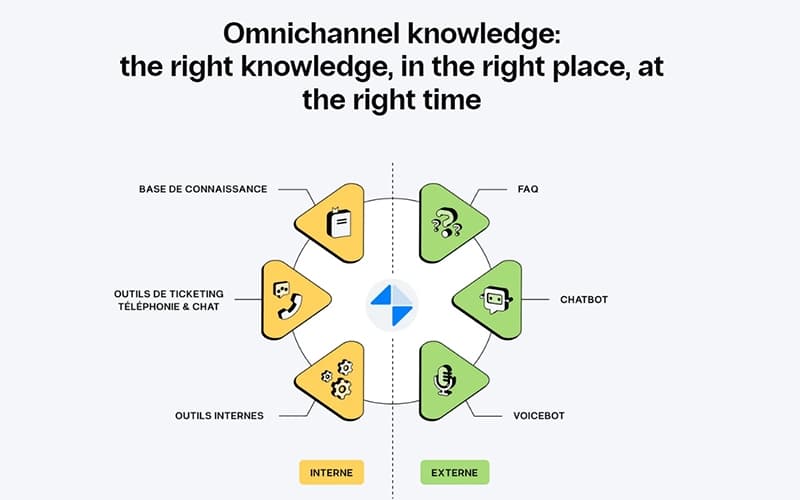
Mayday centralizes customer knowledge with AI-powered internal knowledge, self-service FAQs, and a training platform. While initial rollout may require cross-department coordination, users praise its intuitive interface, responsive customer success managers, and measurable gains in ticket resolution and training time. Overall, Mayday streamlines the delivery of CX knowledge.
Mayday Specifications
- Live Chat
- Omnichannel Support
- CRM Integration
- Canned Responses
Mayday Features
Intelligent FAQ And Personalized Support
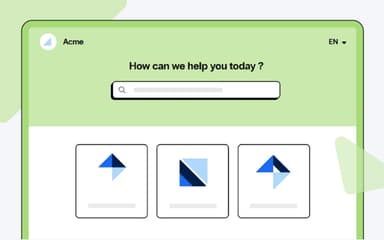
With this feature, the platform offers a fully customizable Frequently Asked Questions (FAQ) portal, allowing logos, colors, fonts, and custom code. AI-enhanced search suggests relevant knowledge, while analytics track content effectiveness, improving customer satisfaction and reducing support contact naturally.
AI Knowledge Management And Optimization
Mayday features AI to analyze and optimize the knowledge base. AI agents identify duplicates, suggest relevant content, generate summaries, and provide automatic translations, helping consultants and customers find accurate answers faster.
Integrated Knowledge Development
The platform combines training modules with the knowledge base to boost team performance. With this feature, hybrid courses, quizzes, and multimedia create an engaging learning experience. Progress tracking and gamification improve skills acquisition and training effectiveness naturally.
Pros And Cons of Mayday
Pros
AI search quickly delivers accurate answers
The FAQ portal greatly reduces support requests
All knowledge is centralized in one place
Cons
Might require initial training for better software adoption
Performance can be occasionally slow under load
Mayday Reviews
Total 20 reviews
4.7
All reviews are from verified customers
Rating Distribution
5
Stars70%
4
Stars30%
3
Stars0%
2
Stars0%
1
Stars0%
Share your experience
Renewables & Environment, N/A employees
Less than a year
“Personalized guidance from the team”
Pros
Something that really makes it stand out is the close support from our Customer Success Manager, with personalized guidance and quick responses whenever needed. The platform keeps evolving and they genuinely take our specific requests into account which means the product continuously improves and adapts well to our needs. It's also very useful to be able to build decision trees. The interface feels user-friendly and well integrated especially with the widget and smart search features. On top of that, the tool is well structured and clear which saves us a lot of time when creating, managing and integrating content.
Cons
A couple of points could still be improved, it can be difficult to monitor the AI's results and responses and image migration is sometimes not completely successful.
Rating Distribution
Ease of use
10
Value for money
10
Customer Support
10
Functionality
10
Commercial Real Estate, N/A employees
Less than 6 months
“Central hub for information”
Pros
The search engine saves a lot of time and having information centralized in one place is really useful. The Mayday widget and browser extension are also helpful and the content duplication feature is a nice plus.
Cons
The AI features still feel lacking. There's also no visibility into the time spent on articles or diagnostics while viewing them and the task tracking connection with the Outlook calendar could be better integrated.
Rating Distribution
Ease of use
9
Value for money
8
Customer Support
9
Functionality
7
Entertainment, N/A employees
More than a year
“High-performing software”
Pros
It is a really high-performing piece of software, with an interface that feels both very clear and very complete. I especially love the rich text editor and its features like drop-down lists and tooltips. The biggest advantage for me though, is the steady stream of updates that keeps making the tool better and more capable over time.
Cons
A year ago, I probably would have still had a few reservations because of some missing pieces but the regular updates have more than addressed those gaps.
Rating Distribution
Ease of use
9
Value for money
10
Customer Support
9
Functionality
10
Frequently Asked Questions
What level of support does Mayday offer?
The platform provides support via ticket submission and FAQs.
What other apps does Mayday integrate with?
The platform integrates with several third-party applications and systems, including Zendesk, Salesforce, Oracle, Slack, and Front.
Does Mayday offer an API?
Yes, Mayday offers an API.
Who are the typical users of Mayday?
Mayday is well-suited for a variety of industries and sectors, including banking, insurance, retail and e-commerce, tourism and mobility, public service, logistics, and telecommunications.
What language does Mayday support?
The software supports English and French.
Does Mayday have a mobile app?
No, Mayday does not offer a mobile app.
What types of Mayday price plans are available?
The vendor offers the following pricing plans, all with custom pricing: Mayday Knowledge, Mayday Selfcare, Mayday Academy, and Mayday AI. Contact us to request a personalized Mayday cost quote based on your institution's requirements.