

GoodAccess
Last Updated
Overview
GoodAccess facilitates users to establish their remote work environment. It comes with an intuitive VPN and access management solution. Though it has limited configurability, its quick zero network accessibility is considerably helpful. In addition, it enables your team to work from anywhere while keeping the data and systems secured.
GoodAccess Specifications
- Security Measure
- Firewall Protection
- Anti-Virus and Anti-Malware
- Data Encryption
What is GoodAccess?
Overview
GoodAccess is a robust SaaS solution known for transforming remote work by providing a Zero Trust Network Access (ZNTA) platform and access management system. It is well-integrated to keep your team connected and protected from any location. You can also manage permission access easily, using advanced encryption with centralized control. Most importantly, GoodAccess VPN always guards your organization's sensitive data from threats.
GoodAccess Pricing
Essential: $7.00/user/month (Billed Annually) or $9.00/user/month (Billed Monthly) for five users minimum
Premium: $11.00/user/month (Billed Annually) or $14.00/user/month (Billed Monthly) for five users minimum
Enterprise: Custom pricing (Minimum 50 users)
Disclaimer: These prices are subject to change.
GoodAccess Integrations
GoodAccess integrates with a variety of apps, a few are mentioned below:
- SalesForce
- Google Cloud
- Magneto
- Microsoft Azure
- Cisco
- FortiGate
- Okta
- JumpCloud
Who Is GoodAccess For?
GoodAccess is a tailor-made platform that serves in various industries, such as:
- Freelancing
- Healthcare
- Finance
- IT administration
- Consulting
Is GoodAccess Right For You?
GoodAccess is the right choice for your business if you need an easy-to-manage solution for secure remote access. Suppose your team works in multiple locations, and you are looking for a candid VPN and access control with no complicated setups. In that case, this platform guarantees secure connections and smooth management. For its efficiency and ease of use, a number of businesses, like Akari Software, XDENT, and Tipli, use it daily.
Are you still deciding whether GoodAccess is the right choice for your business? Contact us at (661) 384-7070 for guidance on any further questions.
GoodAccess Features
Central Dashboard
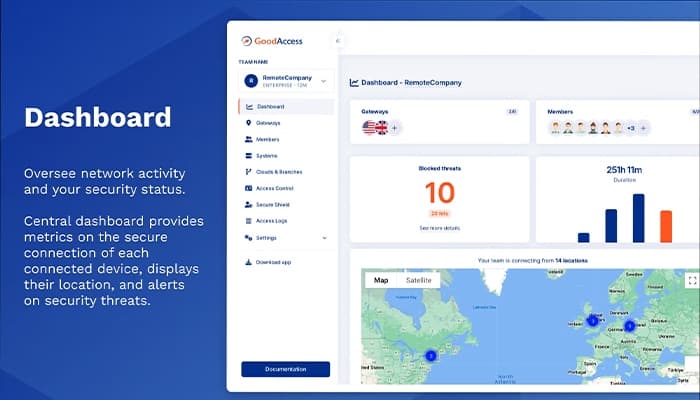
This feature provides the user with a more advantageous vantage point for network activity and security status. From your central dashboard, you can get metrics on each device's secure connectivity and locations and alerts regarding possible security threats.
Single Sign-On
It allows signing into GoodAccess with Okta, Microsoft Entra ID, Google, JumpCloud, or SAML. This feature reduces the workload connected to access management and offers easy access to multiple business applications at a single point to your end-users.
Zero-Trust Access Control
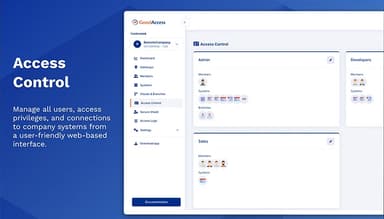
GoodAccess reduces the potential risk of unauthorized access to organizational systems by ensuring strong authentication, network, and application layer segregation, and access logging. Thus, you can have standardized security for your resources.
Multi-Factor Authentication
The solution secures access to your IT resources by providing additional proof of your identity rather than just a username and password. It can also enhance login security to the secure GoodAccess environment or administrative panel.
Control Access To Network
It helps evade unauthorized access to your business network by enforcing the access policy on devices trying to connect to the secure infrastructure.
Pros And Cons of GoodAccess
Pros
Quick to deploy and manage
Secure access from anywhere
Works efficiently on all devices
Reliable customer service
Cons
Lacks some advanced options
Inadequate customization options
Somewhat limited without a stable connection
GoodAccess Reviews
Total 26 reviews
4.8
All reviews are from verified customers
Rating Distribution
5
Stars85%
4
Stars15%
3
Stars0%
2
Stars0%
1
Stars0%
Share your experience
Public Health, 51-100 employees
More than a year
“Protecting Digital Resources With GoodAccess”
Pros
GoodAccess really impresses with its ability to protect digital resources offering top notch security features that give peace of mind.
Cons
Having used GoodAccess for a long time there are no dislikes.
Rating Distribution
Ease of use
10
Value for money
8
Customer Support
10
Functionality
8
Legal, 11-50 employees
More than a year
“Securitng Devices and Networks Easily With GoodAccess”
Pros
Using GoodAccess has made a significant difference in endpoint protection making it much easier to manage both computer and cybersecurity needs.
Cons
GoodAccess has everything needed as a security tool and I have no complaints.
Rating Distribution
Ease of use
8
Value for money
10
Customer Support
10
Functionality
8
Small Business, 11-50 employees
“Valuable insights”
Pros
Getting started takes very little effort since all you really need to do is add the browser extension. The implementation process is simple and doesn't require much work.
Cons
At this point, there's really nothing I dislike. All of the features are free to use and they provide genuinely valuable insights.
Rating Distribution
Ease of use
10
Value for money
10
Customer Support
10
Functionality
10
Frequently Asked Questions
Does GoodAccess offer an API?
Yes, GoodAccess offers API.
Does GoodAccess support mobile devices?
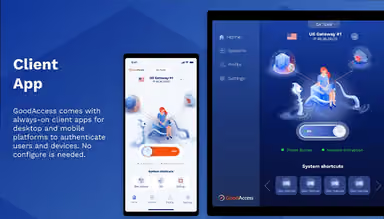
Yes, GoodAccess supports Android, iPhone, and iPad devices.
What language does GoodAccess support?
GoodAccess supports the English and Czech languages.
What types of pricing plans does GoodAccess offer?
GoodAccess cost varies from a minimum of $7.00/user/month up to $14.00/user/month depending on the number of users. Get pricing details to know which plan would be the best.
What other apps does GoodAccess integrate with?
GoodAccess integrates with Microsoft Azure, Magneto, FortiGate, Okta, SalesForce, Google Cloud, Cisco, and JumpCloud.
Who are the typical users of GoodAccess?
Typical users of GoodAccess include small to medium-sized businesses, IT administrators, managed service providers, consultants and freelancers, educational institutions, healthcare providers, financial services, and government agencies.
What level of support does GoodAccess offer?
GoodAccess offers support through live chat, e-mail, and a support portal.