


LastPass
Last Updated
Key Takeaways
Generated from the text of customer reviews
Our Verdict
Overall Rating
Based on 43 users reviews
4.5
Rating Distribution
Positive
91%
Neutral
7%
Negative
2%
Starting Price
$3.00
per month
LastPass Specifications
- Security Measure
- Data Encryption
- Phishing Prevention
- Multi-Factor Authentication
LastPass Features
Password Vault And Zero-Knowledge Encryption
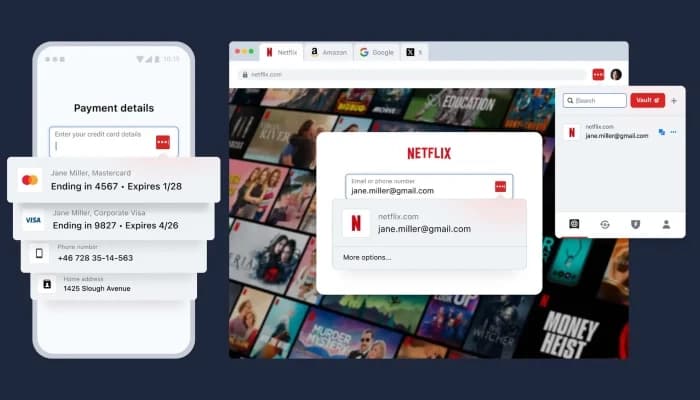
LastPass keeps passwords and other private information in an encrypted vault. Payment details and secure notes can also be stored there. Before the data is synced, it is encrypted on the user’s device. LastPass does not have access to the master password or the readable contents of the vault.
Password Generator And Autofill
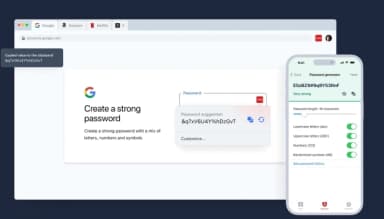
Users can create unique passwords for new accounts with the password generator. LastPass saves login details when users sign in and can fill them in later through its browser extension or mobile app on supported websites and apps.
Dark Web Monitoring And Security Dashboard
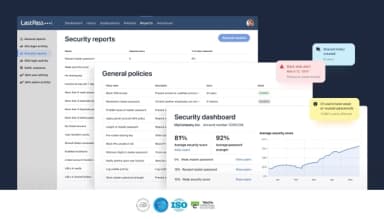
The Security Dashboard shows weak, reused, and older passwords that may need attention. Dark Web Monitoring checks linked information against records of exposed credentials and sends an alert when a possible match is found.
Secure Password Sharing
Users can send saved passwords and other vault items to family members, coworkers, or outside collaborators. Business accounts also let admins arrange shared credentials by user or group and control who can use them.
Single Sign-On And Multifactor Authentication
Business plans include SSO and MFA controls for company accounts. Business Max adds unlimited SSO applications and more MFA options. Passwordless sign-in is also available on supported workstations, VPNs, and identity providers.
SaaS Monitoring And SaaS Protect
Business Max includes tools that help IT teams see how SaaS applications are being used within the company. SaaS Monitoring lists the applications employees have connected, including Shadow IT and Shadow AI. SaaS Protect lets admins block or limit access to applications that have not been approved or pose a security risk.
Admin Console And User Management
The admin console lets business teams manage users and groups while handling access settings and reports from the same interface. Administrators can create more than 100 security and access rules and decide what each group can access. It also supports access changes when employees join the company or leave it.
Pros And Cons of LastPass
Pros
Strong cross-browser password synchronization
Useful shared-folder organization for credentials
Reliable password generation for unique credentials
Convenient access to large password collections
Supports physical security keys such as YubiKey
Cons
Website detection varies across certain sites
Shared credentials can take time to appear
Browser extension can conflict with password managers
LastPass Pricing
Free | Premium | Families | Teams | Business | Business Max |
|---|---|---|---|---|---|
$0 | $3.00 per month | $4.00 per month | $4.25 per user per month | $7.00 per user per month | $9.00 per user per month |
|
|
|
|
|
|
Disclaimer: The pricing details were last updated on Sep 23, 2026 from the vendor's website. Please contact us for a tailored pricing list.
LastPass Reviews
Total 43 reviews
4.5
All reviews are from verified customers
Rating Distribution
5
Stars70%
4
Stars21%
3
Stars5%
2
Stars2%
1
Stars2%
Share your experience
Construction, 500+ employees
More than a year
“Not really reliable”
Pros
What I appreciated was how simple it was to use and best of all for me was that it bundled with my VPN purchase so I didn't need to pay anything extra to access it.
Cons
regrettably I mislaid my LastPass master password and when I tried the account recovery steps they provided they failed for me which meant I ended up losing access to the passwords I had stored there. In my case the lost items weren't anything vital so it wasn't catastrophic. I did like using LastPass overall but my confidence took a hit after the company suffered a major data breach that exposed customers' data. Its convenience and simplicity no longer outweigh the seriousness of that breach and the impact it had on users.
Rating Distribution
Ease of use
10
Value for money
7
Customer Support
3
Functionality
7
Entertainment, 101-500 employees
More than a year
“Team sharing done right”
Pros
I'm really impressed by how easy it is to use. I appreciate being able to share passwords with coworkers and even upload two-factor authentication codes so they can be shared securely with others.
Cons
occasionally the app signs me out and I have to log back in before autofill will work again it can be frustrating at times although I understand it's done for solid security reasons.
Rating Distribution
Ease of use
9
Value for money
10
Customer Support
10
Functionality
10
Higher Education, 101-500 employees
Less than a year
“useless customer support”
Pros
The app is pretty simple to use and syncs across every device I own. But when I get locked out and have to reach customer support there's no help available!
Cons
Getting customer support to respond has been an absolute nightmare. They've basically got my passwords tied up and there's no way to contact them. It's a terrible situation. I've been locked out of my account for three days and can't get any assistance from support. I've tried everything I can think of: I submitted a support ticket, sent four separate emails and still haven't heard back. There isn't a phone number to call and since I'm logged out I can't access the chat option. I still have my master password but because I switched to a new phone I need to configure multi-factor authentication (MFA) and can't sign in. The recovery methods failed. It's extra infuriating because I'm a paying premium subscriber.
Rating Distribution
Ease of use
5
Value for money
5
Customer Support
2
Functionality
4
Frequently Asked Questions
What types of pricing plans does LastPass offer?
LastPass pricing starts at $3.00/month for the Premium plan. The Families plan costs $4.00/month. Teams is priced at $4.25/month, while Business costs $7.00/month. Business Max starts at $9.00/month. Get a detailed LastPass cost breakdown tailored to your specific requirements.
What level of support does LastPass offer?
LastPass provides help through its online help center and community forums. Users can also contact the support team directly by email.
Does LastPass have a mobile app?
Yes, LastPass does offer a dedicated mobile app.
Who are the typical users of LastPass?
LastPass serves individuals and families who want to protect their passwords. Businesses can also use it for small teams and larger organizations. Educational institutions are another group that may use the software.
What language does LastPass support?
LastPass is available in English and supports other languages, including German, French, Italian, Spanish, Portuguese, Dutch, and Japanese.
What other apps does LastPass integrate with?
LastPass works with various applications through single sign-on (SSO). These include Microsoft 365, Google Workspace, Slack, Salesforce, and Zoom.
Does LastPass offer an API?
Yes, LastPass offers an API.