


NDoc
Last Updated
Overview
NDoc software provides comprehensive, clinician-designed EMR capabilities for home health and hospice, drastically improving patient care management and regulatory compliance. Even though care plans can sometimes feel vague and auto-generate problems, its powerful integration capabilities and specialized workflows justify the investment for organizations operating within these specialized niches.
NDoc Specifications
- Appointment Management/Scheduling
- e-Prescriptions
- Lab Integrations
- Patient Portal
NDoc Features
Regulatory Compliance
Clinicians gain access to current clinical data at the point-of-care, ensuring compliance with complex federal regulations, including Medicare. The system drives 100% consistency in documentation across episodes, streamlining OASIS submissions and automating Quality Assurance checks through real-time prompts for patient improvement, stabilization, or decline.
Flexible Workflow
NDoc features workflows designed to conform to the agency environment, preventing bottlenecks often seen in overly rigid systems. Users can configure customized hard or soft stops that prevent scheduling errors without physician authorization, balancing strict control, and clinical efficiency. Scheduling options are decentralized, supporting central, field, or hybrid resource management needs.
Robust Analytics
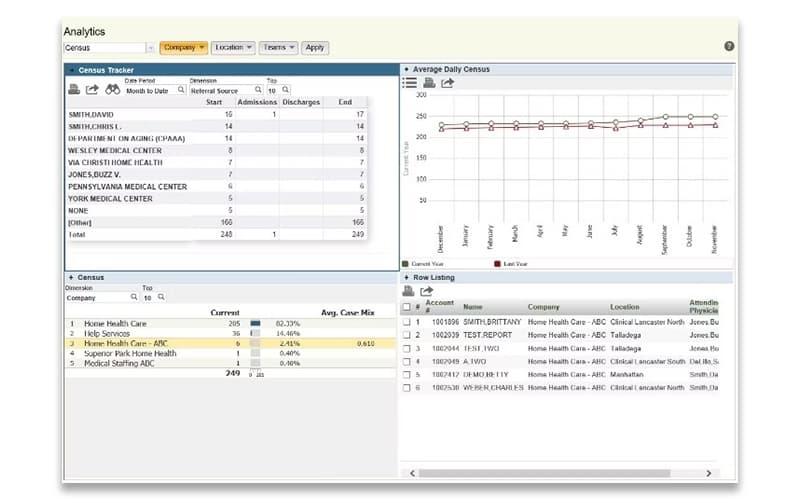
Powered by InterSystems DeepSee™ technology, NDoc features deep-dive charts, key performance indicators (KPIs), and integrated clinical and financial dashboards. This provides global business insight by combining performance data, OASIS information, and billing metrics. Agencies use forecast data and trends to make educated, proactive treatment adjustments during episodes of care.
Embedded Interoperability
This functionality transforms care transitions by processing C-CDA CCD patient data directly into the system, enabling home health integration with the broader medical community. This capability streamlines intake by automatically populating patient referrals with medication profiles, saving significant staff time, and guaranteeing enhanced patient safety across the care continuum.
End Of Life Support
NDoc is specifically equipped to manage the sensitive and complex requirements of End of Life, Palliative, and Bereavement care documentation. This specialized focus ensures clinicians meet all regulatory and visit requirements while allowing them to prioritize thoughtful patient care over administrative tasks. Captured data automatically drives accurate billing and specific reporting needs across the comprehensive platform
Pros And Cons of NDoc
Pros
Alerts help maintain compliance and ensure consistent documentation
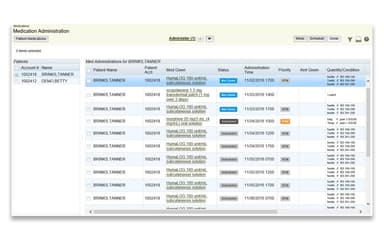
The medication management section is easy to use and efficient
Writing lab and wound orders is simple and well-organized
Strong customization and flexibility for different market needs
Cons
Offline syncing often causes lost or missing charting data
Data sometimes doesn’t flow correctly between clinical and billing modules
NDoc Reviews
Total 18 reviews
4.1
All reviews are from verified customers
Rating Distribution
5
Stars33%
4
Stars39%
3
Stars28%
2
Stars0%
1
Stars0%
Share your experience
Hospital & Health Care, 11-50 employees
More than a year
“Strong support, confusing billing”
Pros
Compared with the four other EMRs I have worked with, the customer support from Thornberry/Ndoc has been the best by far. Their team is top-notch, quick to respond and the help desk ticket process is simple to submit. The system also includes a lot of clinical information and they seem genuinely receptive to feedback and suggestions for improvements. Getting clinicians up and running can take a little time but once they settle in, they generally say the system is fairly easy to work with overall.
Cons
Billing has been the hardest part of using the system. A lot of the problems are very detailed and take several steps to fix and the guide that's supposed to help with those issues isn't very clear. At times information doesn't carry over from clinical to billing and there doesn't seem to be any consistent reason for it. The last few releases have also had some problems that ended up needing weekend patches. The team clearly knows the system well and can walk through it but it often takes a lot of back and forth before things get sorted out. I understand they're planning to roll out a new system this year because the current setup still has quite a few shortcomings. Integration with outside systems or certain referral file types is limited as well.
Rating Distribution
Ease of use
5
Value for money
6
Customer Support
5
Functionality
5
Hospital & Health Care, 51-100 employees
More than a year
“Sensible workflow for admissions”
Pros
From beginning to end the admission process flows well. Each screen asks for the specific details needed before moving to the next step so the progression makes sense. The required information lines up with CMS regulations and the overall format is logical and simple.
Cons
One frustrating part is when a patient is assessed but not admitted so we mark them as SNA for seen not admitted. If they decide the very next day that they do want admission, everything has to be entered again because the same chart cannot be updated and converted into an admission.
Rating Distribution
Ease of use
10
Value for money
9
Customer Support
8
Functionality
8
Hospital & Health Care, 51-100 employees
Less than 6 months
“Automatic orders but confusing menus”
Pros
Handling documents is very easy and sending as well as receiving orders and plans of care feels almost automatic.
Cons
The menus are overwhelming. There are simply too many of them and the way reports are organized doesn't seem to follow any real logic. Even basic alphabetizing would help. Clinicians can easily get lost in the visit menu and sometimes end up completing another clinician's work when that person's visit is on hold. The sync system also isn't anywhere near foolproof and its glitches can cause delays in continuity of care.
Rating Distribution
Ease of use
6
Value for money
6
Customer Support
7
Functionality
5
Frequently Asked Questions
What level of support does NDoc offer?
NDoc offers support via email, online contact or phone.
Does NDoc have a mobile app?
Information about an NDoc mobile application is not available.
What language does NDoc support?
NDoc is primarily available in English.
What types of pricing plans does NDoc offer?
NDoc price includes a Basic plan for $3,150.00. You can also request a personalized NDoc cost quote tailored to their specific needs and operational requirements.
What other apps does NDoc integrate with?
The vendor has not disclosed any specific information about third-party integrations available for this software.
Who are the typical users of NDoc?
NDoc is built to support a wide range of healthcare sectors and teams. It’s an excellent choice for home health agencies, hospice providers, and palliative care centers. The platform also streamlines operations for clinical care management, quality assurance teams, and billing or financial staff, making it a comprehensive solution for end-to-end care delivery.
Does NDoc offer an API?
Information about an NDoc API is not available.