


Tenovi
Last Updated
Overview
Tenovi brings remote monitoring readings into one cloud data stream that organizations can route into their own care platforms. Automatic retries currently cover only measurement webhooks, so other event types may need closer monitoring, but patient readings can keep flowing after brief endpoint outages.
Be the first one to leave a review!
No review found

Starting Price
Custom
Tenovi Specifications
- Patient Demographics
- Appointment Management/Scheduling
- e-Prescriptions
- Lab Integration
What Is Tenovi?
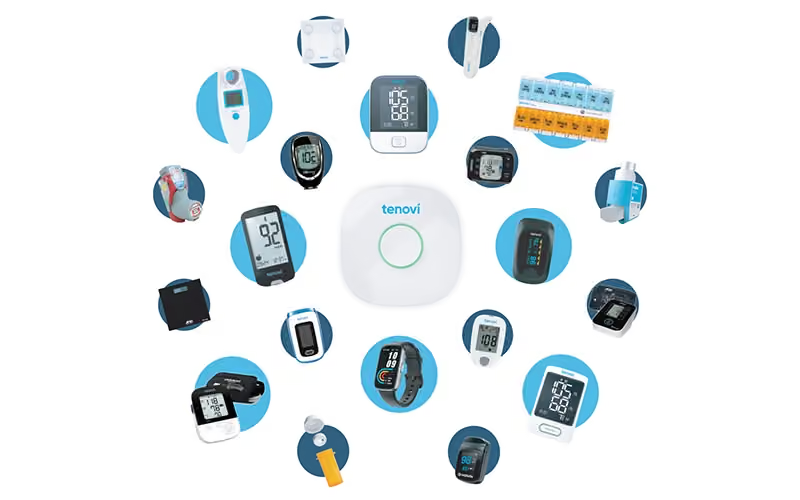
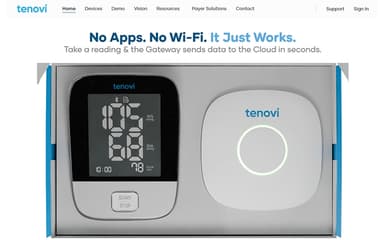
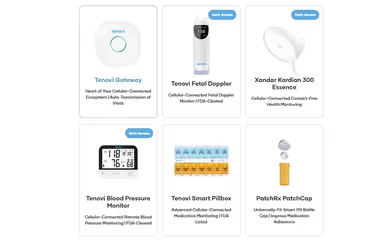
Tenovi is a cloud-based Remote Patient Monitoring (RPM) and Remote Therapeutic Monitoring (RTM) platform for organizations that run remote care programs. It collects readings from patients at home and delivers them to care teams through an API, webhooks, and the Tenovi Web App. Tenovi also supplies the cellular-connected devices and gateways that capture these readings. Its clients include RPM companies, care management platforms, health plans, and pharmacies.
What Is Tenovi Best For?
Tenovi stands out for its Measurement Webhooks, which can send each new reading to several client endpoints at once or route it to one selected endpoint. Readings taken together, such as blood pressure and pulse, can arrive as separate requests or in one JSON array. If an endpoint is down or returns an error, Tenovi retries delivery automatically, which may help prevent data loss during brief outages.
How Much Does Tenovi Cost?
Disclaimer: Pricing references are based on publicly available third-party information and industry benchmarks. Actual costs may vary.
Tenovi Integrations
Tenovi supports software integrations with RPM and RTM platforms and provides data connectivity with EHR platforms, including a direct eClinicalWorks integration that sends patient readings into the eClinicalWorks workflow.
How Does Tenovi Work?
Here’s how healthcare organizations can set up and manage remote patient monitoring with Tenovi software:
- Log in to the Tenovi Web App using your account credentials to access monitoring tools
- Select connected medical devices based on the health measurements you need to track
- Enroll patients and arrange device orders through the Web App or API
- Manage device fulfillment and delivery through Tenovi’s logistics services
- Collect patient measurements through connected devices that transmit readings automatically
- Review patient readings in the Web App or transfer data to an existing care platform through the API
- Monitor incoming readings to support clinical assessments and patient follow-up
Who Is Tenovi For?
Tenovi serves organizations across healthcare, digital health, and remote care sectors, including:
- RPM and RTM companies
- Care management platforms
- Health insurance and payers
- Pharmacies
- Community health centers
- Health systems
Tenovi Use Cases
Based on our analysis of Tenovi’s current capabilities, these are scenarios where the platform may be a reasonable fit for organizations running remote care programs:
1. Care Management Platforms Adding Remote Monitoring To Their Product
A care management platform that wants to offer RPM may not want its customers’ care teams switching to a separate vendor dashboard to see readings. Tenovi can suit these platforms because patient data reaches their own system through Tenovi’s API, so care teams keep working in the interface they already know.
2. Health Plans Tracking Members Between Office Visits
Health plans working on HEDIS and Star measures for hypertension, diabetes, or heart failure often see little member data between visits, which can leave care gaps open until the next claim arrives. Tenovi’s payer offering sends consolidated real-time insights into a plan’s existing systems. Plans can then decide whether their own clinical team follows up or whether they work with one of Tenovi’s care management partners.
3. RPM Programs Preparing Claims From Patient Records
RPM claims depend on details such as when service started and when the patient gave consent. Programs that track these in spreadsheets may find mismatches only once a claim is rejected. Tenovi’s RPM Patient Details view displays start of service and consent dates alongside each patient’s readings, allowing program managers to review these details alongside patient information.
4. Engineering Teams That Code With AI Assistants
Developers connecting to a healthcare API for the first time may spend days reading documentation before they write working code. Tenovi’s documentation follows the llms.txt standard, and some of its API recipes include downloadable prompts for AI assistants. For teams that already build with AI coding tools, this may shorten the time it takes to reach a first working integration.
Is Tenovi Right For You?
If your organization plans to extend its remote care program to new conditions and patient groups, Tenovi may be worth considering. Organizations running several programs can oversee them through a management account and follow webhook activity at both the client and management account levels. Tenovi has completed a SOC 2 Type 2 audit, conducted by Insight Assurance, and publishes a HIPAA Notice of Privacy Practices. It ranked No. 201 overall and No. 23 in Healthcare on the 2026 Inc. 5000 list and was named 2026 Company of the Year by the Connected Health & Safety Association. Its clients include CCN Health and Vivo Care.
Still not sure about Tenovi? Contact us at (661) 384-7070 and we can help you make an informed decision.
Tenovi Features
Data Export Controls
Tenovi lets users choose between full and redacted exports and customize which fields appear in supported exports. Health data is excluded by default; exports containing identifiable health data require a written reason, receive a PHI label in the filename, and are logged.
Device Status Monitoring
Tenovi displays separate indicators for device connectivity and data transmission. Staff can check whether a device is linked to a patient and whether it is actively sending readings from the patient profile or Device Global Control Panel.
Shipment Tracking
Tenovi's Web App tracks device shipments through statuses such as In Transit, Out for Delivery, Delivered, and Delivery Issue. Staff can open device or order details to review carrier information, access tracking history, and check expected delivery dates.
Support Ticket Management
Tenovi's Support Dashboard lets users view company-wide support tickets, check whether requests are open or closed, and search or filter by ticket ID, subject, or other properties. Staff can also export ticket lists for internal reporting.
Pros And Cons of Tenovi
Pros
Helps match each reading to the right patient record
Reduces engineering work when adding new monitoring types
Saves review time when checking unexpected patient readings
Helps compliance teams track how PHI leaves the platform
Reduces lost readings during brief endpoint outages
Cons
Dashboard features may feel basic for some teams
Reporting options may be limited for complex programs
Some workflows may still require manual follow-up
Tenovi Reviews

No reviews yet!
Be the first to review this product
Frequently Asked Questions
Can historical measurement data be pulled from Tenovi?
Yes, historical measurement data can be pulled from Tenovi in bulk using its backfilling recipe, which helps teams load past readings into a new or rebuilt system.
Can a Tenovi webhook be resent manually?
Yes, users can manually resend an individual measurement webhook from the Tenovi Web App by opening the device’s measurement data and selecting the resend icon.
Can Tenovi send the same measurement webhook more than once?
Yes, Tenovi can send the same measurement webhook more than once, because it retries a delivery whenever the receiving endpoint doesn’t confirm receipt. Endpoints should remove duplicates using each measurement’s timestamp and, for readings taken at the same moment, its measurement index.
Does Tenovi offer a Postman collection for testing its API?
Yes, Tenovi offers a Postman environment and collection that developers can use to test API calls before building their integration.
Does Tenovi notify teams when a webhook keeps failing?
Yes, Tenovi emails the team when a webhook is still failing after 24 hours of automatic retries, so the issue can be fixed before more readings are affected.
How much notice does Tenovi give before scheduled maintenance?
Tenovi gives at least five days’ notice before scheduled maintenance windows.