Last Updated

Key Takeaways

Generated from the text of customer reviews

ERPNext is an open-source ERP platform for accounting, inventory, sales, and manufacturing. IT teams, finance staff, and business owners. Reviewers consistently praise its customization flexibility and open-source cost model. However, installation and upgrade difficulty draw the most complaints. ERPNext Version 16, released in January 2026, introduced performance, security, scalability, and stability improvements.

Our Verdict

ERPNext suits businesses with in-house technical capacity or a willingness to work with an implementation partner. Its free open-source software and low-cost hosting make entry affordable, though implementation can add expense. We recommend it particularly for manufacturers and growing businesses that can manage the technical demands of configuration and upgrades.

ERPNext Specifications

  • Financial Management
  • Inventory Management
  • Human Resources Management
  • Customer Relationship Management (CRM)

What Is ERPNext? 

ERPNext is an open-source ERP platform covering accounting, inventory, sales, purchasing, project management, and manufacturing in one system. Its source code is available under the GPLv3 license, so a business can install it on its own server, modify it, or run it through Frappe Cloud, the vendor's own hosting option. For example, a sale entered through the CRM can flow into inventory, then into an invoice, without re-entering the same data across separate tools. 

Beyond its core modules, ERPNext also includes a low-code and no-code builder that lets a business create custom forms, reports, and approval workflows without hiring a developer for every change. 

What Is ERPNext Best For? 

EPRNext stands out for its ‘Self-Service Support Portal.’ It lets customers log into a ticket, check its status, and communicate directly with a support team without going through email or a phone call first. The module also pulls tickets from multiple channels into one place. 

What sets this apart is that it isn't a separate helpdesk product bolted onto the ERP. The ticket sits in the same system as the customer's order history and account record. An agent can see what a customer actually bought before responding to their issue. 

How Much Does ERPNext Cost? 

ERPNext itself is an open source, with no software licensing or per-user fee. Costs depend primarily on hosting and implementation requirements. However, Frappe Cloud, the vendor's own hosting option, currently starts its Sites plan at $5 onwards/month, while its Servers plan starts at $20 onwards/month. Vendor also offers a free trial. 

Beyond the hosting fee, the users should also factor in the following additional costs: 

  • Implementation And Configuration: $1,500 to $100,000+ 
  • Customization And Development: $2,000 to $50,000+ 
  • Training And Support Contracts: $500 to $10,000+/year 

Users generally describe ERPNext as fairly priced given what it delivers. Several reviweres note that they get good value for the cost, even factoring in the time and learning required to customize it. However, some mention that support plans specifically could be more affordably priced. 

Request a personalized ERPNext price quote that suits your hosting requirements. 

Disclaimer: The pricing is subject to change. 

ERPNext Integrations 

ERPNext software supports integration with different third-party platforms such as 

How Does ERPNext Work? 

Log in through your Frappe Cloud instance to access ERPNext dashboard and follow these steps: 

  • Set up company profile and initial settings before adding data 
  • Record transactions, track cash flow, and generate financial reports through the accounting module 
  • Manage inventory levels, sales orders, and supplier shipments in real time 
  • Plan production using bills of materials (BOMs) and manufacturing requirements 
  • Track projects through tasks and resource costs 
  • Manage assets from procurement through depreciation and eventual disposal 
  • Customize workflows directly using ‘DocType’ configuration when standard settings do not fit business requirements 
Watch a free ERPNext demo to see its features in action. 

Who Is ERPNext For? 

ERPNext deals with multiple industries and sectors such as 

  • Retail 
  • Manufacturing 
  • Education 
  • Non-profit 
  • Trading and distribution 
  • Healthcare 
  • Financial services 

ERPNext Use Cases 

Based on our analysis of user reviews and ERPNext features, we have identified key scenarios where this software is a good fit: 

Manufacturing Businesses With Multi-Step Production 

Tracking production that involves prerequisites and subassemblies rather than a single build step gets difficult to manage as complexity grows. ERPNext's ‘Manufacturing’ module lets a business define subitems as their own sellable products. It links them back to the parent item's bill of materials. Reviewers highlight that it is useful for handling complex production structures where components pass through multiple stages. 

Businesses Requiring Full Financial Visibility 

ERPNext suits businesses that need to understand their financial position from both summary and transaction-level views. Finance teams can review receivables, payables, cash flow, profit and loss, balance sheets, and general ledger entries, then trace balances back to their source transactions. Users also mention accessible data capture and useful reports for financial analysis. 

Growing Businesses Expanding Their ERP Usage 

Businesses that expect their user count or module usage to grow over time can start with ERPNext on a smaller scale and expand the implementation as needs change. Reviewers across small, mid-market, and enterprise organizations report using it this way as requirements grew. User feedback also highlights the platform’s flexibility as it can accommodate growing requirements. 

Companies Digitizing Internal Business Processes 

ERPNext supports organizations that want to move recurring internal activities away from paper-based handling. It can route tasks between relevant employees and track their status digitally. Its low-code configuration provides a way to adapt these processes as requirements change. 

Is ERPNext Right For You? 

ERPNext is a practical option for organizations planning to scale operations across more users, entities, and transaction volume. Frappe Cloud runs on AWS and OCI infrastructure, and ERPNext itself includes 2FA, IP restriction, and field-level roles and permissions to control access as more people work within the system. The platform also holds ISO 9001:2015, ISO 27001:2022, and SOC 2 Type II certifications. Together, these capabilities enable ERPNext to support a growing user base and more complex operations without requiring organizations to compromise on access control or established security standards.

Another point worth considering is tax compliance for companies trading internationally. France's B2B electronic invoicing mandate takes effect September 1, 2026, which requires VAT-registered businesses to receive structured e-invoices. ERPNext's open-source ecosystem includes country-specific compliance apps. It includes ones for France and Germany, that support PEPPOL e-invoicing, though current coverage should be confirmed for a specific country before relying on it against a deadline. 

Moreover, ERPNext released version 16 brought a redesigned interface, faster performance, and formula-driven financial report templates for region-specific compliance. Organizations evaluating ERPNext now should account for this release when comparing it against other ERP platforms. 

Still deciding if ERPNext fits your operation? Reach out at (661) 384-7070 and our team can walk you through what it handles for your business.

ERPNext Features

Financial Accounting

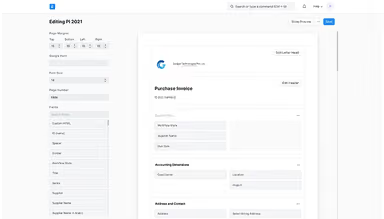
The platform organizes a business's chart of accounts and generates a ledger entry automatically for every submitted transaction, including stock and manufacturing entries. It tracks payables and receivables, applies tax templates automatically, and produces financial statements on demand. Multi-company setups can consolidate financial data across entities, with each company maintaining its own currency.

See How It Works
Procurement

This feature flags restocking needs by comparing stock levels against a reorder threshold, then sends a request for quotation to suppliers through a self-service portal. Responses line up for side-by-side comparison before a purchase order goes out. Receiving goods runs through a quality check before invoicing updates automatically.

See How It Works
Asset Management

The software creates an asset record automatically when purchased through a receipt or invoice. From there, depreciation schedules run on a configured method and post entries on their own. When the asset is sold or scrapped, the system generates matching journal entries, and if its value changes, value adjustments recalculate the depreciation accordingly.

See How It Works
Manufacturing

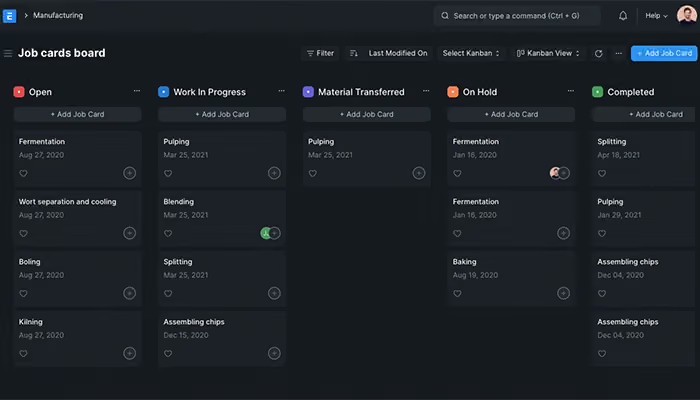
This module tracks a bill of materials for each finished product to list raw materials and the sequence of operations required to produce it. Production planning checks material availability across warehouses before generating a work order. Once created, the order triggers material transfers and job cards, while capacity planning tracks workload per workstation.

See How It Works
Customer Relationship Management (CRM)

CRM organizes leads, contacts, deals, and organizations in one pipeline, with emails, calls, and team discussions tracked in the same record. Meta leads from Facebook and Instagram pull directly into the pipeline with details filled. After this lead capture, automation handles lead assignment, and follow-ups without manual tracking.

See How It Works
Point Of Sale

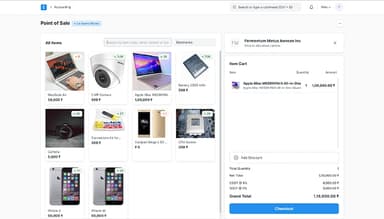
It runs billing through a touchscreen interface, pulling items by barcode scan and applying store-based pricing and active discounts automatically. Each billing counter defaults to a preset customer, warehouse, and payment mode. And at the end of the shift, it consolidates the day's transactions into a single invoice.

See How It Works

Pros And Cons of ERPNext

Pros

  • Allows modification of operations to fit the software

  • Replaces manual tasks with digital process management

  • Supports analysis through useful reports

Cons

  • Heavy customizations may make upgrades and updates unstable

  • Data accuracy may vary at times

ERPNext Reviews

Total 169 reviews

4.5

All reviews are from verified customers

Rating Distribution

5

Stars

64%

4

Stars

28%

3

Stars

5%

2

Stars

2%

1

Stars

1%

Share your experience

AA

Amjid A.

Mid-Market, 500+ employees

5.0
November 2024

Workflow simplifies company processes

Pros

this tool includes nearly everything a company could want and I'm especially fond of the Workflow feature because it removes paper and keeps processes smooth within the platform.

Cons

I had to struggle with vendor support because most providers seemed to have little or only basic familiarity with the tool and I ended up having to walk them through things since even grasping the basic business logic was difficult for them. There also aren't many developers who are fluent in the required programming languages and the ones who are technically strong often lack great understanding of business processes.

Rating Distribution

Ease of use

9

Value for money

9

Customer Support

10

Functionality

9

A

Anonymous

Small-Business, 11-50 employees

3.0
February 2024

Basic IT system with limitations

Pros

Overall the interface feels convenient and easy for me to use and as an administrator I can manage permissions, control data access and scale it easily without extensive training.

Cons

it's more of a basic, 'vanilla' style IT system geared toward smaller businesses. I've noticed some limitations especially around accounting and reporting features. Occasionally we've also run into issues with data accuracy which has caused problems for our team.

Rating Distribution

Ease of use

6

Value for money

5

Customer Support

6

Functionality

6

AD

Anthony D.

Small-Business, 11-50 employees

5.0
February 2024

Essential tool for complex manufacturing

Pros

For complex manufacturing workflows, I find this tool extremely useful since it handles prerequisites, subitems and flexible component pricing in a way that suits my needs.

Cons

Setting up and customizing it has been the hardest part for me, once that's done, using the software runs very smoothly. I wish it offered ready-made templates or configurations aligned with common business structures so I wouldn't have to build everything from scratch.

Rating Distribution

Ease of use

8

Value for money

10

Customer Support

10

Functionality

10

Frequently Asked Questions

Does ERPNext offer an API?

Yes. It offers an API.

What language does ERPNext support?

It supports multiple languages, including English, Spanish, and Hindi.

What other apps does ERPNext integrate with?

The software can smoothly integrate with multiple systems such as DropBox, Braintree, Twilio, Stripe, WooCommerce, Google Drive,Zenoti, and Shopify.

What types of pricing plans does ERPNext offer?

ERPNext is free and open source with no licensing or per-user fees. Frappe Cloud hosting starts at $5/month for Sites and $20/month for Servers. A free trial is also available. Get in touch for a personalized ERPNext cost quote tailored to your needs.

Who are the typical users of ERPNext?

The platform is typically used by users across several industries and sectors such as education, healthcare, retail, trading, non-profit, manufacturing, and e-commerce.

What level of support does ERPNext offer?

ERPNext  provides support through online documentation, helpdesk, video tutorials, community forums, and contact forms.

Does ERPNext have a mobile app?

Yes. It has a mobile app for both iOS and Android devices.