


Last Updated
Key Takeaways
Generated from the text of customer reviews
Our Verdict
Peek Pro Specifications
- Attendee Communication
- Registration Management
- Venue And Resource Management
- Agenda And Schedule Management
Peek Pro Features
Online Booking
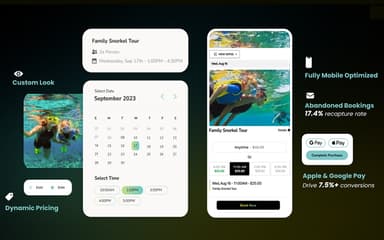
It gives businesses a booking flow that customers can use on its website to select an activity, date, time, and number of guests, then pay online. It can also include elements such as dynamic pricing, waitlists, and upsells during checkout. Tour and activity operators benefit from it because customers can book without calling or visiting in person. Guests also get benefits because they can make a reservation whenever they are ready.
Point Of Sale
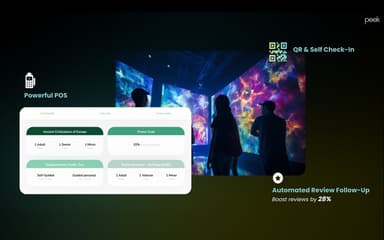
The software has an in-person checkout system (accessible via an iPad or the native iOS app) that allows staff to process physical walk-up tickets, equipment rentals, and on-the-spot retail or merchandise add-ons in seconds. This benefits the front-desk staff and tour guides most, who need to manage long lines of walk-up customers smoothly without crashing the digital inventory.
Abandoned Bookings
Peek Pro identifies customers who began a booking but did not complete payment. It can send follow-up messages by text or email to encourage them to return and finish the purchase. This is valuable for marketing managers and business owners who want to rescue warm leads and maximize sales without spending extra money on paid advertisements to win those customers back.
Waitlists
It allows guests to register their interest when an activity or time slot is sold out. If a place becomes available because another guest cancels, Peek Pro can notify the waiting guest and offer the open spot. Operators benefit from it because cancelled spaces have a better chance of being filled, and this feature also benefits eager customers who missed the initial ticket window but still want a chance to attend.
Dynamic Pricing
The software allows a business to set different prices according to demand, availability, date, time, season, or special events. For example, an operator can charge more for a busy Saturday tour and use a lower price to attract bookings on a quiet weekday. Owners and revenue managers benefit from it because they can manage prices more deliberately instead of using one fixed price for every booking slot.
Guest Experience Tools
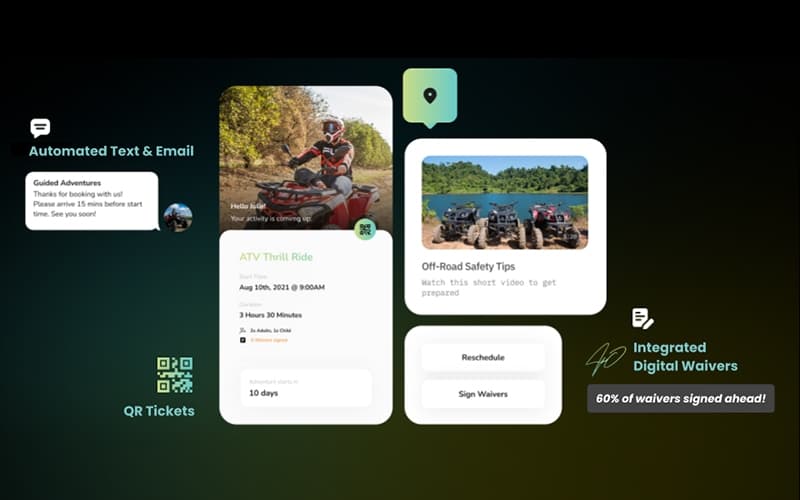
The platform has a centralized mobile customer portal where guests can autonomously view tickets, request self-service rescheduling, sign digital waivers in advance, and process post-activity tips or feedback requests. It benefits travelers who expect instant, paperless control over their itinerary without waiting on hold, and operations staff who are freed from answering endless phone calls for simple booking changes and manual waiver paperwork at check-in.
AI-Powered Automation (Peek Copilot)
This one is an embedded AI assistant (Peek Copilot) designed to handle automatic day-to-day administrative workloads. Instead of you doing everything by hand, this tool automatically changes your ticket prices to make you the most money, writes your marketing emails and social media posts, organizes your staff schedules, and automatically builds your daily sales reports.
Pros And Cons of Peek Pro
Pros
Users praise its responsive live chat support during busy periods
Offers easy setup and integration onto existing websites
Dashboard makes filtering bookings and tours simple for beginners
Cons
Gratuity feature sometimes causes duplicate guest charges
Offers limited flexibility to move guests between tour types
Peek Pro Reviews
Total 22 reviews
3
All reviews are from verified customers
Rating Distribution
5
Stars36%
4
Stars5%
3
Stars14%
2
Stars14%
1
Stars32%
Share your experience
Sara
Small Business, 1-10 employees
More than a year
“Non-Existent Customer Service & Bugs”
Pros
Reservations come through accurately.
Cons
Terrible Customer Service. Fees taken out of tips. Continual bugs in apps and browser.
Rating Distribution
Ease of use
6
Value for money
3
Customer Support
1
Functionality
6
John Bartlett
Small Business, 1-10 employees
More than a year
“Absolutely HORRIBLE customer service”
Pros
It did the job to track bookings
Cons
Terrible customer service. Chat doesn't work (and starts as AI), Tickets are not responded to in a timely manner, and you cannot update or edit. Phone is just AI (and then opens a ticket - which does no good). The entire process is broken and non-responsive. And forget about ever talking to anyone, Their 24X7 support is just AI garbage
Rating Distribution
Ease of use
3
Value for money
2
Customer Support
1
Functionality
5
Jennie
Sports, 11-50 employees
“Packed with the most advanced features”
Pros
Peek offers more advanced features than Fareharbor. Also scheduling activities is a simple task with it and I love how the interactive calendars allow me to work seamlessly with my clients.
Cons
Some of the report features are tricky to reconcile with my QuickBooks especially when it comes to payouts and tax reporting.
Rating Distribution
Ease of use
10
Value for money
9
Customer Support
10
Functionality
9
Frequently Asked Questions
What level of support does Peek Pro offer?
Peek Pro offers support via phone, email, and a knowledge base.
What language does Peek Pro support?
Peek Pro offers support in English language.
Does Peek Pro have a mobile app?
Yes, Peek Pro offers a mobile app available on both iOS and Android.
What types of pricing plans does Peek Pro offer?
Peek Pro does not publish standard pricing; costs are estimated to fall between 6% and 8% of booking value, plus payment processing fees. Contact us for a custom Peek Pro price quote.
What other apps does Peek Pro integrate with?
Peek Pro integrates with Google Calendar, Stripe, WordPress, Zapier, Lightspeed, and travel platforms like Expedia, Viator, and GetYourGuide.
Does Peek Pro offer an API?
Yes, Peek Pro provides API access.
Who are the typical users of Peek Pro?
Typical users of Peek Pro software include small businesses, freelancers, and mid to large-sized enterprises running tours, activities, and rental operations.