Last Updated

Key Takeaways

Generated from the text of customer reviews

FieldEdge is a field service management tool used by HVAC, plumbing, and electrical contractors. Users frequently highlight its support team and QuickBooks integration. Common complaints include multi-step workflows and concerns about reporting customization. Recent updates include workflow improvements, online appointment requests, two-way SMS texting, and smarter dispatch scheduling tools.

Our Verdict

FieldEdge is best suited to established service businesses that need structure across growing teams and higher job volumes. While the investment may be difficult to justify smaller operations, it can deliver stronger long-term value for companies with multiple technicians. It is recommended for mid-sized to large contractors prioritizing scalability and operational oversight.

Overall Rating

Based on 10 users reviews

2.9

Rating Distribution

Positive

40%

Neutral

20%

Negative

40%

Starting Price
Custom Pricing
FieldEdge Specifications

  • Work Order Management
  • Scheduling & Dispatching
  • Mobile Access
  • Customer Relationship Management (CRM)
View All Specifications

What Is FieldEdge?

FieldEdge is a cloud-based software tailored for field service industries such as HVAC, plumbing, and electrical services. It provides comprehensive solutions to simplify business operations, including managing customer relationships, optimizing schedules, and improving billing efficiency.

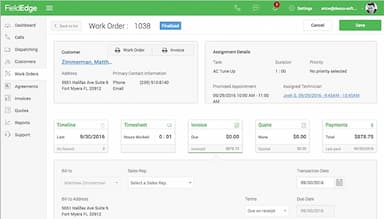
Part of the Xplor Technologies family, FieldEdge is built for service contractors managing multiple technicians in the field and office staff handling scheduling, dispatching, and invoicing. The platform covers the full-service lifecycle from call booking and dispatching through job completion, invoicing, and payment collection, all connected to QuickBooks for real-time accounting sync. 

What Is FieldEdge Best Known For? 

FieldEdge is best known for its strong dispatching and scheduling capabilities that help service contractors efficiently assign jobs, manage technicians, and streamline daily field operations. It also offers accounting integration features that support accurate invoicing and job costing within service workflows. 

How Much Does FieldEdge Cost? 

FieldEdge pricing typically starts at approximately $225/month (1 office user + 1 technician). It follows usage-based custom pricing plans where costs scale with team size, including office staff and field technicians: 

  • Select 

  • Premier 

  • Elite 

The software does not typically offer a fully self-serve free trial but instead provides a demo or guided walkthrough for prospective customers. 

In addition to subscription pricing, businesses may also account for the following potential costs: 

  • Onboarding And Implementation: ~$299–$599 setup fee depending on company size and data migration needs 

  • Training And Configuration Support: ~$150/hour for workflow setup, staff training, and system customization 

  • Data Migration Services: ~$150–$400 depending on complexity and legacy system transfer 

  • Add-on Modules (e.g., marketing automation, advanced reporting, call tracking): ~$19–$99/month depending on selected features 

  • Priority Support Or Optimization Services: ~$99/month for enhanced support tiers in some packages 

Total cost may vary depending on technician count, selected plan tier, add-ons, and level of customization required. 

Many users find FieldEdge’s pricing scalable for growing field service teams, but costs can increase significantly as additional technicians, dispatch users, and advanced modules are added. 

To obtain a tailored quote that aligns with your specific requirements, you can request a personalized FieldEdge price quote.

Disclaimer: Pricing references are based on publicly available third-party information and industry benchmarks. Actual costs may vary. 

FieldEdge Integrations

FieldEdge software seamlessly integrates with various popular business applications, including:

How Does FieldEdge Work? 

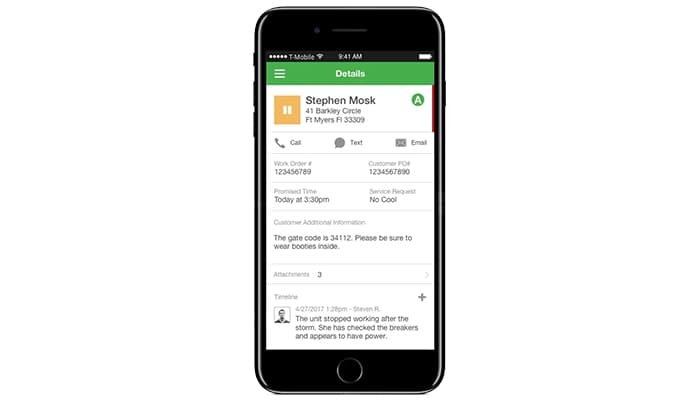
FieldEdge operates as a cloud-based platform accessible from any web browser and via its iOS and Android mobile app. Here is how the core field service workflow runs: 

  • Start by setting up your account and uploading company information to configure users, pricing, services, and business settings

  • Book service calls capturing customer details job type and history, so dispatchers have full context before assigning work

  • Dispatch technicians using a live board showing availability location and workload to match the right tech to each job 

  • Create estimates in the field through the mobile app using a flat rate price book and sending options for customer approval

  • Complete jobs and collect payments by generating invoices taking card payments and capturing signatures in the app  

  • Sync data to accounting system automatically keeping invoices payments and customer records updated in real time  

  • Manage service agreements by scheduling recurring work orders that generate automatically on renewal dates  

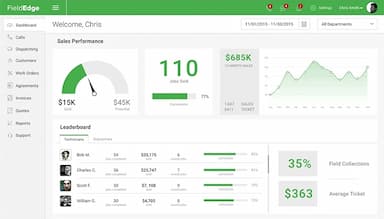
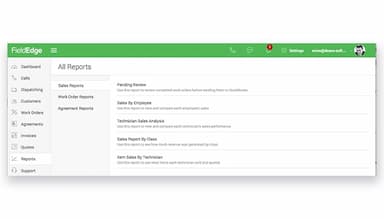
  • Track performance and reporting through dashboards covering revenue jobs and technician activity 

Watch a free FieldEdge demo to see the full workflow in action.

Who Is FieldEdge For?

The software is designed for businesses of all sizes across various industries, such as:

  • HVAC 

  • Plumbing 

  • Electrical 

  • Locksmith 

  • Appliance repair 

  • Construction and facilities services 

FieldEdge Use Cases 

Based on analysis of FieldEdge user feedback and its operational usage across service businesses, the following scenarios represent where the platform tends to fit naturally within day-to-day field service workflows: 

Contractors Coordinating High-Volume Dispatch Across Multiple Field Crews 

Service businesses running several technicians simultaneously often rely on FieldEdge to coordinate daily job allocation and field movement in real time. Dispatchers use live visibility into technician status and location to assign work based on availability and proximity. This setup reduces back-and-forth coordination between office staff and field teams and helps maintain continuity across multiple active jobs throughout the day. 

Contractors Aligning Field Activity With Accounting Workflows In QuickBooks 

Organizations already operating on QuickBooks can implement FieldEdge to bridge field execution with back-office accounting processes. It gives the configuration in which there is accuracy of billing records and timing of revenue recognition are operational priorities. Office can staff review job records created in the field and manage financial reconciliation without re-entering transactional data.  

Maintenance-Focused Businesses Managing Scheduled Return Visits And Agreements 

HVAC and plumbing companies with recurring service commitments use FieldEdge to structure repeat visit cycles tied to customer agreements. Administrative teams coordinate upcoming work orders based on predefined schedules rather than ad-hoc planning. Businesses with retention-based service contracts can get the same part of revenue consistently.  

Growing Service Firms Transitioning From Owner-Led Operations To Structured Teams 

Small contractor businesses scaling into multi-technician operations move away from informal coordination practices. As workloads expand, responsibilities for scheduling, dispatching, and job tracking shift from individual oversight to defined office roles. The platform is commonly used in this stage of growth to support operational standardization without restructuring the entire workflow model. 

Is FieldEdge Right For You?

FieldEdge is a good choice if you need to reduce coordination gaps between office staff and technicians in a high-volume service environment. It is particularly useful when jobs, invoices, and payments are still being managed across separate tools or manual steps, leading to delays or missing updates.

By keeping dispatch, job completion, and billing connected in one workflow, it helps service businesses maintain cleaner job tracking and fewer invoicing errors. It is less necessary if your business handles low job volume and does not rely on structured dispatch or integrated accounting workflows.

Still not sure if FieldEdge is right for you? Get in touch with our customer support team at (661) 384-7070, and it will help you make a confident decision.

FieldEdge Features

FieldEdge Payments

FieldEdge Payments streamlines payment processing by enabling secure, real-time payment collection directly from customers. This eliminates delays and reduces manual errors, allowing businesses to improve cash flow and offer customers convenient payment options, enhancing overall customer satisfaction​.

See How It Works
Proposals And Quoting

This feature simplifies creating and presenting detailed proposals for jobs. Businesses can provide accurate quotes quickly, helping to win more bids and reducing back-and-forth communication, leading to a faster approval process and higher customer confidence​.

See How It Works
Scheduling And Dispatching

FieldEdge ensures technicians are assigned efficiently to the right jobs. It optimizes routing and minimizes travel time, boosting productivity and ensuring timely service delivery, which improves customer satisfaction and reduces operational costs​.

See How It Works
Marketing And Email

Users can enable businesses to design and send targeted campaigns. By reaching the right audience with the right message, it improves lead generation and customer retention, ensuring businesses stay top-of-mind for their clients​.

See How It Works
FieldEdge Flat Rate

FieldEdge features flat rate options that provides pre-set pricing for services, making it easy for businesses to present transparent costs. This builds trust with customers, ensures consistent pricing, and eliminates disputes over charges, improving overall operational clarity and efficiency​.

See How It Works

Pros And Cons of FieldEdge

Pros

  • Easy to use with an intuitive interface

  • Strong QuickBooks integration for seamless accounting processes​

  • Facilitates efficient customer communication through built-in tools

  • Detailed customer history accessible for better service quality

Cons

  • Some features require too many steps to execute​

  • Lacks drag-and-drop scheduling functionality

  • Persistent minor bugs impacting usability, according to software users

FieldEdge Pricing

Select

eye

View Price

What's Included

  • Dashboard and call booking

  • Work orders and job management

  • Basic scheduling and dispatching

  • Customer management and history

  • Pricebook and flat rate pricing

  • Basic service agreements and quotes

  • QuickBooks Online and Desktop sync

  • 2 mobile app licenses included

  • Integrated payments and invoices

  • Onboarding specialist + Navigator KB

Premier

eye

View Price

What's Included

  • All Select features

  • Advanced dispatching and scheduling

  • Multi-option quotes

  • Advanced service agreements

  • 10 saved reports

  • Performance and commission tracking

  • Prospect tracking

  • 4 mobile app licenses included

  • Field Services Academy access

  • Knowledgeable support team

Elite

eye

View Price

What's Included

  • All Premier features

  • Unlimited saved reports

  • Outbound call recording

  • Proposal Pro (multi-option proposals)

  • MarketingEdge with 2-way texting

  • Consumer management portal

  • 6 mobile app licenses included

  • Priority support tier

Disclaimer: The pricing details were last updated on May 15, 2026 from the vendor's website. Please contact us for a tailored pricing list.

FieldEdge Reviews

Total 10 reviews

2.9

All reviews are from verified customers

Rating Distribution

5

Stars

30%

4

Stars

10%

3

Stars

20%

2

Stars

0%

1

Stars

40%

Share your experience

C

Chris

Mechanical or Industrial Engineering, 1-10 employees

More than a year

4.0
February 2025

it works well if bugs are removed

Pros

What I liked most about FieldEdge was how easy it was to use. The design and functionality were simple to use.

Cons

One thing I really didn't like about FieldEdge is that there are still some bugs in the software that need to be worked out. It's a bit frustrating, especially when you expect everything to be smooth.

Rating Distribution

Ease of use

8

Value for money

10

Customer Support

6

Functionality

9

E

Ernie

Construction, 1-10 employees

Less than a year

3.0
September 2024

I really regret this choice

Pros

They provided some really helpful features that made it easier for me to evaluate performance and manage my clients.

Cons

I was really disappointed with the way FieldEdge handled their pricing and communication. They promised we'd pay 2.7% using Clearent, their payment processor but we were charged 3.4% right away. They never acknowledged any flaws in the program and instead, they blamed us for not using it properly. It was frustrating, especially since they didn't show any empathy for our problems and weren't able to help us at all.

Rating Distribution

Ease of use

4

Value for money

2

Customer Support

5

Functionality

8

L

Lisa

Consumer Services, 1-10 employees

Less than 6 months

1.0
September 2024

FieldEdge doesn't quite deliver

Pros

I really like how the platform has a sleek, professional look, it definitely stands out to me.

Cons

Navigating the platform was tough for both technicians and office staff. It's also not great that office staff can't access jobs through the platform. On top of that, both technicians and office staff get locked out a lot. The worst part is that FieldEdge doesn't seem to have a solution for this.

Rating Distribution

Ease of use

2

Value for money

2

Customer Support

1

Functionality

1

Frequently Asked Questions

Does FieldEdge offer an API?

Yes, FieldEdge offers an API.

What language does FieldEdge support?

FieldEdge supports English.

What other apps does FieldEdge integrate with?

FieldEdge integrates with Quickbooks, FleetSharp, Podium and Mailchimp.

Does FieldEdge have a mobile app?

Yes, FieldEdge has a mobile app.

What type of pricing plans does FieldEdge offer?

FieldEdge price for its three plans, Select, Premier and Elite, starting at approximately $89. It will differ depending on your business needs. Users can get FieldEdge cost quote accordingly.  

Who are the typical users of FieldEdge?

The typical users of FieldEdge are HVAC, plumbing, electrical, locksmith, appliance repair, and facilities services contractors.

What level of support does FieldEdge offer?

FieldEdge offers email, chat, FAQs, phone support, and a knowledge base (Navigator).