


ForceManager
Last Updated
Overview
ForceManager is a mobile CRM designed for sales teams, offering tools like activity tracking, sales performance analytics, and AI-driven insights. It integrates seamlessly with Microsoft 365 and Teams, though some users report that the mobile app interface could be more intuitive. Despite this, it remains a robust solution for boosting sales team productivity.

ForceManager Specifications
- Work Order Management
- Scheduling & Dispatching
- Mobile Access
- Customer Relationship Management (CRM)
ForceManager Features
Sales Accelerator
Sales Accelerator helps sales teams set personalized objectives and track their progress. It encourages collaboration by sharing goals across teams, fostering accountability. This feature boosts motivation and performance, enabling teams to close deals faster and achieve targets effectively.
Dana AI
Dana AI is an intelligent assistant that provides real-time insights to boost sales performance. By automating routine tasks, it frees up time for sales reps to focus on more impactful activities. Dana AI also offers predictive analytics to improve decision-making.
Sales And Activity Analysis
This feature offers detailed insights into individual and team performance, providing metrics on sales activities, customer engagement, and pipeline health. This helps managers make data-driven decisions, improving efficiency and highlighting areas where teams can optimize their efforts.
Smart Voice Report
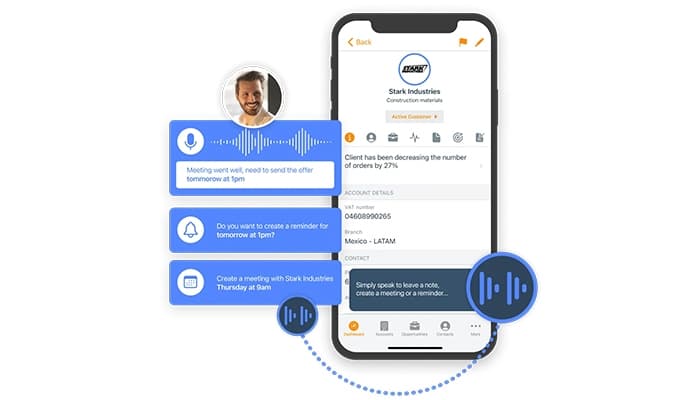
The software enables sales reps to generate reports using voice commands, streamlining the process of CRM data entry. It saves time, enhances accuracy, and allows for quick updates, ensuring that sales teams can focus more on engaging customers than on administrative tasks.
GoalManager
GoalManager lets managers set and track personalized goals for each sales rep, aligned with team objectives. It ensures that goals are clear, measurable, and motivating, fostering performance improvement. The tool helps with ongoing monitoring and assessment of sales targets.
Pros And Cons of ForceManager
Pros
Boosts sales team productivity
Seamless integration with existing tools
Real-time reporting and insights
Detailed sales performance tracking
Excellent customer support provided
Cons
High price for small teams
Lacks offline functionality
Complex setup process
Occasional syncing issues, according to software users
ForceManager Reviews
Total 8 reviews
4.8
All reviews are from verified customers
Rating Distribution
5
Stars75%
4
Stars25%
3
Stars0%
2
Stars0%
1
Stars0%
Share your experience
Transportation/Trucking/Railroad, 51-100 employees
More than a year
“Very flexible solution”
Pros
It is simple, user-friendly and works seamlessly on mobile. The integration with email and WhatsApp is a big plus, making communication much smoother.
Cons
It can be challenging to make highly specific improvements and accessing lists of added information is not as simple as I would prefer.
Rating Distribution
Ease of use
10
Value for money
8
Customer Support
10
Functionality
7
Construction, 51-100 employees
More than a year
“Highly recommend”
Pros
Out of all the apps I tested before choosing FM, this one stood out as the most flexible and easiest to use. It just made sense from the start.
Cons
Honestly, there are not many issues but for the mobile version to run smoothly, at least 6GB of RAM is needed. Ideally, 8GB would make everything feel much more fluid.
Rating Distribution
Ease of use
10
Value for money
10
Customer Support
10
Functionality
7
Construction, 11-50 employees
More than a year
“Great program!”
Pros
I really like how easy it is to use, plus the way it organizes activities like emails and calls with clients is super convenient. The built-in metrics make tracking everything easy.
Cons
Just like any software, there is an implementation process to go through before getting fully set up.
Rating Distribution
Ease of use
10
Value for money
10
Customer Support
10
Functionality
10
Frequently Asked Questions
Does ForceManager offer an API?
Yes, ForceManager offers an API.
What language does ForceManager support?
ForceManager supports several languages including English, Portuguese, Danish and Russian.
What other apps does ForceManager integrate with?
ForceManager integrates with Whatsap, Google Workspace, Office 365, Gmail and Outlook. Schedule a free ForceManager demo to learn more.
Does ForceManager have a mobile app?
Yes, ForceManager has a mobile app.
What type of pricing plans does ForceManager offer?
ForceManager price starts at $14.50/user/month for the Essentials plan, $19.50/user/month for the Starter plan, $27.50/user/month for the Professional plan and $42.50/user/month for the Performance plan. Users can also get custom pricing accordingly.
Who are the typical users of ForceManager?
The typical users of ForceManager are those in the environmental services, wine and spirits, IT, newspapers, insurance, aviation and management consulting.
What level of support does ForceManager offer?
ForceManager offers email, phone support, chat, FAQs and Knowledge Base.