


GoFormz
Last Updated
Key Takeaways
Generated from the text of customer reviews
Our Verdict
Overall Rating
Based on 14 users reviews
4.8
Rating Distribution
Positive
100%
Neutral
0%
Negative
0%
Starting Price
$499
per month
GoFormz Specifications
- Work Order Management
- Mobile Access
- Reporting & Analytics
- Time Tracking
GoFormz Features
Mobile Forms
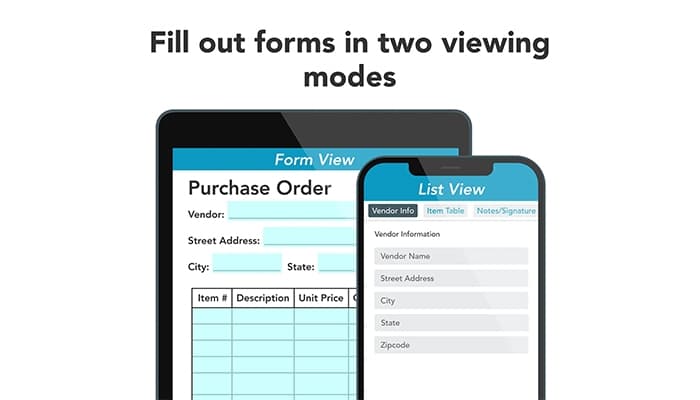
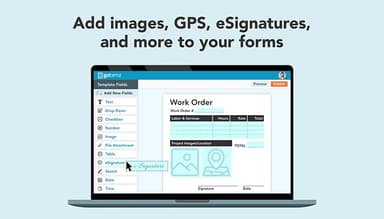
Converts old paper forms to digital ones that can be accessed on any phone, tablet, or computer via the free iOS, Android, or Windows app. People can complete forms offline and attach photos, sketches, GPS, and electronic signatures to each field. Fields can be dragged onto the uploaded form, and logic and calculations can be added above.
Online Forms
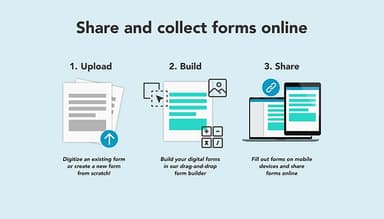
The platform helps build a new form from scratch using a drag-and-drop, no-code editor, or digitizes an existing paper form. Forms can be completed on any computer connected to the internet, and there is custom branding throughout, with eSignature fields for legally binding sign-offs.
Reports
The platform allows users to generate reports on form collections to determine trends, opportunities, and obstacles in real time, consolidating data into one report. Reports can be programmed to be automatically sent to an inbox or uploaded to a connected platform, and can be customized to include the fields or data points that are relevant as the collection grows.
e-Signatures
GoFormz supports e-signatures in forms, contracts, and invoices, with support for ESIGN and UETA requirements. Required signature fields prevent users from submitting a form until all necessary signatures are completed, helping teams avoid incomplete approvals and documentation.
Workflows
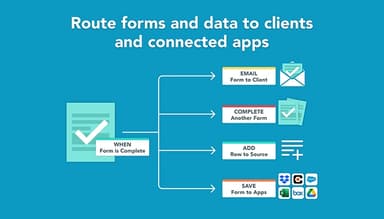
Transfers data between GoFormz and integrated systems in real time with a trigger and a collection of actions, either from pre-made recipes or created from scratch. Completed forms automatically forward to colleagues, customers, or Cloud storage, and forms can be pre-filled and sent directly to field devices.
Pros And Cons of GoFormz
Pros
No-code builder converts paper forms to digital ones
Offline mobile app enables crews to work anywhere, even when there's no signal, and sync later
Digital forms are similar to paper forms, which makes the adoption easy
Completed forms are automatically routed to email, storage, or linked applications
Quick response from the support team and quick resolution of issues
Cons
Rigid template options are difficult to customize with complex forms
e-signing feature can be improved
Forms do not have the option to add media files
GoFormz Pricing
Starter | Enterprise |
|---|---|
$499 per month | Custom pricing |
|
|
Disclaimer: The pricing details were last updated on Sep 14, 2026 from the vendor's website. Please contact us for a tailored pricing list.
GoFormz Reviews
Total 14 reviews
4.8
All reviews are from verified customers
Rating Distribution
5
Stars79%
4
Stars21%
3
Stars0%
2
Stars0%
1
Stars0%
Share your experience
Public Safety, 51-100 employees
More than a year
“Quick to learn”
Pros
Learning to use GoFormz was incredibly simple and I love how well it integrates with other software. Their customer service is top-notch! and the team are always quick to jump in and help whenever we need it.
Cons
It is a small thing but sometimes we run into issues with workflows between different software programs. Luckily, the customer service team is always quick to jump in and help us sort things out!
Rating Distribution
Ease of use
8
Value for money
8
Customer Support
10
Functionality
7
Construction, 101-500 employees
More than a year
“My experience using GoFormz”
Pros
GoFormz is a super flexible and customizable app that has helped improve efficiency and reduce paper waste in our operations. It has made standardizing our documentation so much easier.
Cons
The pricing can get pretty high, especially when a large number of users are needed.
Rating Distribution
Ease of use
10
Value for money
6
Customer Support
10
Functionality
9
Construction, 500+ employees
More than a year
“Great fit for Procore integration”
Pros
Setting up a Procore integration with GoFormz was very easy for me! The process was simple and customer support was there whenever I needed assistance.
Cons
Reporting works well but I really wish we could generate reports based on custom fields. That would make things a lot easier.
Rating Distribution
Ease of use
10
Value for money
10
Customer Support
10
Functionality
10
Frequently Asked Questions
Does GoFormz offer an API?
Yes, GoFormz provides API access.
What language does GoFormz support?
GoFormz supports the English language.
Does GoFormz offer a mobile app?
Yes, GoFormz offers a mobile app for iOS and Android devices.
What other apps does GoFormz integrate with?
GoFormz supports a range of integrations, including Salesforce, Box, Acumatica, Procore, QuickBooks, Zapier, Smartsheet, Autodesk, and Microsoft SQL Server.
What types of pricing plans does GoFormz offer?
GoFormz pricing is as follows: Starter $499/month and Enterprise (custom pricing). To make an informed choice, request a detailed GoFormz cost estimate tailored to your needs.
Who are the typical users of GoFormz?
GoFormz is tailored for use across various industries, including agriculture, construction, energy, engineering, food and beverage, healthcare, HVAC, field service, and manufacturing.
What level of support does GoFormz offer?
GoFormz provides support through a knowledge base, FAQs/forums, email/help desk, chat, and phone support.