


PartsTech
Last Updated
Key Takeaways
Generated from the text of customer reviews
Our Verdict
PartsTech Specifications
- Invoicing & Billing
- Inventory Management
- Mobile Access
- Reporting & Analytics
PartsTech Features
Parts And Tire Search
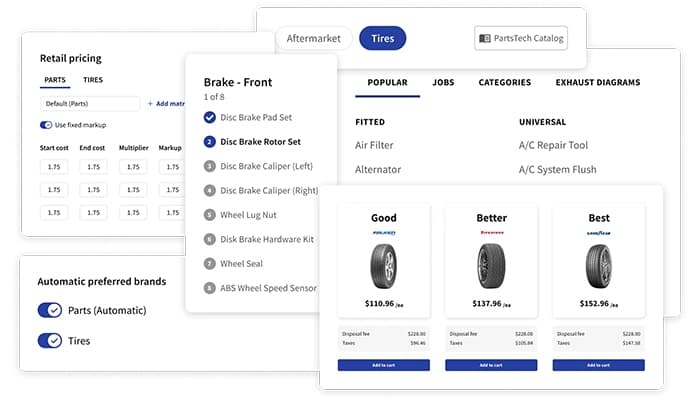
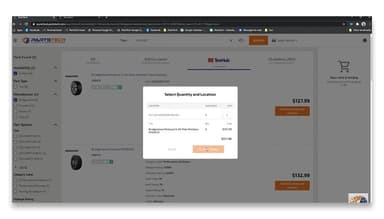
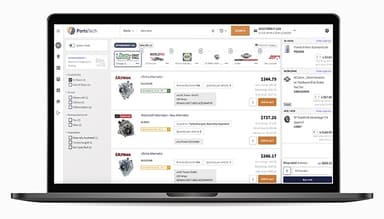
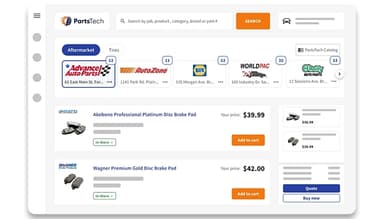
ering parts and tires becomes more efficient by consolidating supplier information in a single platform. PartsTech allows users to search for automotive parts and tires across multiple suppliers from one place. This feature provides instant access to availability, updated product details, and pricing based on commercial agreements, ensuring a streamlined procurement process and reducing search time.
Diagrams
PartsTech features visual parts diagrams that help users locate specific components within a vehicle assembly. PartsTech eliminates uncertainty in the part selection, while interactive visual diagrams enhance the search and ordering process. Clicking on specific visuals within detailed diagrams ensures accurate identification of required components, streamlining repairs and improving efficiency in locating and selecting essential parts for any job.
Tire Comparison
By providing clear comparisons, the tire selection tool presents good, better, and best options with detailed specifications, cost breakdowns, and available rebates. Informed decisions become easier through email, text, or print, ensuring a seamless selection process and faster service completion. It groups available choices into different categories so users can review alternatives from various suppliers. Selection details can be shared with customers through standard communication methods.
Quick Quoting
PartsTech enhances the quoting process and generates real-time estimates, incorporating aftermarket and OEM parts from multiple suppliers. A streamlined workflow accelerates repair approvals and part orders, reducing wait times and improving overall service efficiency for faster job completion.
Analytics
The software provides detailed insights into procurement patterns and analyzes ordering data across suppliers, users, part types, brands, and tire sizes. It helps optimize purchasing decisions, reduce costs, and improve shop efficiency. Data views can be filtered by different operational parameters such as part type or vendor.
Pros And Cons of PartsTech
Pros
Helps locate quality parts at fair prices
Provides accurate updates and completion dates for customers
Clearly displays availability and pricing from multiple suppliers
Easy to integrate with existing software like AutoLeap
Cons
Some orders may not reach the correct supplier
Customer support responses can be inconsistent when resolving supplier-related issues
PartsTech Pricing
PartsTech Free | PartsTech Plus | PartsTech Complete |
|---|---|---|
$0per month | $50per month | $95per month |
|
|
|
Disclaimer: The pricing details were last updated on Sep 14, 2026 from the vendor's website. Please contact us for a tailored pricing list.
PartsTech Reviews
Total 11 reviews
4.8
All reviews are from verified customers
Rating Distribution
5
Stars82%
4
Stars18%
3
Stars0%
2
Stars0%
1
Stars0%
Share your experience
Small-Business, 11-50 employees
“Somehow Satisfied”
Pros
I love how I can see all my vendors in one place without having to click through page after page. It saves me so much time!
Cons
Sometimes, It doesn't have all the parts listed from a vendor or I end up having to go to the vendor's website to find the right part because PartsTech doesn't even show that it's available.
Rating Distribution
Ease of use
6
Value for money
8
Customer Support
8
Functionality
8
Small-Business, 11-50 employees
“Makes my day a whole lot easier”
Pros
Searching for parts and ordering them through PartsTech is honestly the best part of my day. It's so easy and efficient.
Cons
The only downside to PartsTech isn't really on their end, it's more about the stores. Sometimes the inventory issues at stores are a problem where a part says it's in stock but in reality, they don't have it.
Rating Distribution
Ease of use
10
Value for money
10
Customer Support
10
Functionality
10
Small-Business, 11-50 employees
“Simple to use with excellent service”
Pros
I've been using It for a few months now, mostly with Worldpac and O'Reillys. It took me a little time to get the hang of everything but I really like how it connects directly with Tekmetric and loads everything into my estimates automatically.
Cons
One thing I don't love is that when ordering from Worldpac, the shipping costs don't automatically transfer over. But at least they added a checkmark reminder so it's easier to remember.
Rating Distribution
Ease of use
10
Value for money
10
Customer Support
10
Functionality
10
Frequently Asked Questions
What pricing plans does PartsTech offer?
The PartsTech pricing model offers three feature-rich pricing plans—PartsTech Free ($0/month), PartsTech Plus ($50/month), and PartsTech Complete ($95/month), with a free version available for exploration. Users can request a customized PartsTech cost structure.
Who are the typical users of PartsTech Software?
PartsTech supports shop owners, managers, service advisors, and technicians across diverse repair services, including general repair, multi-location franchises, tire shops, quick lube centers, and specialty repair facilities.
What languages does PartsTech support?
PartsTech supports the English language.
Does PartsTech have a mobile app?
PartsTech lacks a dedicated mobile app but is accessible via a web browser for part searches and availability checks.
Does PartsTech have an API?
Yes, PartsTech offers an API.
What other apps does PartsTech integrate with?
PartsTech integrates with leading systems such as Shopmonkey, AutoLeap, Tekmetric, TireShop by Freedomsoft, Repair360, Shop Boss, NAPA TRACS, Omnique, and Bay-Master.
What level of support does PartsTech offer?
PartsTech offers support through a knowledge base, FAQs/forums, and phone and email/help desk assistance.