




Last Updated
Key Takeaways
Generated from the text of customer reviews
Simpro is a field service management platform used by trade businesses across electrical, plumbing, HVAC, fire protection, and security. Scheduling, job tracking, and the connection between quoting, job management, and invoicing are consistently noted strengths. Implementation time and mobile app reliability are recurring concerns among users. Simpro recently launched its Lightning AI suite, introducing AI agents for job preparation, technician training, on-site documentation, and automated customer communication.
Our Verdict
The platform covers key field service workflows in one platform, from estimating through to invoicing and reporting. It suits trade businesses that need office and field teams working from shared, live data. The platform offers broad functionality, which helps businesses with complex operations, but it adds setup overhead for smaller teams. For trade businesses managing multiple technicians, recurring jobs, and quoting, Simpro is worth consideration as a long-term operational platform.
Overall Rating
Based on 61 users reviews
3.9
Rating Distribution
Positive
69%
Neutral
21%
Negative
10%
Starting Price
$150
per user per month
Simpro Specifications
- Work Order Management
- Scheduling & Dispatching
- Job Costing
- Inventory Management
What Is Simpro?
Simpro is a field service management platform built for trade businesses in electrical, plumbing, HVAC, fire protection, and security sectors. It handles quoting, scheduling, dispatching, invoicing, inventory, and asset maintenance in one system. It supports both reactive service jobs and planned maintenance contracts. Field technicians access job details, notes, and forms through Simpro Mobile. Changes sync to the office as they happen. Accounting integrations with QuickBooks, Xero, and MYOB connect job data directly to financial workflows. The platform also includes Simpro Lightning, an AI suite with agents for job prep, documentation, technician onboarding, and customer communication.
What Is Simpro Best For?
The platform is valued for its Field Service CRM. It gives trade businesses a single customer record covering job history, communications, notes, photos, and invoices. The ‘Customer Portal’ lets clients view quotes, jobs, invoices, and assets without calling the office. Field staff updates job data through Simpro Mobile, and any changes sync to the office in real time. This helps office teams respond to job updates faster and reduces the back-and-forth effort involved in administrative record-keeping.
How Much Does Simpro Cost?
Simpro pricing is estimated to be around $150/user/month, according to industry benchmarks for comparable field service management platforms. This estimate is intended for general budgeting purposes, as actual costs can vary based on team size, selected modules, business complexity, customization, and deployment requirements. Simpro uses quote-based pricing and confirms that its initial setup fee covers onboarding, training, and data migration.
In addition to the base subscription costs, organizations should account for the following potential expenses:
- Implementation: $5,000–$15,000 for SMBs; $15,000–$40,000 for complex commercial deployments
- Data Migration: $2,000–$10,000, depending on customer, job, asset, inventory, and historical data volume
- Admin And Field Staff Training: $1,000–$10,000, depending on team size and training requirements
- Accounting, CRM, Inventory, And API Integrations: $2,000–$20,000, depending on integration scope and customization
- Advanced Modules And Customization: $2,000–$15,000+, depending on asset management, preventative maintenance, reporting, workflow, and other specialized requirements
Simpro uses custom pricing across all plans. Reviewers who find it a strong fit generally consider the cost reasonable given what the platform covers. Others note that implementation fees, training costs, and features gated behind higher tiers can push the total outlay beyond what was initially expected.
Disclaimer: Pricing references are based on publicly available third-party information and industry benchmarks. Actual costs may vary.
Simpro Integrations
Simpro integrates with various third-party platforms for accounting, AI, customer service, supplier, automation, estimating, facility management, reporting, compliance, and marketing, including:
- Avalara software
- Coast
- EzzyBills
- Link4
- Paycepaid
- MYOB
- QuickBooks
- Power BI
- Asana
How Does Simpro Work?
Here's how you can get started with Simpro software:
- Set up your account and configure workflows, user roles, and permissions to match how your business operates
- Add customer records, job sites, and asset information to build your database
- Build quotes and estimates using the Estimating and Quoting tool, drawing from catalogue items and pre-built assemblies
- Schedule technicians using the dispatch calendar and assign jobs based on location, availability, or service zone
- Give field technicians access to job details, notes, and forms through Simpro Mobile before and during each job
- Log labour, materials, and job updates from the field in real time, with changes syncing to the office immediately
- Generate and send invoices once a job closes, with data flowing directly from the job record
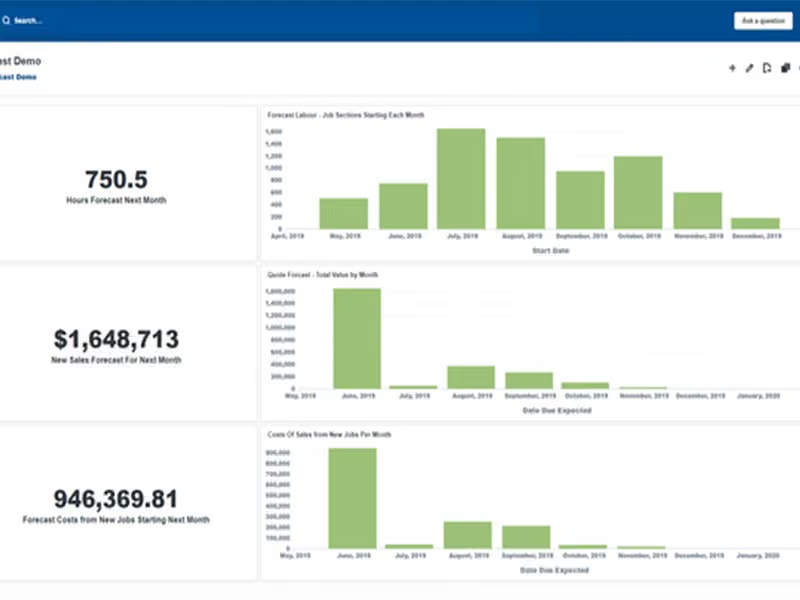
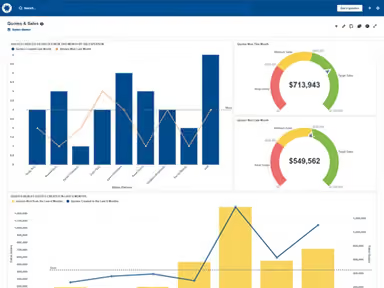
- Monitor job costing, team performance, and business reporting through the built-in dashboards and reports
Who Is Simpro For?
Simpro is suitable for organizations across a range of industries and sectors, including:
- Electrical
- Plumbing
- Heating, Ventilation, and Air Conditioning (HVAC)
- Fire protection
- Security
- Facilities services
Simpro Use Cases
Based on our analysis of user reviews and Simpro features, we have identified key scenarios where this platform is a strong fit for trade and field service businesses:
Trade Businesses Where Office And Field Teams Work From Different Systems
When office staff manage jobs in one tool and field technicians log work in another, information gaps can become a problem fast. Updates made on site do not reach the office in time. Changes do not always get communicated. Simpro keeps both sides on a single live record. Notes, materials, time entries, and status changes sync as they happen on each job.
Service Companies Managing High Volumes Of Recurring Asset Maintenance
Businesses handling ongoing maintenance contracts across multiple sites struggle to track what was serviced, when, and what is coming next. Missing a scheduled visit or losing service history creates compliance risk and unhappy clients. Simpro's Maintenance Planner organizes planned work by site, records each service against the relevant asset, and surfaces what is due. Reviewers note that the planner gives them a clearer pipeline view and removes the need for manual tracking.
Estimating Teams Spending Too Long Building Quotes From Scratch
Trade businesses that price every job manually absorb time before a single job is won. When jobs involve complex material and labor combinations, the time adds up. Simpro allows teams to build pre-configured assemblies that bundle labor and materials together. Teams can reuse them and update them across quotes without starting from scratch each time.
4. Field Service Businesses Dealing With Late Payments And Invoice Disputes
Businesses that invoice at the end of the month regularly deal with gaps between work completed and cash received, and disputed charges slow things down further. Simpro’s JobBrief AI agent creates a plain-language summary of the work completed for the customer to highlight what was done, what was found, and the next steps. According to Simpro, this post-job communication helps reduce billing disputes and accelerate payments.
Is Simpro Right For You?
Trade businesses running field operations often deal with disconnected tools and no shared view across the office and the field. Margins slip, jobs fall through, and admin builds up on both sides.
Simpro addresses this by connecting the full job lifecycle on one platform. It has been built specifically for trade workflows across electrical, plumbing, HVAC, fire protection, and security, and supports operations across multiple markets, including the US, UK, Australia, and Canada.
Businesses without dedicated admin or implementation support may find the initial setup demanding. The platform is best suited for operations with the internal capacity to configure and maintain it over time. The software offers security controls including two-factor authentication, role-based access, audit logs, and single sign-on through Microsoft Entra and Okta.
Still not sure about Simpro? Contact our expert staff at (661) 384-7070 for further guidance.
Simpro Features
Estimating And Quoting
Estimating And Quoting builds job quotes and project estimates from catalogue items, pre-built assemblies, and templates. Labour and material costs are tracked throughout. Quotes go out from the office or the field via Simpro Mobile, and built-in reporting monitors open quotes, deadlines, and margin.
Takeoffs
A digital markup add-on for estimators, this tool lets users upload blueprints, set a scale, and measure materials directly on screen. Symbol recognition reads trade-specific markings in any orientation. Drawings link to quotes, jobs, and project cost centers in Simpro.
SMS Messaging
Text updates reach customers, contractors, and field staff directly from Simpro through SMS Messaging, with no separate provider needed. Messages go out automatically within job workflows or manually on demand. Each message logs the date, sender, recipient, and content.
Delight
An AI customer marketing agent built into Simpro Premium, Delight reads job and customer data to find service opportunities. Outreach goes out based on each customer's history. Expired quotes are followed up automatically, and a dashboard tracks what generates booked jobs.
Scheduling And Dispatching
The scheduling module assigns technicians through day, week, month, and project calendar views. Dispatchers filter by location, labour rate, or service zone. Schedule changes sync immediately between office and field, and a live map shows technician locations in real time.
Digital Forms
Mobile-friendly and built with drag-and-drop fields, Digital Forms auto-populates with geo-tags, timestamps, and Simpro job data. Conditional logic supports custom builds, and PDF overlay adds editable fields to existing documents. Completed forms sync automatically to the relevant job record.
Maintenance Planner
Purpose-built for businesses managing assets across multiple sites, Maintenance Planner handles preventative maintenance scheduling, technician assignment, and recurring job generation. Service data and test results sync to Simpro records, with reporting covering service dates, test history, and contract details.
Pros And Cons of Simpro
Pros
Integrated quoting, job management, and invoicing reduces admin errors
Scheduling and dispatching tools give full visibility across active jobs
Inventory management keeps parts and materials organized in one place
End-to-end workflow connects lead generation to invoice and payment
Mobile offline capability lets field techs work without signal
Cons
Mobile app can experience sync and stability issues occasionally
Initial implementation requires considerable time and experienced setup assistance
Report customization is limited without advanced skills or external tools
Simpro Reviews
Total 61 reviews
3.9
All reviews are from verified customers
Rating Distribution
5
Stars43%
4
Stars26%
3
Stars16%
2
Stars5%
1
Stars10%
Share your experience
Construction, 11-50 employees
Less than a year
“Misleading marketing, terrible after-sale”
Pros
I've found their marketing so persuasive I signed the contract, they promised an simple learning platform.
Cons
In practice the system demanded excessive time for data entry without delivering worthwhile results. The support was poor and the contract was inflexible, only allowing changes that favored the company. Proceed with caution.
Rating Distribution
Ease of use
2
Value for money
2
Customer Support
2
Functionality
2
Construction, 51-100 employees
More than a year
“glitchy and complex”
Pros
I find it to be a professional solution that offers comprehensive workforce management capabilities allowing me to track costs and revenue across multiple projects and overall it delivers very powerful tools suited particularly to the demands of today's service operations.
Cons
While I appreciate that Simpro is a powerful platform for job management, what I find least appealing is its user interface which often comes across as somewhat glitchy and not very simple, particularly for those joining the system for the first time, the need to navigate several clicks just to reach routine tasks interrupts my workflow and reduces efficiency and on top of that the ability to customise reports is fairly limited unless you possess advanced technical skills or resort to external reporting tools which becomes a real obstacle for teams that require flexible, tailored reporting.
Rating Distribution
Ease of use
10
Value for money
10
Customer Support
10
Functionality
10
Telecommunications, 11-50 employees
More than a year
“constant bugs and outages”
Pros
I'll revisit this later because I'm finding it hard to identify any real upsides at the moment perhaps the one benefit is that being placed on hold for thirty minutes at a time gives me ample opportunity to contemplate the life decisions that led me to choose this software.
Cons
Customer support is abysmal and I've had to completely reinstall the app after virtually every update which is infuriating given that it frequently contains bugs that have caused me to lose work, prices have been raised again recently, outages are common and when I attempt to call I usually face a very long wait while support tickets take days rather than hours for someone to respond.
Rating Distribution
Ease of use
4
Value for money
2
Customer Support
2
Functionality
2
Frequently Asked Questions
Can Simpro Premium help me manage more jobs efficiently?
Yes, Simpro Premium is designed to help you manage more jobs effectively. It provides a comprehensive suite of advanced features that further fine-tune your operations, workflows, and contacts.
I'm looking for a Simpro alternative. Are there other similar software options available?
Yes! There are several strong Simpro alternatives worth considering. Popular choices include ServiceTitan, Jobber and Procore.
Does Simpro offer an API?
Yes, Simpro does offer an API.
What language does Simpro support?
Simpro primarily supports English language.
What other apps does Simpro integrate with?
Simpro integrates with several third-party applications through plugins, including Avalara, Coast, EzzyBills, Link4, Asana, Power BI, Paycepaid, MYOB, and QuickBooks.
Does Simpro software have a mobile app?
Yes, Simpro does offer a mobile app iOS and Android users.
What types of pricing plans does Simpro offer?
Simpro is estimated at $150/user/month. Implementation typically costs $5,000–$40,000, depending on deployment complexity. Request a personalized Simpro cost estimate for your business.
Who are the typical users of Simpro?
Simpro is suitable for organizations across a range of industries and sectors, including electrical, plumbing, heating, ventilation, and air conditioning (HVAC), fire protection, security, and facilities services.
What level of support does Simpro offer?
Simpro offers support via phone, email, support chat, help desk, and contact form.
How can Simpro software enhance business efficiency and growth?
The platform enhances business efficiency and growth by consolidating operations and providing job scheduling, financial insights, and inventory management features.
How does Simpro Software help with asset maintenance and provide complete control?
Simpro software provides robust asset maintenance features, allowing businesses to track and manage their assets effectively. It offers complete control over your operations, from scheduling jobs to invoicing customers, leading to business growth.