



Last Updated
Overview
Mobiwork Specifications
- Vehicle Tracking (GPS)
- Fuel Management
- Maintenance Scheduling
- Driver Management
Mobiwork Features
Electronic Forms
MobiWork’s electronic forms simplify field data collection by enabling teams to capture information directly on mobile devices. This reduces paperwork, minimizes errors, and accelerates data entry. Real-time syncing ensures office teams have instant access to up-to-date job details, empowering better decision-making and operational agility. Customizable and easy to use, electronic forms improve accuracy and streamline workflows across the entire field service lifecycle.
Progressive Billing
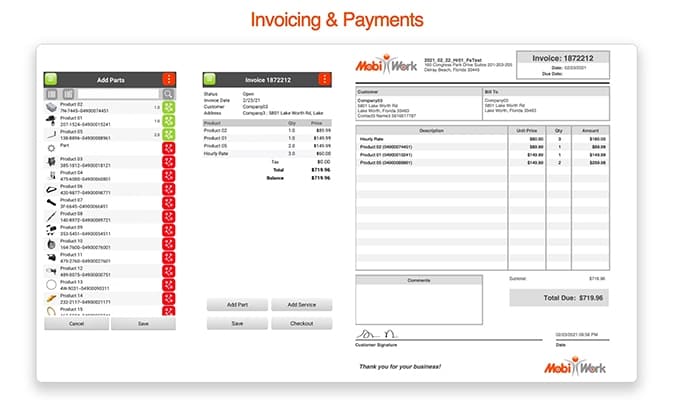
This feature automates billing by tracking work completed and expenses in real time, allowing businesses to issue accurate, incremental invoices. Progressive billing reduces manual errors, improves cash flow consistency, and accelerates revenue cycles. By automating complex billing stages, MobiWork frees administrative resources while providing clients with clear, timely invoices tied directly to completed work.
Automated Reports
MobiWork generates detailed, customizable reports on operational performance, job status, and maintenance activities—without manual effort. Automated reporting improves data accuracy, saves time, and delivers actionable insights that help managers optimize workforce productivity and equipment uptime. These insights enable smarter planning, trend analysis, and continuous improvement of field service operations.
Quotes
MobiWork lets users create, send, and manage quotes quickly from any mobile device. This streamlines the quoting process, ensures pricing consistency, and shortens response times to customer inquiries. Easy quote management supports better customer experiences and helps close business faster, while keeping sales and service teams aligned.
Live Dashboards
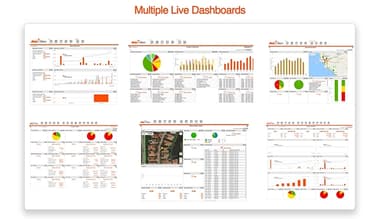
Live dashboards provide real-time visibility into key operational metrics like job progress, technician locations, fleet status, and service performance. Managers can monitor activities instantly, identify bottlenecks early, and make data-driven decisions that improve service quality and operational efficiency. The intuitive dashboard keeps all stakeholders informed and aligned throughout the workday.
Scheduling & Dispatch
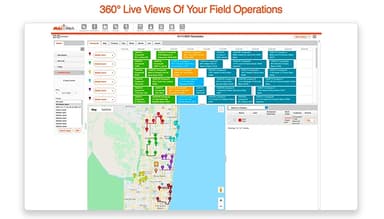
MobiWork offers dynamic scheduling and dispatch tools that simplify job assignment and optimize technician routes. The drag-and-drop interface helps dispatchers efficiently allocate resources, balance workloads, and adjust plans in real time. Route optimization reduces travel time and fuel costs, ensuring technicians arrive promptly. With real-time updates and notifications, both office staff and field teams stay synchronized. This feature enhances operational efficiency, minimizes downtime, and helps businesses meet customer expectations with timely, well-coordinated service delivery.
Asset & Equipment Management
Track and manage company assets, equipment, and tools effortlessly with MobiWork’s asset management capabilities. Schedule preventative maintenance, monitor asset usage, and maintain detailed service histories—all accessible in the field or office. This reduces costly downtime, extends asset lifecycles, and supports compliance with industry regulations. Field technicians can log asset details on-site, ensuring accurate and up-to-date records that improve inventory control and decision-making.
GPS Tracking & Real-Time Location
MobiWork’s GPS tracking offers real-time visibility into technician locations and job progress. Managers can monitor routes, track arrival times, and verify service delivery with location-based automation. This transparency improves dispatch accuracy, supports safety protocols, and provides customers with accurate ETAs. Real-time tracking helps streamline field operations and boosts accountability without sacrificing technician autonomy.
Payment Processing
Enable faster cash flow with integrated payment processing through MobiWork’s mobile app. Field technicians can securely accept credit cards and digital payments on-site, reducing invoicing delays and improving customer convenience. The seamless payment capture is linked to invoicing and job records, simplifying financial reconciliation. This feature supports businesses in accelerating revenue cycles while maintaining professional service interactions.
Custom Workflow Automation
MobiWork empowers businesses to automate repetitive tasks and enforce best practices with customizable workflows. Automate notifications, status updates, approvals, and data routing to reduce manual effort and errors. Role-based access controls ensure that each user sees and acts on the right information at the right time. Workflow automation boosts consistency, compliance, and operational speed across the entire field services lifecycle.
Pros And Cons of Mobiwork
Pros
Easy integration with other systems
Streamlines fleet management and maintenance
Increases operational efficiency
Real-time updates and reporting
Customizable forms for data collection
Cons
Occasional mobile app glitches
Can be expensive for small businesses
Limited advanced analytics features
Mobiwork Reviews
Total 12 reviews
4.9
All reviews are from verified customers
Rating Distribution
5
Stars92%
4
Stars8%
3
Stars0%
2
Stars0%
1
Stars0%
Share your experience
Jose
Real Estate, 11-50 employees
Less than 6 months
“The best tool for scheduling tasks”
Pros
It has made scheduling so much easier for us. Also it helps us keep everything well-organized, mainly when managing different issues. And having everything in one place causes less confusion, and it has improved how we used to handle our daily tasks.
Cons
There are so many features in it that I know would be very useful, but I have not had the chance to learn how to use them yet. However it is on me and is not the problem of software.
Rating Distribution
Ease of use
10
Value for money
10
Customer Support
10
Functionality
10
Samuel
Telecommunications, 1-10 employees
Less than a year
“Covers almost everything we need”
Pros
MobiWork is a complete solution as it covers everything we need, from work order scheduling to asset management. Plus it also provides great accountability. Their customer support team is responsive and helpful too.
Cons
Even though it has a lot of great features, integrating it into a large-scale business is quite difficult. Also, the scheduling feature on tablet devices is not the best. I feel like a few improvements will make it work better.
Rating Distribution
Ease of use
10
Value for money
6
Customer Support
8
Functionality
10
Marek
Financial Services, 11-50 employees
Free Trial
“Had a positive experience”
Pros
One of the things that impressed me the most about MobiWork is its mobile focused approach to field service management. It has an easy-to-use mobile app which allows our field technicians to access job information, update work orders and capture data directly from their devices. This real-time connectivity has really increased our efficiency and improved communication across the team. Another great feature is the GPS tracking as it helps us keep an eye on technician locations and makes scheduling and route optimization much smoother.
Cons
My experience with MobiWork has been mostly positive, but one thing that could be better is the limited integration with third-party systems. Even though it itself has a solid set of features for field service management, but it does not offer much flexibility when it comes to integrating with other business tools. Because of that, at times manual data entry or extra workarounds are needed to sync information with other software we use.
Rating Distribution
Ease of use
8
Value for money
8
Customer Support
10
Functionality
10