


PortPro
Last Updated
Overview
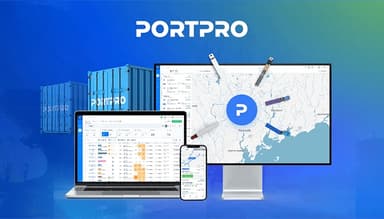
PortPro is an advanced software that simplifies trucking operations with tools to optimize your workflow. While some users note occasional system downtime, the software comes with robust features to ensure overall efficiency. PortPro supports optimized tools, from courier tracking to accounting, to drive growth, save time, and deliver seamless outcomes.
PortPro Specifications
- Vehicle Tracking (GPS)
- Fuel Management
- Maintenance Scheduling
- Driver Management
PortPro Features
Order Entry
This feature helps users streamline and automate delivery order entry. It auto-populates data fields, making manual entry effortless. Furthermore, it integrates with APIs and EDI, offering real-time updates and bulk uploads to save time and reduce manual tasks.
Container Tracking
Users can efficiently manage container details by automatically tracking vital information like vessel ETA, container status, and holds. It offers real-time updates and accurate data, helping users to easily manage their containers, avoiding demurrage fees, and ensuring timely delivery.
Dispatch
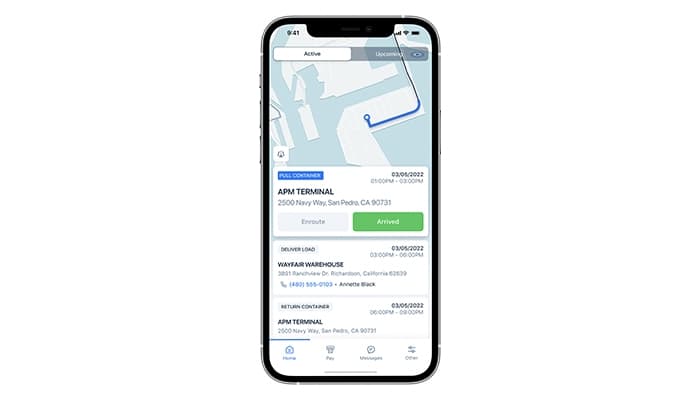
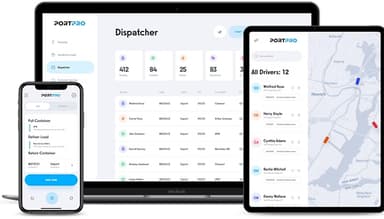
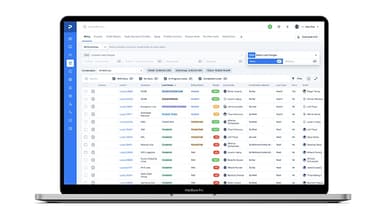
PortPro empowers dispatchers to manage loads more efficiently with customizable boards and real-time updates. It assists in assigning drivers, adjusting routes, and receiving status updates instantly. It also helps reduce delays and ensures smooth coordination between dispatchers and drivers for timely deliveries.
Customer Portal
The software empowers users to enhance their customer experience with instant access to load statuses, container tracking, and vital documents. It supports real-time GPS tracking, load status updates, and easy document access, reducing administrative work and improving transparency.
Reporting
It automates TMS reporting to enable users to generate customizable reports for better business insights. The feature supports various filters and automatic delivery options. Thus, it ensures comprehensive visibility into customer performance, drivers, and operational efficiency.
Pros And Cons of PortPro
Pros
Effective tracking and planning tools
Robust invoicing and reporting features
Ability to tailor recommendations
Easy-to-use customer portal
Cons
Occasional system downtimes, according to some software users
Some users note frequent training-focused issues
PortPro Reviews
Total 11 reviews
4.7
All reviews are from verified customers
Rating Distribution
5
Stars73%
4
Stars27%
3
Stars0%
2
Stars0%
1
Stars0%
Share your experience
Transportation/Trucking/Railroad, 51-100 employees
Less than 6 months
“Easy to work with”
Pros
PortPro is new yet modern and keeps up with today's tech, especially with its AI features. Also it is built for growth and works well with current trends. One of the things that stands out to me is that it's browser-based as it makes it so easy to access and work. The driver app is great too and the Customer Portal is even better. Honestly, there is a lot that I love about it.
Cons
Well it is clearly built for single-terminal motor carriers and then modified for multi-terminal ones. However even after this transition, some key features still do not fully work for multi-terminal MCs. It also has some basic logic issues, like allowing the same equipment to be duplicated and only supporting data uploads for creating new entries, not updating existing ones. The terminology can be confusing too as they use import terms like "Consignee" for both cargo receivers and shippers or calling export cargo loading "Delivery." Another issue is that if my company shares a client with other PortPro users, we can't grant that client portal access using their preferred email. It has to be different for each of us. These were unexpected issues for a platform that outperforms many alternatives in other ways. Hopefully, fixing these won't take a backseat to adding new features.
Rating Distribution
Ease of use
8
Value for money
10
Customer Support
8
Functionality
7
Transportation/Trucking/Railroad, 51-100 employees
Less than a year
“Hands down the best TMS option”
Pros
It makes managing orders simple as it guides you through the entire order process. From day one, the onboarding team took all the time needed to get us fully set up and trained. The transition to the Customer Service team was smooth, and they have been awesome. Huge shoutout to them for always checking in and making sure our experience stays the best!
Cons
Executive level roll up reporting is still in the works just needs to be finalized and published. Also I think the addition of a stronger financial AP process would be a great improvement, as it will make it perfect.
Rating Distribution
Ease of use
10
Value for money
10
Customer Support
10
Functionality
9
Transportation/Trucking/Railroad, 101-500 employees
Less than a year
“Great fit for drayage needs”
Pros
PortPro layout and filters are very user-friendly and the system is also highly customizable. Plus their team is always available and happy to help with any questions we have.
Cons
The only complaint is that it was not available in the market earlier.
Rating Distribution
Ease of use
10
Value for money
6
Customer Support
7
Functionality
10
Frequently Asked Questions
Does PortPro offer an API?
Yes, PortPro offers an API.
Does PortPro have a mobile app?
Yes, PortPro has a mobile app for Android and iOS users.
What language does PortPro support?
PortPro supports different languages, such as English, Spanish, Danish, and German.
What types of pricing plans does PortPro offer?
The PortPro cost comes in customizable plans for each business. Request a tailored quote of the PostPro pricing specific to your business needs.
What other apps does PortPro integrate with?
PortPro integrates with QuickBooks only. You can learn more about its integrations through a free PortPro demo.
Who are the typical users of PortPro?
The typical users of PortPro are logistics and transportation companies, particularly those in drayage operations, including trucking companies, freight forwarders, and terminal operators.
What level of support does PortPro offer?
PortPro offers support through email, in-app chat, and a knowledge base.