




Last Updated
Key Takeaways
Generated from the text of customer reviews
Our Verdict
Overall Rating
Based on 287 users reviews
4.3
Rating Distribution
Positive
89%
Neutral
10%
Negative
1%
Starting Price
$25
per month

Fusion By Ensora Health Specifications
- Appointment Management/Scheduling
- Client Portal
- Telemedicine
- Billing and Invoicing
Fusion By Ensora Health Features
Telehealth
The platform includes HIPAA-compliant video calls between therapists and clients. Clients can join from any location with an internet connection. Telehealth visits appear on the same calendar as in-person visits. The tool works on phones, tablets, and computers.
Client Portal
The client portal is part of the EHR, so its content links to scheduling, documentation, and billing. Clients can complete digital intake forms, view and request appointments, open shared documents, pay invoices, and download home exercise programs.
Reporting And Task Management
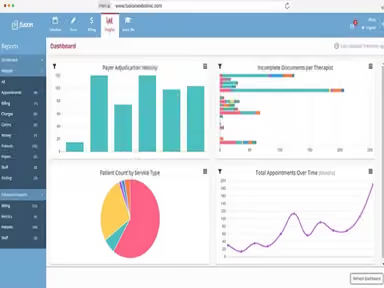
Fusion has a task manager, authorization tracking, and reporting dashboards in one system. Tasks can be assigned across the front desk, billing, and clinical teams. Authorization tracking shows remaining visits and expiration dates. Dashboards report therapist productivity, attendance, and schedule utilization by therapist or location.
Rehab Therapy Billing
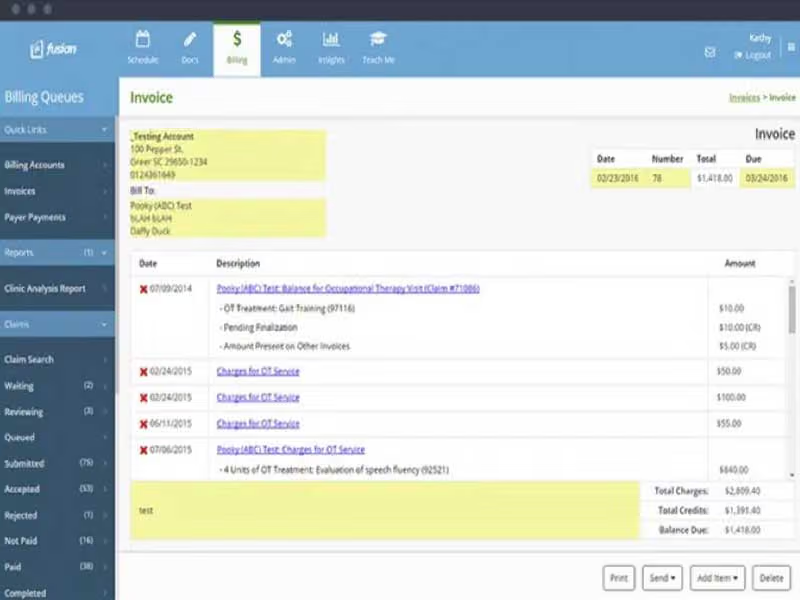
The platform creates claims from completed documentation and pulls CPT codes, modifiers, and units based on payer rules. Conditional rules flag missing information before a claim is filed. Billing also covers electronic claim submission, automatic ERA posting, invoices, Superbills, and Click-to-Pay links.
Automated Reminders And Waitlist
The software sends text and email reminders before every visit, which replaces manual confirmation calls. When a visit is canceled, the built-in waitlist shows which clients are waiting. Staff fill the open slot from one scheduling view that covers every discipline, therapist, and location.
Pros And Cons of Fusion By Ensora Health
Pros
Helps practices spend less time on administrative tasks
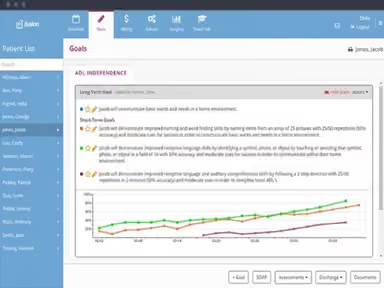
Documentation stays consistent across the whole therapy team
Clinicians from different therapy disciplines can share information more easily
Enables practices to handle insurance billing with lesser time and effort
Clinicians have more time to spend with clients
Cons
Custom forms are limited mainly to intake workflows
Mobile navigation can feel difficult between pages and files
Some scheduling tools can take time to understand
Fusion By Ensora Health Pricing
Foundation | Essentials | Advanced | Premier |
|---|---|---|---|
$25 per month (1 user) | $99 per month (1 user) | $159 per month for the first user + $45 per additional user | $229 per month for the first user + $75 per additional user* |
|
|
|
|
Disclaimer: The pricing details were last updated on Sep 16, 2026 from the vendor's website. Please contact us for a tailored pricing list.
Fusion By Ensora Health Reviews
Total 287 reviews
4.3
All reviews are from verified customers
Rating Distribution
5
Stars46%
4
Stars43%
3
Stars8%
2
Stars1%
1
Stars1%
Share your experience
Medical Practice, 1-10 employees
Less than a year
“Claims tracking right inside the EMR”
Pros
Being able to track claims through primary, secondary and so on is really convenient and it helps a lot that everything can be handled right inside the EMR without needing to jump to another system.
Cons
One thing that's limiting is not being able to create custom forms just for providers to use since forms can only be sent as intake forms. It's also frustrating that there isn't a way to send forms to third parties for them to complete or sign.
Rating Distribution
Ease of use
8
Value for money
7
Customer Support
7
Functionality
8
Health, Wellness and Fitness, 1-10 employees
“frustrating exit terms”
Pros
The default templates are genuinely useful especially for small medical and healthcare businesses. My favorite feature is the "Pull Forward" option for previous notes which makes documentation and paperwork much more manageable and convenient.
Cons
The pricing doesn't feel worth it if you have fewer than 10 users. Support isn't available in real time either since most things get pushed to the online library, FAQs or AI instead of actual personalized help. It's also hard to get one-on-one assistance when you really need it. On top of that, leaving Fusion comes with strict contract terms, including a required 3 or 6-month advance notice before you can cancel so the fine print really matters. Data export was also very frustrating especially based on how poorly they managed a client's exit.
Rating Distribution
Ease of use
6
Value for money
6
Customer Support
5
Functionality
6
Health, Wellness and Fitness, 1-10 employees
“Not recommended”
Pros
There really wasn't anything positive to mention.
Cons
Without a doubt this was the worst billing experience I've ever dealt with. I would absolutely not recommend ENSORA to anyone. Their billing department kept charging me for several months even though they provided no services whatsoever. I made multiple attempts to get the problem resolved but nothing was ever corrected. On top of that, the manager was completely unresponsive and ignored my concerns. The company showed no accountability or professionalism at all. Save yourself the frustration and stay away from this service.
Rating Distribution
Ease of use
2
Value for money
2
Customer Support
1
Functionality
2
Frequently Asked Questions
Does Fusion by Ensora Health help with insurance credentialing?
Yes, Fusion provides access to a credentialing specialist team that works with speech-language pathologists, physical therapists, and occupational therapists. The team prepares and submits payer enrollment applications. It also tracks each application and follows up with the insurance company. New Advanced customers get up to two payer enrollments per clinician. Premier customers get up to three.
Does Fusion use client data to train AI models?
No, Fusion does not use client Protected Health Information (PHI) to train AI models. Data processed by Ensai Session Assistant is used only to generate notes. This policy is fixed, and no setting can change it.
What level of support does Fusion offer?
Fusion provides support through 24/7 live chat, phone, email, and support tickets. It also offers a knowledge base, webinars, courses, videos, and a user community to help customers learn and troubleshoot the software.
How long does implementation and data migration take with Fusion By Ensora Health?
Fusion does not specify a fixed timeline. A dedicated project manager guides the setup and data migration. Practices also get training resources and private sessions with experts before onboarding begins. How long the process takes depends on the practice's setup and how much needs to be migrated.
Can Fusion support practices with high claim volumes?
Yes, Fusion supports electronic claims and automated billing workflows. Higher tier plans come with larger claim allowances. The Premier plan allows unlimited claim submissions, but the Fair Usage Policy applies.
Does Fusion allow customized documentation?
Yes, Fusion allows practices to change some parts of their documentation workflow. Staff can adjust how they take notes and edit the intake forms, and there are templates for different specialties. Practices can also save short phrases and templates for notes they write often.
Does Fusion offer a dedicated mobile app?
No, Fusion does not offer a dedicated mobile app. It can be accessed on any web-enabled device, including smartphones and tablets, through a web browser.