


Druva
Last Updated
Overview
Druva helps large enterprises centralize data governance and compliance with automated eDiscovery, legal holds, and sensitive data monitoring. While some features require initial setup to enable full automation, its SaaS platform provides continuous compliance monitoring, proactive risk mitigation, and centralized visibility across cloud and endpoint data.
Druva Specifications
- Policy And Document Management
- Risk Assessment And Mitigation
- Regulatory Compliance Tracking
- Audit Management
What Is Druva?
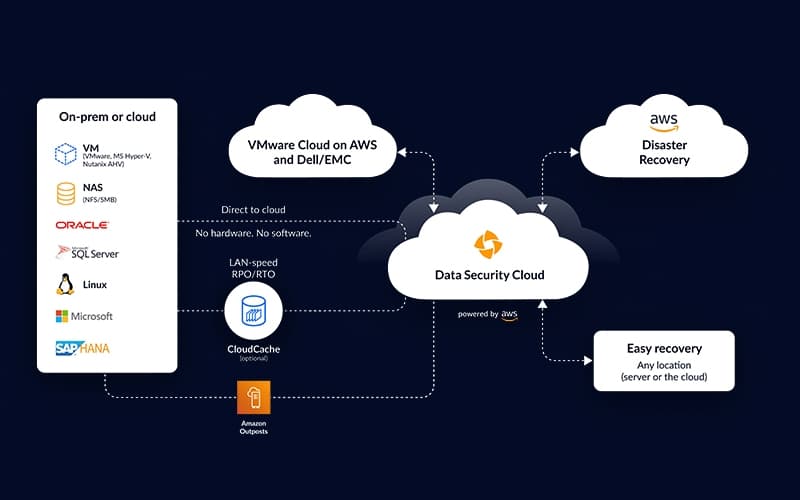
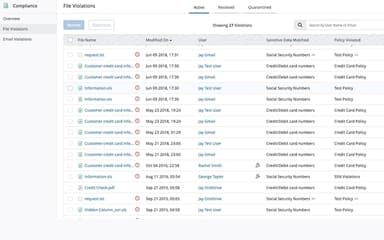
Druva is a SaaS platform that helps organizations manage and protect enterprise data across cloud and endpoint environments. It provides centralized visibility into sensitive data and simplifies compliance with regulations like GDPR, HIPAA, and CCPA through pre-built and customizable templates. The platform continuously monitors data for potential violations by sending alerts and enabling automated remediation or defensible deletion. With proactive risk mitigation and governance tools, Druva helps reduce compliance, legal, and security risks while maintaining control over critical information.
Druva Pricing
The Druva cost is structured around the following customizable modules:
Enterprise Data (Data Center and Public Cloud):
- Business
- Enterprise
- Enterprise Plus
Productivity Data (Microsoft 365, Google Workspace, and Endpoints):
- Enterprise
- Elite
- Elite Plus
CRM Data (Salesforce):
- Enterprise
- Elite
CRM Data (Microsoft Dynamics 365):
- Enterprise
Disclaimer: The pricing is subject to change.
Druva Integrations
Druva software offers integration with multiple apps, including:
- Okta
- Microsoft Sentinel
- Splunk Enterprise
- CrowdStrike Falcon
- ServiceNow
- BetterCloud
Who Is Druva For?
Druva software is suitable for businesses across a range of industries and sectors, including:
- Construction
- Education
- Healthcare
- Life sciences
- Business services
- Financial services
- Manufacturing
Is Druva Right For You?
Druva is an excellent fit for organizations that prioritize cloud-native data protection and governance, without the complexity of managing hardware. Its standout capability is providing a unified, 100% SaaS platform for backup, recovery, and GRC functions. Druva software has a proven track record of delivering resilient and compliant data management solutions for enterprises, ensuring your critical information is secure and easily accessible for legal or regulatory needs.
Are you still unsure if Druva is the right solution for you? Call us at (661) 384-7070 for further assistance.
Druva Features
Public Cloud Backup
Druva offers cloud-native backup solutions for public cloud environments like AWS and Azure. It simplifies data protection by eliminating data silos, reducing the total cost of ownership through global deduplication and compression, and defending against ransomware with secure, immutable snapshots.
Hybrid Cloud Backup
The platform combines scalable backup, disaster recovery, archival, and analytics. It simplifies data protection, reduces operational costs, ensures rapid recovery, and centralizes management while delivering secure, flexible, and AI-powered cloud services for hybrid workloads.
End User Protection
Druva offers data protection for Microsoft 365, Google Workspace, and devices. It ensures seamless data availability, safeguards against ransomware and insider threats, and simplifies compliance with eDiscovery, legal holds, and governance, delivering resilient, secure, and always-accessible end-user data management.
Accelerated Ransomware Recovery
Druva's ransomware recovery solution accelerates the process of identifying and recovering from ransomware attacks. It allows quick quarantine of suspect snapshots, scanning data before restoration, and minimizing data loss across multiple recovery points, ensuring rapid return to business operations.
Sensitive Data Governance
The system enables organizations to proactively monitor and manage sensitive data across various workloads. It provides automated compliance scanning, alerts within 24 hours of violations, and facilitates defensible deletion of sensitive data, helping organizations maintain compliance with regulations like GDPR and HIPAA.
Pros And Cons of Druva
Pros
Recovers data from anywhere, anytime
Keeps record of all workstation and server backups
Makes moving to new hardware very simple
Cons
Limited offline access during backup cycles
Initial setup may require technical expertise
Druva Reviews
Total 10 reviews
4.7
All reviews are from verified customers
Rating Distribution
5
Stars70%
4
Stars30%
3
Stars0%
2
Stars0%
1
Stars0%
Share your experience
Non-Profit Organization Management, 101-500 employees
Less than a year
“Reliable backup from anywhere”
Pros
With it user data can be backed up without interrupting or bothering end users at all. It gives us the flexibility to schedule data recovery anytime and from anywhere. If a user's system stops working, we're still able to restore and provide the data directly from the backend.
Cons
The front end is not very user-friendly.
Rating Distribution
Ease of use
7
Value for money
8
Customer Support
8
Functionality
7
Media Production, 51-100 employees
Less than 6 months
“Provides helpful charts and reports”
Pros
Right from the start, backing up and restoring servers and server files felt pretty simple to use. We were able to learn a lot of the platform on our own just by exploring and testing things out. It also provides a lot of helpful charts and reports that give good visibility into the different servers we have protected.
Cons
Now and then I run into a feature that feels like it should be located in one section but instead I have to click through several areas to find it somewhere else. It's not a major problem but I do hope the interface gets improved at some point.
Rating Distribution
Ease of use
8
Value for money
9
Customer Support
10
Functionality
8
Health, Wellness and Fitness, 51-100 employees
Less than a year
“responsive support”
Pros
It is easy to handle and the interface is simple to use. Whenever help is needed, support is available and the service team responds quickly.
Cons
The system crashes fairly often. The outages are usually temporary but they still happen at least twice a month.
Rating Distribution
Ease of use
10
Value for money
9
Customer Support
9
Functionality
9
Frequently Asked Questions
What language does Druva support?
Druva supports English, Spanish, French, German, and Japanese languages.
Who are the typical users of Druva?
Druva features are used by businesses across a wide range of industries and sectors, including financial services, education, manufacturing, healthcare, business services, and construction.
What level of support does Druva offer?
Druva offers support through phone, email, an online form, a help center, and a support portal.
Does Druva have a mobile app?
No, Druva does not have a mobile app.
Does Druva offer an API?
Yes, Druva offers an API.
What other apps does Druva integrate with?
Druva supports integration with several apps, including CrowdStrike Falcon, ServiceNow, Okta, and Microsoft Sentinel.
What types of pricing plans does Druva offer?
Pricing is divided into three main customizable modules: Enterprise Data, Productivity Data, and CRM Data. The Enterprise Data module (for data center and public cloud workloads) includes Business, Enterprise, and Enterprise Plus plans. The Productivity Data module (covering Microsoft 365, Google Workspace, and endpoints) offers Enterprise, Elite, and Elite Plus tiers. The CRM Data module supports Salesforce with Enterprise and Elite plans, and Microsoft Dynamics 365 with an Enterprise plan. Request a tailored Druva price plan for your organization today!