


Onna
Last Updated
Overview
Onna offers a data management platform that centralizes unstructured enterprise data and supports governance, risk, and compliance tasks. While some users note occasional performance slowdowns with very large datasets, its integrations, audit capabilities, and policy management features make it a dependable solution for legal and compliance teams.
Onna Specifications
- Policy and Document Management
- Risk Assessment and Mitigation
- Regulatory Compliance Tracking
- Regulatory Change Monitoring and Impact Analysis
What Is Onna?
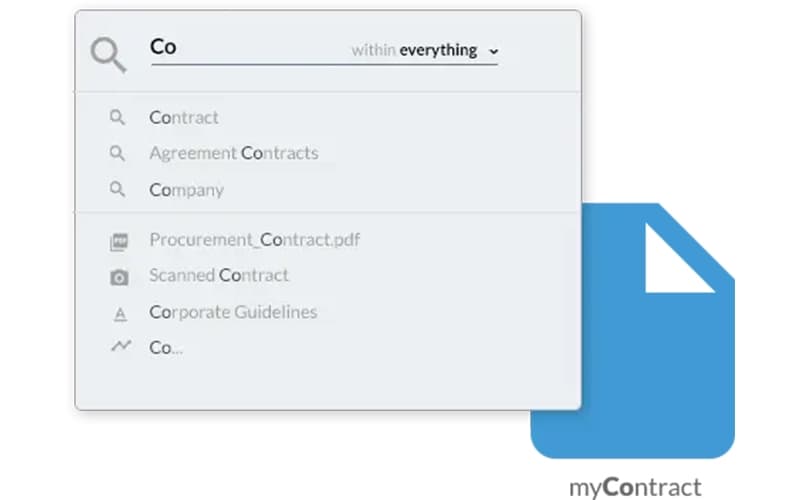
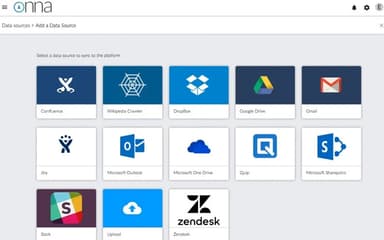
Onna is a data management platform designed for large enterprises struggling with information sprawl across disparate cloud applications. It creates a single, centralized repository for all unstructured data, making it accessible and secure. Key capabilities, such as forensic data preservation and robust search, empower legal and IT teams to streamline internal investigations and compliance audits. This cohesive approach enhances organizational decision-making by transforming fragmented information into a unified, actionable asset for mitigating risk and responding to legal matters.
Onna Pricing
Disclaimer: The pricing has been sourced from third-party websites and is subject to change.
Onna Integrations
The software supports integration with multiple systems and platforms, such as:
- Slack software
- Jira software
- Microsoft Teams
- Zoom
- GitHub
Who Is Onna For?
Onna is ideal for a wide range of industries, sectors and organizations, including:
- Legal services
- Government agencies
- Large enterprises
- Technology companies
- Financial services
- Healthcare providers
- Educational institutions
Is Onna Right For You?
Onna is the ideal solution for large enterprises managing vast amounts of unstructured data. The platform unifies information from multiple cloud applications into a single, searchable repository while ensuring security, scalability, and compliance with regulations such as GDPR and CCPA. Trusted by leaders like Dropbox, Oracle, and Lyft, Onna has earned recognition including eDiscovery Innovation of the Year and a Silver award for Most Innovative Company.
Still unsure about Onna? Contact us at (661) 384-7070 for further guidance.
Onna Features
Manage Retention Policies
Onna enforces consistent governance across multiple data sources by automatically applying retention policies to both existing and new content. The platform allows custom retention rules per source, helping organizations maintain compliance, extract actionable insights, and balance regulatory requirements with operational data needs efficiently.
Defensible Archiving
The platform preserves an accurate and auditable record by connecting to modern business applications via API. Onna extracts both data and metadata, including edits, deletions, and audit logs. This ensures organizations have defensible evidence for legal and compliance purposes, supporting regulatory, litigation, and internal investigation needs.
Data Classification
Onna uses machine learning to automatically identify and tag critical information across all locations. The software recognizes common sensitive file types, including passports, social security numbers, contracts, and licenses. Users can quickly locate, manage, and secure key data, improving compliance, operational efficiency, and data visibility across the enterprise.
Preservation Retention
The software supports organizations in maintaining compliance with evolving regulations such as GDPR, HIPAA, CCPA, and PCI. Onna automates preservation retention processes, ensuring that critical data is retained according to mandates, helping legal and compliance teams meet regulatory requirements while reducing the risk of violations and penalties.
Data Minimization
Onna identifies data that falls outside defined retention policies to reduce unnecessary storage and potential risk. The platform helps organizations minimize sensitive or outdated information effectively, lowering costs, improving data governance, and strengthening compliance by ensuring that only required and relevant data is kept across all sources.
Pros And Cons of Onna
Pros
Centralizes data from multiple cloud applications efficiently
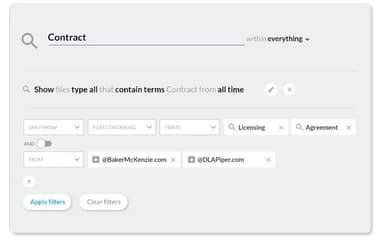
Advanced search capabilities save time during eDiscovery processes
Seamless integration with existing workflow tools
Cons
Customer support response times may vary
Initial setup can be technical without guided support
Onna Reviews
Total 3 reviews
4.7
All reviews are from verified customers
Rating Distribution
5
Stars67%
4
Stars33%
3
Stars0%
2
Stars0%
1
Stars0%
Share your experience
Airlines/ Aviation, 1-10 employees
Less than a year
“Saves a lot of time”
Pros
Having everything connected through one simple API interface makes accessing information from tools like Slack, Salesforce and other productivity apps much more user-friendly. It puts data into one accessible format which saves a lot of time and removes the hassle of jumping between different platforms just to find what I need. It really works as a bridge across a wide range of apps. The eDiscovery feature is also a strong productivity boost especially while working remotely since it cuts down on all the back-and-forth emailing with the team.
Cons
One area that needs work is customer support since responses to questions or feature issues can take longer than expected. That should be improved especially for a product centered on boosting productivity. The security features could also be stronger although they are still adequate for now.
Rating Distribution
Ease of use
10
Value for money
9
Customer Support
9
Functionality
9
Legal Services, 500+ employees
Less than a year
“Fantastic support team”
Pros
Between collecting FB at Work and Atlassian data, this stands out as one of the very few tools that can handle both and it does the job well. Even though it wasn't officially recommended by Onna, I still managed to successfully pull our client's on-prem Confluence data from the office over VPN using a laptop, including at least 30 GB. Also worth mentioning, the support team was absolutely fantastic.
Cons
QCing collections in the main portal can be challenging because there just isn't enough detail available there. On top of that, the review/export portal will occasionally stop showing data in the workspace for a bit which definitely causes some unnecessary panic, even though the data always ended up coming back.
Rating Distribution
Ease of use
8
Value for money
10
Customer Support
9
Functionality
7
Legal Services, 500+ employees
Less than a year
“Fast, user-friendly and customizable”
Pros
Right from the start, the interface feels modern and user-friendly so getting around the platform is very natural. The solution is also quite fast which makes daily use more efficient. I also appreciate that it is API-based and the preview functionality shown directly in the search results is very helpful. Another useful feature is the ability to customize tags at the document level which really helps speed up future searches.
Cons
A few things are still missing though. The UI is currently available only in English, inherited security is still on the roadmap and versioning has not been introduced yet.
Rating Distribution
Ease of use
10
Value for money
9
Customer Support
10
Functionality
8
Frequently Asked Questions
What types of pricing plans does Onna offer?
Onna subscriptions begin at $5,000/year. Get a detailed Onna cost breakdown to make an informed decision.
What language does Onna support?
Onna software primarily supports English.
What other apps does Onna integrate with?
Onna software supports integration with multiple systems and platforms, including Microsoft Teams, Slack, Zoom, GitHub, and Jira, enabling seamless collaboration and streamlined workflows across various tools.
Does Onna have a mobile app?
No, Onna does not offer a dedicated mobile app.
What level of support does Onna offer?
Onna offers tiered support plans to suit different organizational needs. The Standard plan provides committed response times, while Premium and Premium Plus plans offer faster responses, extended support hours, and dedicated resources. Additionally, users can access a self-service Help Center for guidance and troubleshooting.
Who are the typical users of Onna?
Onna features are used by legal teams, compliance officers, IT administrators, and enterprise organizations managing unstructured data across multiple platforms.
Does Onna offer an API?
Yes, Onna offers an API.