

Last Updated
Overview
Case Master Pro is cloud-based case management software for law firms, collection agencies, and subrogation professionals. It streamlines case management, billing, and document handling to boost efficiency. However, some users may find its advanced features overwhelming at first, requiring time to fully understand and utilize the system’s capabilities.
Case Master Pro Specifications
- Case Management
- Document Management
- Client Management (CRM)
- Billing & Invoicing
What Is Case Master Pro?
Case Master Pro is an all-in-one, cloud-based case management software tailored for law firms, collection agencies, and subrogation professionals. It simplifies case management, billing, accounting, and document handling, boosting efficiency. With an intuitive interface, users can quickly access crucial information. Customizable financial modules cater to complex cases, while top-tier security, including two-factor authentication and PCI/SOC2 compliance, ensures data protection and regulatory adherence. This powerful solution streamlines workflows and enhances productivity for legal and financial operations.
Case Master Pro Pricing
Case Master Pro Integrations
Case Master Pro connects with an organization’s current integration list to keep the law firm running smoothly. Its built-in features integrate effortlessly with industry-leading platforms.
- Quickbooks
- DocuSign
- Microsoft Office
Who Is Case Master Pro For?
Case Master Pro is utilized across various industries, including:
- Law firms
- Collection agencies
- Subrogation professionals
- Real estate collections
- Judgment recovery services
- Credit card collections
- Medical collections
Is Case Master Pro For You?
Case Master Pro is ideal for collection agencies, subrogation, real estate collections, judgment recovery, credit card collections, and medical collections. It streamlines case management, billing, and document handling, providing tailored solutions to enhance efficiency and effectiveness in these specialized fields.
Still not sure if Case Master Pro is right for you? Connect with our customer support staff at (661) 384-7070 for further assistance.
Case Master Pro Features
Case Management
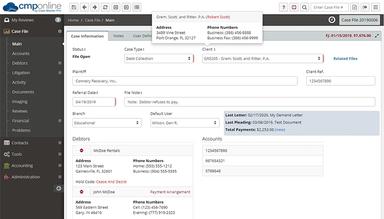
Case Master Pro’s case management feature allows users to efficiently track and manage legal cases, including client information, case notes, and related documents. This centralized system ensures easy access to case data, facilitating improved decision-making and enhancing client service and productivity.
Billing And Accounting
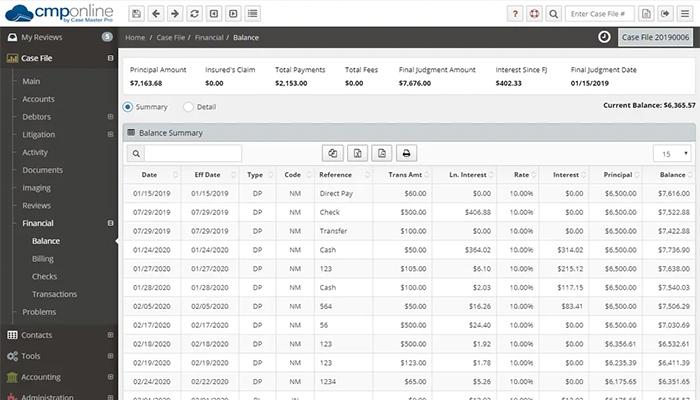
The billing and accounting feature simplifies financial processes by enabling users to generate invoices, track payments, and manage trust accounts. With support for different billing methods, including hourly rates and flat fees, it ensures financial accuracy and integrates with accounting systems for seamless reporting.
CMP Imaging
CMP Imaging provides a streamlined solution for managing case-related images. Users can upload, store, and organize image files securely, ensuring that they are easily accessible when needed. This feature enhances document management by supporting a variety of image file formats, offering flexibility in case processing.
Administration
Case Master Pro offers powerful administrative tools for managing users, permissions, and settings. Administrators can control access levels, customize workflows, and manage system configurations. This ensures that the software is tailored to the organization's specific needs, optimizing performance and ensuring smooth operations across teams.
Reporting
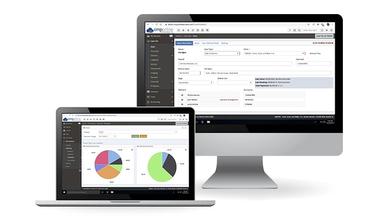
The reporting feature enables detailed, customizable reports on various aspects of case management, including financial transactions, billing, and compliance. Users can generate reports on demand, gaining insights into performance, identifying trends, and making data-driven decisions to improve case handling and operational efficiency.
Document Management
Case Master Pro includes a robust document management system, allowing users to securely store, organize, and retrieve case documents. With features like version control, permission settings, and easy search functionality, it ensures that documents are always up-to-date and accessible to authorized personnel, boosting collaboration.
Pros And Cons of Case Master Pro
Pros
Offers robust tools for Tracks cases, generates documents efficiently
Improves flexibility with remote access
Supports transactions, invoicing, and collections, reducing third-party tool reliance
Automates tasks to save time
Provides detailed reporting and analytics for better decision-making and compliance tracking
Cons
Some users may find the system complex at first, requiring time to master its features
Pricing may limit small firms
Limited integrations with external software
Requires stable internet for performance
Case Master Pro Reviews
Total 19 reviews
4.9
All reviews are from verified customers
Rating Distribution
5
Stars95%
4
Stars5%
3
Stars0%
2
Stars0%
1
Stars0%
Share your experience
Blair
Law Practice, 1-10 employees
More than a year
“CMP is a game-changer for us!”
Pros
It is super easy to use and I love how fast the support team responds. It seems like they're always improving things, which is great to see.
Cons
I haven't really encountered any issues but if I ever do, the support team always resolves them quickly and completely.
Rating Distribution
Ease of use
10
Value for money
10
Customer Support
10
Functionality
10
Timothy
Financial Services, 1-10 employees
Less than 6 months
“I'm already happy with it”
Pros
I've been working in debt collection for over 25 years and switching to this new system was really smooth. Accessing our data for exports or generating documents is easy. I couldn't ask for an easier transition.
Cons
Honestly, I haven't run into anything that's been a problem so far. Whenever we need something, the customer service team gets back to me fast with a solution or even just a helpful suggestion.
Rating Distribution
Ease of use
10
Value for money
10
Customer Support
10
Functionality
10
Brenda
Law Practice, 1-50 employees
More than a year
“Great product with lots of customization options”
Pros
Most of the features are pretty simple. It keeps all the key details of a case in one place and I can even create custom reports when I need them.
Cons
We switched from the server-based product to the online version. There are a few things that seem a little out of place, like how the document templates aren't where the text templates are. It's a bit confusing, but nothing too bad.
Rating Distribution
Ease of use
10
Value for money
10
Customer Support
9
Functionality
10
Frequently Asked Questions
Does Case Master Pro software offer an API?
No, Case Master Pro does not mention offering an API on its website.
Does Case Master Pro have a mobile app?
No, Case Master Pro does not have a dedicated mobile app, but it is accessible on mobile devices through its web-based platform.
What language does Case Master Pro support?
Case Master Pro supports the English language.
What types of pricing plans does Case Master Pro software offer?
Case Master Pro cost is customized based on the specific needs of each organization. Pricing details are tailored to fit the unique requirements of the business.
What other apps does Case Master Pro software integrate with?
Case Master Pro integrates with DocuSign, QuickBooks, and Microsoft Office.
Who are the typical users of Case Master Pro software?
Typical users of Case Master Pro software include law firms, medical collections, collection agencies, subrogation professionals, judgment recovery services and credit card collections.
What level of support does Case Master Pro software offer?
Case Master Pro offers comprehensive support options, including phone assistance, live chat, email/helpdesk, and a knowledge base.