


CasePacer
Last Updated
Overview
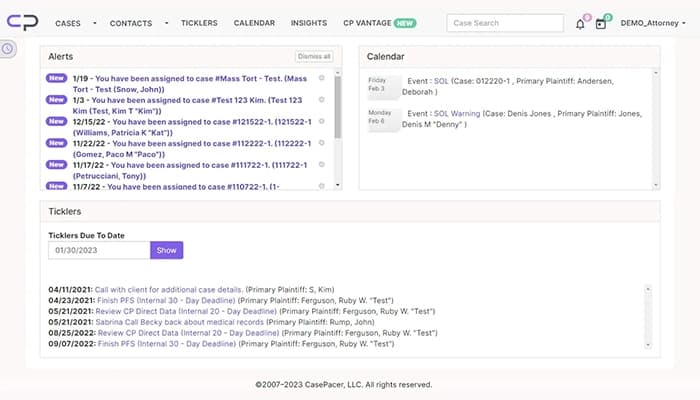
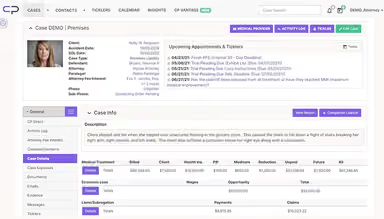
CasePacer systemizes legal case management with cloud accessibility and robust tools. Although it lacks built-in e-signature support, it provides flexible customization for unique business needs. The software is designed for law firms and helps enhance productivity, organize case details, and keep teams connected with an intuitive interface and automated workflows.
CasePacer Specifications
- Case Management
- Document Management
- Client Management (CRM)
- Billing & Invoicing
What Is CasePacer?
CasePacer is a powerful cloud-based case management solution designed for law firms looking for efficiency and organization. It helps attorneys and legal teams manage cases, automate tasks, and stay connected from anywhere. It offers user-friendly tools that assist users in simplifying workflows and enhance collaboration. CasePacer platform supports smooth customization to match unique legal needs, ensuring firms are able to optimize their processes effortlessly. Its cloud-based structure keeps data secure while offering the flexibility modern legal professionals require to streamline operations effectively.
CasePacer Pricing
The software offers two pricing options, as detailed below:
- Monthly Plan: $5/active case/month
- Deferred Plan: Pay-at-settlement option
Disclaimer: The prices are subject to change.
CasePacer Integrations
Who Is CasePacer For?
CasePacer is designed for law firms, especially those handling personal injury, mass tort, and litigation cases. It’s mainly used by attorneys, paralegals, and legal teams looking for a streamlined case management solution.
Is CasePacer Right For You?
CasePacer software is perfectly built for you if you are a legal professional who handles personal injury, mass tort, or litigation cases. The platform simplifies case management with cloud-based tools, automation, and smart workflows. Whether you're a solo attorney or part of a large firm, it keeps everything organized, secure, and efficient, helping you focus on winning cases, not managing paperwork.
Do you still feel that CasePacer is not the right choice for you? Contact our professional customer support team at (661) 384-7070 for further assistance.
CasePacer Features
Document Management
It simplifies organizing and accessing case files by seamlessly integrating them into workflows. It saves time, reduces hassle, and ensures important legal documents are always at your fingertips when needed.
Billing And Timekeeping
The billing and timekeeping feature assists law firms in tracking billable hours and case expenses effortlessly. It provides flexible timekeeping options, making invoicing accurate, efficient, and stress-free for legal teams.
Smart Analytics
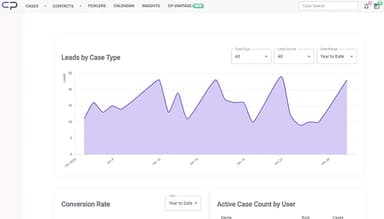
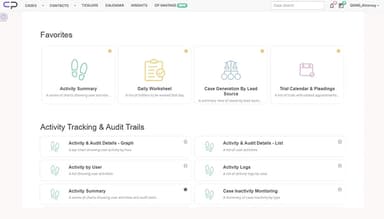
This feature helps users generate reports without external tools. It transforms raw case data into meaningful insights, making forecasting, decision-making, and case tracking easier and more efficient.
Mass Tort Cases
This feature systemizes mass tort case management by allowing plaintiffs to upload documents, images, and videos directly from their mobile devices, ensuring smooth collaboration and efficient case handling.
Cloud Vs. On-Site
The Cloud vs. On-Site feature empowers firms to choose between cloud-based or on-site case management. It ensures firms select the best setup based on security, accessibility, and operational needs.
Customer Success Team
It assists users with expert support for implementation, training, and troubleshooting. It ensures a smooth transition to CasePacer, helping firms increase efficiency and get maximum benefit from this platform.
Pros And Cons of CasePacer
Pros
Offers flexible customization to fit unique business needs
Access data anytime, anywhere with a web-based interface
Cuts down on server expenses and IT maintenance costs
Receives frequent updates for enhanced features and security
Cons
Lacks privacy between colleagues in shared environments
No built-in e-signature support for document approvals
Does not offer integration with Outlook calendar for scheduling
CasePacer Reviews
Total 12 reviews
4.8
All reviews are from verified customers
Rating Distribution
5
Stars83%
4
Stars17%
3
Stars0%
2
Stars0%
1
Stars0%
Share your experience
Legal Services, 1-10 employees
More than a year
“Its so helpful for our law firm”
Pros
Having all client cases in one place, with a consistent organization, makes reviewing new case files so much easier.
Cons
There is no privacy among co workers. Anyone can access my cases and documents, which is a concern.
Rating Distribution
Ease of use
9
Value for money
10
Customer Support
10
Functionality
9
Legal Services, 1-10 employees
Less than 6 months
“Excellent software, definitely worth using”
Pros
The document management system in this software is incredibly advanced and well-designed.
Cons
Cannot mention any cons here.
Rating Distribution
Ease of use
10
Value for money
10
Customer Support
10
Functionality
10
Law Practice, 1-50 employees
More than a year
“This software has saved me many times”
Pros
I love that we can manage large caseloads with a small team. The CasePacer team has worked closely with us to customize features, allowing us to quickly respond to court directives and unexpected requests.
Cons
An e-signature integration and a broadcast communication tool to replace MailChimp would be a great addition.
Rating Distribution
Ease of use
9
Value for money
10
Customer Support
9
Functionality
10
Frequently Asked Questions
Does CasePacer offer an API?
No, CasePacer does not offer an API.
Does CasePacer have a mobile app?
Yes, CasePacer has a mobile app for Android and iOS users.
What types of pricing plans does CasePacer offer?
CasePacer price consists of two plans, i.e., a monthly plan at $5/active case/month and a deferred plan with a pay-at-settlement option. Both plans include a 90-day guarantee, allowing firms to cancel if unsatisfied within the first three months. You can also request a customized CasePacer cost quote.
What other apps does CasePacer integrate with?
CasePacer integration details are available through its comprehensive demo.
Who are the typical users of CasePacer?
Typical users of CasePacer are attorneys, paralegals, and legal teams in law firms that handle personal injury, mass tort, and litigation cases.
What language does CasePacer support?
CasePacer supports only the English language.
What level of support does CasePacer offer?
CasePacer offers support via phone, email/helpdesk, FAQs, a customer portal, and a knowledge base.