


Centerbase
Last Updated
Key Takeaways
Generated from the text of customer reviews
Centerbase is a legal practice management platform used by midsize law firms to manage matters, billing, accounting, and operations. Users commonly praise its reporting and ease of use, while some mention a learning curve around customization and billing. In August 2026, Centerbase announced a Scan Logic integration for e-billing and OCG compliance.
Our Verdict
Centerbase offers an integrated approach to matter management, billing, and law firm operations. It is well suited to midsize firms that want these functions within one configurable platform. Users generally view the software as reasonably priced for its feature set, though some mention concerns about added costs and implementation expenses. We recommend it for firms seeking centralized legal and financial management with room for customization.
Centerbase Specifications
- Case Management
- Document Management
- Client Management (CRM)
- Billing & Invoicing
What Is Centerbase?
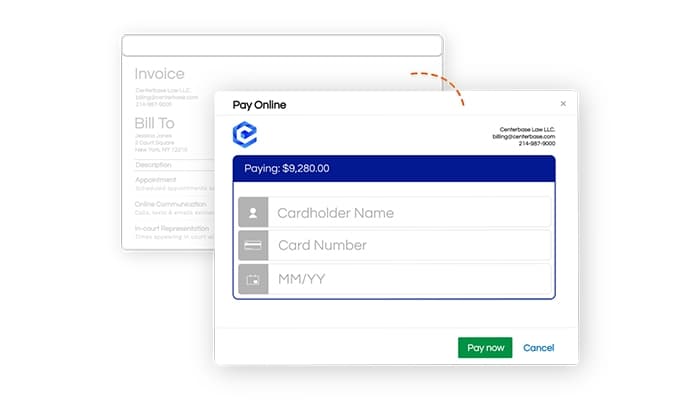
Centerbase is a cloud-based legal practice management platform. It includes matter management, timekeeping, billing, accounting, document management, calendaring, payments, and reporting. The platform supports workflows from client intake and case management through invoicing, collections, and financial reporting, giving firms a centralized view of legal and business operations.
What Is Centerbase Best For?
Centerbase is best for automating repetitive legal workflows that would otherwise require manual follow-up. Its Automated Workflows can intake clients, run conflict checks, open or update matters, set appointments, generate documents, route pre-bills for approval, send overdue bill reminders, and trigger client emails based on predefined conditions. This can help reduce administrative work and give staff more time for billable and higher-value tasks.
How Much Does Centerbase Cost?
Disclaimer: Pricing references are based on publicly available third-party information and industry benchmarks. Actual costs may vary.
Centerbase Integrations
Centerbase integrates with the following third-party tools:
- LawToolBox
- Plaid
- NetDocuments
- QuickBooks Online
- Office365
- iManage
How Does Centerbase Work?
Here's how you can access Centerbase and move through a typical workflow:
- Capture prospective client information through an intake form, which creates a Potential New Client record in Centerbase
- Run a firm-wide conflict check across contacts, matters, and notes before opening the case
- Convert the approved client into an active matter and use Automated Workflows to assign tasks, schedule appointments, send emails, and update matter information
- Manage related documents, deadlines, tasks, and client activity from the matter record
- Record billable activity through manual or automated time capture, then move pre-bills through review and approval
- Generate invoices, collect payments, track outstanding balances, and review WIP, AR, profitability, and other firm performance data
Who Is Centerbase For?
The software is designed for midsize law firms and legal professionals managing both casework and firm operations, including:
- Managing partners
- Attorneys
- Firm administrators
- Finance and accounting teams
- Billing professionals
- Legal operations staff
Centerbase Use Cases
Based on our analysis of user feedback and Centerbase features, we have identified key scenarios where the software is a good fit:
Firms Scaling Client Intake Without Adding Manual Steps
A growing intake pipeline can create duplicate data entry between inquiry forms, conflict checks, scheduling, and matter setup. Centerbase carries prospect information into the wider practice management workflow, where teams can run conflict checks, open matters, assign tasks, schedule appointments, and send follow-up communications. This can help firms increase intake volume without adding the same level of administrative work.
Litigation Practices Managing Changing Court Deadlines
Court-driven work often involves deadlines that shift when hearings, filings, or trigger dates change. Centerbase links calendars and matter activity, while its LawToolBox integration can calculate jurisdiction-based deadlines and update related dates when schedules move. This can help litigation practices keep changing court deadlines and dependent dates aligned across active matters.
Finance Teams Handling Trust Funds And Outstanding Balances
Trust-heavy practices need to keep client funds, invoices, and reconciliation activity closely connected. Within Centerbase, finance teams can monitor IOLTA balances, set replenishment thresholds, perform three-way reconciliations, and identify available funds that may be applied to receivables. This gives finance teams a more connected way to manage trust funds alongside outstanding client balances.
Firm Leaders Investigating Performance Without Building Reports
A partner trying to understand why collections slowed or which matters are becoming stale may need more than a static dashboard. Centerbase IQ allows questions to be asked in plain English against live matter, billing, timekeeping, and AR data, returning charts, tables, and links to the underlying records. This can help firm leaders investigate performance questions without creating a separate report for each issue.
Is Centerbase Right For You?
If your mid-sized law firm is looking for a platform that connects practice management, billing, and legal accounting, Centerbase may be a good fit. It is particularly suited to firms that have outgrown entry-level tools but do not need the overhead of an enterprise system. Law firms such as Elias Law Group and Hudson Cook LLP use Centerbase to support their operations.
Centerbase also provides role-, group-, and record-level permissions, change and deletion logs, encrypted backups, and 256-bit AES encryption. The platform has completed a SOC 2 Type II examination, with controls independently audited each year. Its Microsoft 365 integration may also suit firms that already rely heavily on Outlook, Word, and SharePoint.
However, its focus on mid-sized firms and integrated financial operations may provide more functionality than smaller practices with relatively simple matter management and billing needs require.
Still not sure if Centerbase is right for you? Get in touch with us at (661) 384-7070, and our experts can help you make an informed decision.
Centerbase Features
Automated Time Capture
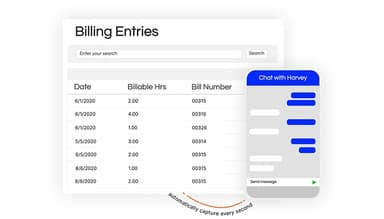
Centerbase can capture billable activity generated through calls, texts, emails, appointments, tasks, and document work, reducing the need for attorneys to reconstruct their time later. Captured activity remains connected to the relevant matter and billing workflow, while firms can also use traditional timers and timesheets. For more advanced capture, Centerbase integrates with Billables AI to match work to clients and matters and generate billing narratives for attorney review.
Electronic Pre-Bill Approval
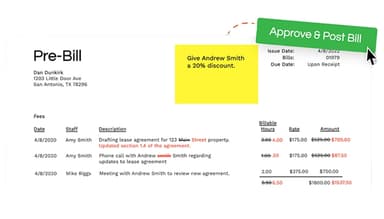
Centerbase's ePre-bill feature moves invoice review through configurable electronic approval workflows. Attorneys can edit descriptions, hours, rates, and amounts, hold or mark entries as non-billable, and leave notes for subsequent reviewers. The system tracks edits and approvals while automatically routing each pre-bill to the next reviewer, giving billing teams visibility into pending and approved invoices. This is a premium add-on rather than a standard feature.
Legal Accounting And Trust Management
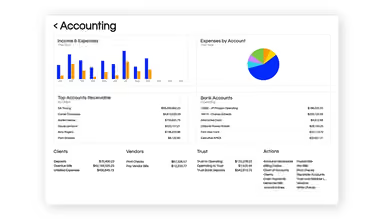
Centerbase includes a native general ledger that connects firm accounting with billing, timekeeping, and client finances. Firms can manage operating and trust accounts, vendor bills, deposits, expenses, and other financial activity without relying on a separate accounting system. For trust accounts, Centerbase automatically produces a three-way reconciliation comparing bank, book, and individual client ledger balances, supporting IOLTA accounting requirements.
Native Document Management
Documents and workspaces remain connected to their corresponding matters within Centerbase rather than being stored separately. Firms can use OCR for full-text searches and conflict checks, populate document templates with matter and client data, save emails into workspaces, and request eSignatures from matters. Document activity in Word and Outlook can also feed automated time capture.
Centerbase IQ
Centerbase IQ adds a natural-language AI layer to firm data. Users can ask questions about areas such as matter profitability, accounts receivable, WIP, billing, and timekeeping, and receive answers generated from live Centerbase records. Results can include charts and tables, along with citations that link back to the underlying records used to produce an answer. IQ can also search synced documents alongside structured firm data.
Report Center
For visibility into firm performance, Centerbase's Report Center combines billing, accounting, trust, timekeeping, and financial data within a shared reporting engine. Firms can adjust columns, filters, sorting, and grouping and save configurations as reusable views. Reports can also be segmented by responsible attorney, office, practice area, timekeeper, or client and exported to CSV, Excel, or PDF.
Pros And Cons of Centerbase
Pros
Reduces duplicate work between billing and accounting
Speeds up invoice review with electronic pre-bill workflows
Adapts matter workflows to firm-specific processes
Cons
Custom reports can take time to configure
Some reports may require further manipulation in Excel
Centerbase Reviews
Total 10 reviews
4.6
All reviews are from verified customers
Rating Distribution
5
Stars70%
4
Stars20%
3
Stars10%
2
Stars0%
1
Stars0%
Share your experience
Legal Services, 11-50 employees
Less than a year
“Progress over time is impressive”
Pros
My CSM is by far the biggest asset to Centerbase. He is enthusiastic, talented, engaging and always responsive whenever I contact him.
Cons
I have to be honest here. Over the past year, it has not been responsive when it comes to service and report development. The turnover has been pretty disappointing too.
Rating Distribution
Ease of use
10
Value for money
8
Customer Support
4
Functionality
6
Law Practice, 11-50 employees
Less than a year
“Been using it for years and still happy”
Pros
I love that I can use both the accounting and billing programs at the same time. Before that I have to make double entries into two separate systems which takes a lot of time but Centerbase has really saved us time. Plus it's made it easier for attorneys to enter time and approve prebills which helps us get invoices to clients on time.
Cons
Sometimes the system runs a bit slow especially during the monthly billing cycle. We often have to refresh or restart the program. Also it would be nice if reports on time entries were more specific and customizable as right now, it requires us to review the data in Excel which takes up extra time.
Rating Distribution
Ease of use
8
Value for money
10
Customer Support
9
Functionality
8
Legal Services, 11-50 employees
Less than a year
“Has some issues”
Pros
Centerbase is so easy to learn and has a lot of great features.
Cons
It can definitely be powerful but we have run into some issues. Also we have learned that it does not always work the way we expected it to. The latest update caused several problems and support hasn't been great too. As the tickets often go unanswered for days. Alnd I feel like I always have to reach out to our success manager to get anything done. Things just do not feel timely and nothing seems urgent. Also, creating reports that we need specific to our firm can be tricky and often doesn't turn out the way we want. We do not want to keep bothering support but I wish it was easier to use.
Rating Distribution
Ease of use
8
Value for money
4
Customer Support
2
Functionality
5
Frequently Asked Questions
What is Centerbase customer support like?
Centerbase provides onboarding and customer support, but user experiences are mixed. Some users report slow responses and limited technical assistance, so buyers with complex setups may want to clarify support response times and implementation assistance beforehand.
Does Centerbase experience downtime?
Users have reported service disruptions and intermittent access, including document-access issues. Buyers reliant on continuous cloud access may want to review uptime commitments and recovery procedures.
How does Centerbase handle service disruptions?
Some users reported limited communication and unclear restoration timelines during a recent outage. Buyers may want to clarify how Centerbase communicates incidents and provides status updates during disruptions.
Does Centerbase track changes to time entries?
Yes, Centerbase provides modification and deletion logs that can help firms audit changes to records. The deletion log records what was deleted, who deleted it, and when, with filters for users and date ranges. Change tracking must be enabled for the relevant fields or items.
Who are Centerbase's main competitors?
Centerbase's main competitors are cloud-based legal practice management and billing platforms like Clio Manage, MyCase, Smokeball, and PracticePanther.
Can Centerbase audit user activity?
Yes, Centerbase can track record modifications and deletions, helping administrators investigate changes made by individual users. However, tracking settings need to be enabled for the relevant fields and record types for those changes to be captured.