Last Updated

Key Takeaways

Generated from the text of customer reviews

CoCounselor is a legal practice management platform used by Personal Injury law firms to manage intake, case workflows, communication, and document handling in one system. Although events do not automatically sync with calendars, the platform simplifies case management with built-in notifications that keep team members informed. Recent updates include enhancement to PI law practice management, focusing on intake automation.

Our Verdict

CoCounselor delivers strong value for personal injury law firms seeking an integrated solution for client intake, case management, and reporting. Users suggest that its pricing is generally considered reasonable relative to the features provided. While smaller practices with limited operational needs may not fully utilize its capabilities. We recommend it for firms looking to improve intake efficiency and case management.

Overall Rating

Based on 24 users reviews

4.5

Rating Distribution

Positive

88%

Neutral

13%

Negative

0%

Starting Price
$199

per user per month
CoCounselor Specifications

  • Case Management
  • Document Management
  • Client Management (CRM)
  • Billing & Invoicing
View All Specifications

What Is CoCounselor?

CoCounselor is a cloud-based legal software designed for Personal Injury law firms and professionals. It addresses common challenges in case management and client interaction. It provides an integrated platform for organizing and managing legal tasks. The software streamlines administrative processes like tracking case progress and managing client communications. Its automated tools facilitate routine tasks, reduce the likelihood of errors, and consolidate all legal aspects in one platform. Further, CoCounselor enhances overall efficiency and allows legal teams to focus more on their clients and case strategy.

What Is CoCounselor Best For? 

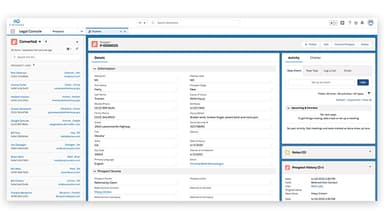
CoCounselor stands out for its Prospect Management capabilities, which provide a complete timeline of prospect interactions and activity history in one place. The platform helps firms track every touchpoint and conversation, manage leads through stage-based pipelines, detect and merge duplicate records, and convert prospects into clients with a single click, improving visibility and streamlining the client acquisition process. 

How Much Does CoCounselor Cost? 

CoCounselor price starts at $199/user/month with the Standard package covering basic needs. Another plan, Enterprise, costs $299/user/month for teams with advanced needs. 

Along with these, users should account for the following potential additional costs based on the industry benchmarks: 

  • Implementation: $500–$5,000 for small coaching setups and $5,000–$20,000+ for enterprise deployments involving workflow configuration and onboarding support 

  • Data Migration: $1,000–$10,000 depending on client records, historical session data, and journaling imports 

  • Training And Onboarding: $500–$7,500 for coaches and admin teams to fully adopt AI tools and workflows 

  • Integrations: $1,000–$15,000 depending on complexity and number of connected tools 

  • Customization And Workflow Setup: $2,000–$25,000 for organizations requiring tailored coaching frameworks, automation rules, and branded client experiences 

Users generally view CoCounselor pricing as fair and aligned with the value it delivers for Personal Injury law firms. Reviewers often highlight that the platform’s strong feature set and ability to streamline intake and case management justify the cost, contributing to a positive value-for-money perception. Some smaller firms may find it less ideal depending on their usage needs and customization requirements. 

Get a custom CoCounselor cost estimate to make a valuable decision for your organization.

Disclaimer: The pricing is subject to change. 

CoCounselor Integrations

CoCounselor seamlessly integrates with various popular business applications, including:

How Does CoCounselor Work? 

Log in to CoCounselor to access a cloud-based practice management platform designed specifically for Personal Injury law firms. Follow the steps below to use its core features: 

  • Import or migrate your firm’s data and configure the platform to match your intake, case management, and operational workflows 

  • Capture new leads through intake forms and manage them from a centralized dashboard with detailed prospect records, notes, and activity history 

  • Use intake automation to assign leads automatically, trigger email or SMS follow-ups, and keep prospects moving through the intake pipeline efficiently 

  • Convert qualified prospects into clients and transition their information into case management workflows for seamless onboarding and matter tracking 

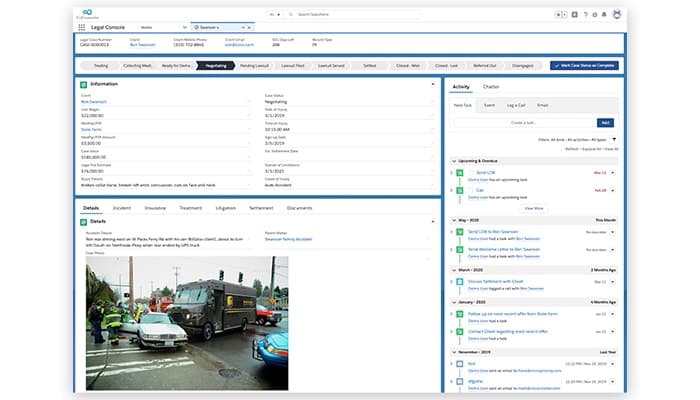
  • Manage cases from a single workspace by tracking deadlines, milestones, documents, settlements, and communications throughout the case lifecycle 

  • Collaborate with attorneys, case managers, and staff using shared tasks, calendars, automated workflows, and internal communication tools 

  • Keep clients informed through automated status updates, two-way messaging, client portal access, appointment reminders, and e-signature capabilities  

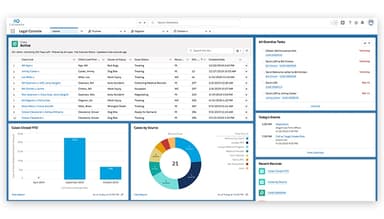
  • Monitor firm performance with customizable dashboards, reporting tools, referral tracking, marketing analytics, and business intelligence insights to support data-driven decisions 

Schedule a free CoCounselor demo to learn about the software’s offerings and capabilities first-hand.

Who Is CoCounselor For? 

The software is purpose-built for Personal Injury law firms, offering specialized tools to manage intake, case management, and firm operations. 

CoCounselor Use Cases 

Based on our analysis of CoCounselor’s features and product positioning, we have identified key scenarios where the platform is commonly used by Personal Injury law firms to manage client intake, case operations, communication, and firm performance: 

1. Law Firms Improving Prospect Intake And Conversion Rates 

Personal injury firms often receive large volumes of inquiries from potential clients across multiple channels, making it difficult to track every interaction and follow up consistently. Missed opportunities can lead to lost revenue and lower conversion rates. CoCounselor addresses this challenge with prospect management tools that maintain complete activity histories, track every touchpoint, automate follow-ups, and support stage-based intake workflows. By centralizing prospect information and enabling one-click client conversion, firms can improve intake efficiency and increase signed cases. 

2. Growing Firms Managing High-Volume Personal Injury Caseloads 

As case volumes increase, firms frequently struggle to maintain visibility into deadlines, documents, communications, and case progress. Relying on spreadsheets or disconnected systems can create operational bottlenecks and increase administrative workload. CoCounselor provides centralized case management capabilities that organize case information, automate workflows, and keep teams aligned throughout the case lifecycle. This helps firms maintain consistency while handling larger caseloads without sacrificing service quality. 

3. Legal Teams Enhancing Client Communication And Engagement 

Personal Injury clients often require regular updates regarding case developments, appointments, and documentation requirements. Managing these communications manually can consume significant staff time and increase the risk of missed messages. CoCounselor streamlines client engagement through automated communication tools, centralized messaging, reminders, and client-facing workflows that help keep clients informed throughout the legal process. This improves transparency while reducing the administrative burden on firm staff. 

4. Firms Centralizing Case Information And Team Collaboration 

CoCounselor is useful for firms that need to centralize case information and improve collaboration across legal teams. Personal injury cases often involve attorneys, case managers, intake specialists, and support staff working across multiple matters simultaneously. CoCounselor centralizes case records, documents, communications, and activity histories within a single platform, enabling staff to access up-to-date information and collaborate more effectively. This helps reduce administrative inefficiencies while ensuring everyone involved in a case remains aligned on progress and next steps. 

Is CoCounselor Right For You?

As a notable software for the legal industry, CoCounselor offers solutions that facilitate smoother daily legal operations. It makes it easier for legal teams to stay organized and efficient. The software is scalable and secure and heavily emphasizes data security with enterprise-grade protection including end-to-end encryption, regular backups, and SOC 2 compliance. It is also compliant with industry standards.

Still not sure if CoCounselor is right for you? Contact us at (661) 384-7070, and our experts will help you make the right decision for your organization.

CoCounselor Features

Calendaring And Task Management

CoCounselor offers organizations robust calendaring and task management tools to schedule appointments, deadlines, and reminders. It ensures that important dates and tasks remain a priority. It improves calendar and time management to help legal teams stay on track.

See How It Works
Call Tracking And Prospect Automation

This feature logs and tracks all client and prospect calls and integrates them into case files. It also automates follow-ups and reminders. The software ensures no lead goes unnoticed, facilitating better client engagement and conversion rates.

See How It Works
Document Management

Users can enjoy secure storage, easy retrieval, and organization of legal documents. It streamlines document handling and ensures all relevant files are accessible and up-to-date. CoCounselor reduces manual paperwork and enhances productivity.

See How It Works
Analytics And Performance Reporting

CoCounselor generates detailed insights into case performance, client interactions, and productivity. It helps make data-driven decisions, track progress, and identify areas for improvement, enhancing the strategic management of their practice.

See How It Works
Client And Case Management

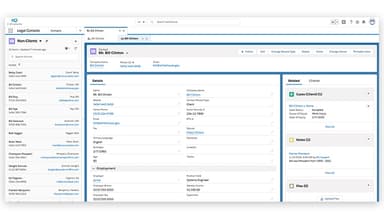
It centralizes all client and case information in one secure system, allowing legal teams to easily access updates, track case progress, and manage multiple matters simultaneously. It improves coordination across attorneys, case managers, and support staff.

See How It Works
Data Integrity And Duplicate Management

The platform includes built-in tools to detect and merge duplicate records, ensuring clean and accurate client and prospect data across the system. This improves record consistency and reduces administrative errors.

See How It Works
Intake Management System

CoCounselor features an ‘Intake Management System’ that streamlines the intake process by capturing, organizing, and qualifying new leads through a structured workflow. It standardizes prospect data collection, supports automated routing to relevant staff, and ensures smooth transition from initial inquiry to active case creation.

See How It Works
Firm Management And Team Coordination

This feature supports firm-wide control with tools for managing staff roles, workflows, and internal processes. It enables leadership teams to monitor intake activity, assign cases, and track overall firm performance from a single dashboard.

See How It Works
Referral Tracking

CoCounselor tracks all incoming referral sources and helps firms monitor how each channel contributes to new cases. It measures referral conversion rates, automates thank-you outreach to referral partners, and provides a dedicated referral partner portal for easier collaboration. It also includes ROI reporting by referral channel to help firms evaluate and optimize their referral network performance.

See How It Works

Pros And Cons of CoCounselor

Pros

  • Comprehensive automation features that support legal workflows

  • Users can tag team members directly in updates, helping improve internal communication

  • The ability to log client calls helps teams maintain a record of interactions for future reference

  • Users appreciate that certain workflows and settings can be adjusted to match their firm’s working style

Cons

  • Reminder dates have to be entered manually, as noted by some users

  • Users report that not all fields in a contact profile can be edited, which reduces flexibility

  • Finding specific client files can take time when dealing with unique names

CoCounselor Pricing

Standard

eye

View Price

What's Included

  • Case Management

  • Contact/Client Relationship Management

  • File Analytics

  • File Storage

  • Document Generation

  • Calendar (Gmail & Outlook Integration)

  • Marketing & Referral Tracking

  • Custom Fields & Page Fields

  • Video Management

Enterprise

eye

View Price

What's Included

  • Everything in the Standard plan, plus:

  • Custom Workflows & Automation

  • Unlimited File Storage

  • Call Tracking & Lead Generation

  • SafeWell Testing

Disclaimer: The pricing details were last updated on May 15, 2026 from the vendor's website. Please contact us for a tailored pricing list.

CoCounselor Reviews

Total 24 reviews

4.5

All reviews are from verified customers

Rating Distribution

5

Stars

63%

4

Stars

25%

3

Stars

13%

2

Stars

0%

1

Stars

0%

Share your experience

C

Corina

Legal, 51-100 employees

More than a year

5.0
August 2021

Customizable case dashboard

Pros

I really appreciate how I can tailor the case dashboard to suit our organization's needs. Everything I require is easily accessible, and I don't have to sift through multiple folders to find information.

Cons

The template generator could use some improvements, but honestly, it's not a big issue for me.

Rating Distribution

Ease of use

10

Value for money

10

Customer Support

10

Functionality

10

F

Fernanda

Legal, 1-10 employees

Less than a year

4.0
August 2020

CoCounselor works well

Pros

The ability to organize things alphabetically is a real advantage!

Cons

When I need something done, I have to go through an administrator.

Rating Distribution

Ease of use

8

Value for money

7

Customer Support

8

Functionality

8

S

Sara

Legal, 11-50 employees

Less than a year

5.0
August 2020

Improving day by day

Pros

What I find most valuable about this software is how it helps keep track of everything related to our client's cases. We can draft custom templates in no time, including intake forms, demand letters, and even complaints. It's made me much more efficient. I also like how it captures data, helping to maximize profits on each case. It's incredibly easy to find the information needed, and the entire team can stay informed on every aspect of a case with ease.

Cons

The only thing I'd like to see added to this software is making the case list tabs more customizable, especially for each paralegal.

Rating Distribution

Ease of use

10

Value for money

10

Customer Support

10

Functionality

10

Frequently Asked Questions

Does CoCounselor offer an API?

No, CoCounselor does not offer an API.

What language does CoCounselor support?

CoCounselor supports the English language only.

What level of support does CoCounselor offer?

CoCounselor offers email, chat, phone support, and FAQs.

What other apps does CoCounselor integrate with?

The tool integrates with Gmail, Outlook, DocuSign, and a few other third-party apps.

What type of pricing plans does CoCounselor offer?

CoCounselor pricing starts at $199/user/month for the Standard package and goes up to $299/user/month for the Enterprise package. Request a tailored CoCounselor cost now!

Who are the typical users of CoCounselor?

CoCounselor software is primarily used by personal injury law firms that need a structured system to manage daily legal operations.

Does CoCounselor have a mobile app?

No, the platform does not offer a mobile app.