


Last Updated
Overview
Dibcase Legal Case Management software enhances legal operations with customizable dashboards, interactive client portals, and automated document generation. While the initial setup may be complex, its cloud-based accessibility, powerful features, and dedicated support make it an essential tool for law firms aiming for efficiency.
Dibcase Legal Case Management Specifications
- Case management
- Document management
- Time tracking
- Court calendaring and scheduling
Dibcase Legal Case Management Features
Document Generation
Dibcase Legal Case Management enhances document workflows with a comprehensive template editor, dynamic merge fields, and seamless Word and PDF imports. Pre-designed templates, customizable formatting, and structured organization optimize document handling for legal professionals, ensuring efficiency and accuracy in every case.
Report Builder
The software offers customizable reports for tracking case statuses, pending fees, and lead management. Exportable to Excel, these reports cover multiple practice areas. Editable parameters provide tailored analysis, improving efficiency and decision-making for legal professionals.
OHO And A/C Spreadsheet Import
Dibcase Legal Case Management allows direct Social Security Administration (SSA) Electronic Records Express (ERE) spreadsheet imports, enabling efficient case updates. Eliminating third-party vendors reduces conflicts while ensuring data accuracy. Automated updates streamline workflows, minimizing manual input and saving valuable time.
Lead Stages
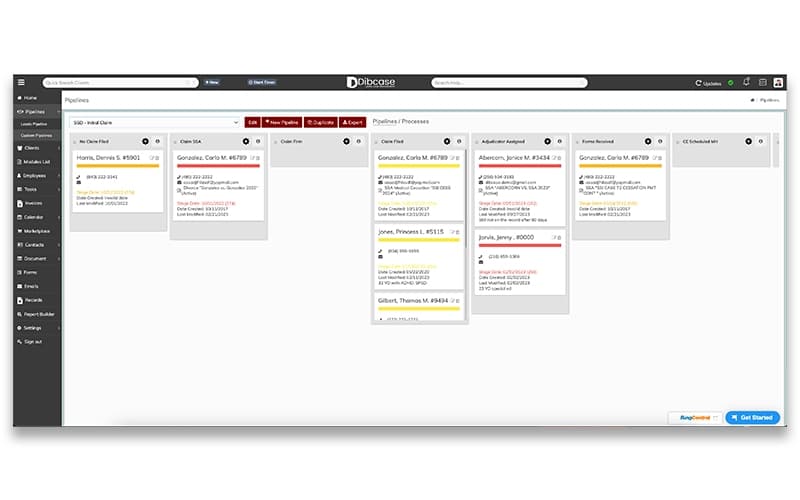
The platform optimizes lead tracking with customizable stages. Kanban-style cards enable effortless reordering. Automated SMS notifications enhance communication, while a one-click conversion transforms leads into active clients, improving efficiency in case progression.
Integrated Communications
The system provides built-in text messaging and email integration for seamless client interactions. Automated time tracking records for every communication while dynamic templates merge client data. Notifications ensure responsiveness, keeping legal professionals informed in real-time.
Pros And Cons of Dibcase Legal Case Management
Pros
Easy-to-use interface with streamlined case management
Efficient document generation tool, ideal for growing firms
Supports client communication with continuous improvements
Customizable reports tailored to specific needs
Cons
Limited practice areas
Initial learning curve
Dibcase Legal Case Management Reviews
Total 13 reviews
5
All reviews are from verified customers
Rating Distribution
5
Stars100%
4
Stars0%
3
Stars0%
2
Stars0%
1
Stars0%
Share your experience
Rhonda W.
Legal Services, 1-10 employees
More than a year
“Perfect for solo practitioners”
Pros
It really simplifies the whole process for case management. If you spend a bit of time getting familiar with it, you can have all your information right on your devices. Plus the team provides the best customer service I have come across. They are quick to respond, offer tutorials and even provide one on one training. The best thing is that the one who assists me is also an advocate, so he really understands my needs and is great for colleague to colleague conversations.
Cons
Some features are difficult to use so I had to take some tutorials in order to understand them better.
Rating Distribution
Ease of use
9
Value for money
10
Customer Support
10
Functionality
9
Jeffrey T.
Law Practice, 1-10 employees
Less than 6 months
“I like it!”
Pros
I really liked how easy their interface is to use.
Cons
There is a small learning curve involved but overall it is not going to be an issue for our firm.
Rating Distribution
Ease of use
10
Value for money
10
Customer Support
10
Functionality
10
Corey A.
Law Practice, 1-10 employees
Less than 6 months
“Pretty easy to set up”
Pros
Being able to automatically send emails and texts to our clients has saved us so much time.
Cons
The process was really smooth and the transitions were seamless. Honestly I have not found anything I dislike.
Rating Distribution
Ease of use
10
Value for money
10
Customer Support
10
Functionality
10
Frequently Asked Questions
Who are the typical users of Dibcase Legal Case Management?
Dibcase Legal Case Management provides legal solutions for attorneys, advocates, and professionals across various practice areas, including all law types, social security, personal injury, veterans' disability, and workers' compensation.
Does Dibcase Legal Case Management have a mobile app?
Dibcase Legal Case Management does not offer a dedicated mobile application.
What other apps does Dibcase Legal Case Management integrate with?
Dibcase Legal Case Management supports integrations with third-party applications, including Dropbox, Google Drive, Amazon Web Services, Office 365, Chronicle, Zapier, Google Calendar, and Outlook Calendar, ensuring seamless connectivity and enhanced workflow efficiency.
What types of pricing plans does Dibcase Legal Case Management offer?
Dibcase Legal Case Management cost follows a subscription-based model offering plans starting at $59/month for up to 50 clients, scaling to $299/month for 301-500 clients, all with unlimited users. The most popular plan costs $199/month for 101-300 clients, and a 14-day trial is available for all plans. Request a Dibcase Legal Case Management price analysis to explore the available packages and features of each plan.
Does Dibcase Legal Case Management offer an API?
Dibcase Legal Case Management offers API access.
What language does Dibcase Legal Case Management support?
Dibcase Legal Case Management supports English.
What level of support does Dibcase Legal Case Management offer?
Dibcase Legal Case Management provides multiple support options, including chat, email/help desk, knowledge base, phone support, and FAQs/forums.