


HighQ
Last Updated
Key Takeaways
Generated from the text of customer reviews
Our Verdict
Overall Rating
Based on 14 users reviews
4.1
Rating Distribution
Positive
93%
Neutral
0%
Negative
7%
Starting Price
$1,317
per user per year
HighQ Specifications
- Document Management
- Workflow Automation
- Client Portal
- Document Automation/Assembly
HighQ Features
Personalized Client Portals
Round-the-clock access to legal information and resources comes through client portals tailored to specific matters. Each client gets a secure, personalized portal designed around their own requirements. This way, clients get a dedicated place to access relevant information whenever needed, supporting convenient access outside standard working hours.
Centralized Virtual Data Rooms
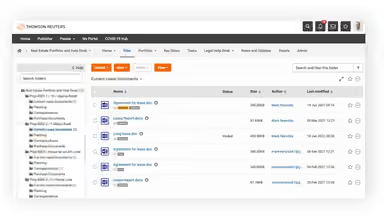
HighQ features virtual data rooms that provide a single, secure place to store, assemble, and categorize relevant deal documents. They also support document collaboration, keeping deal data centralized in one location. This helps users manage deal documentation more efficiently without passing files back and forth between parties.
Generative AI Insights And Reporting
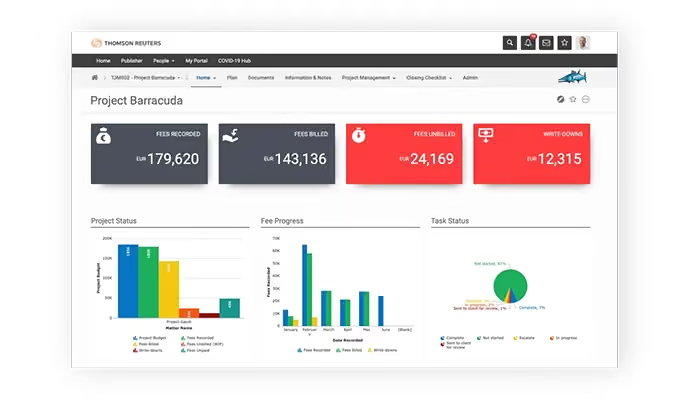
HighQ's data visualization and reporting tools help users make practical use of AI-generated insights. Insights get added automatically to iSheets for analysis, sharing, and building visual reports. As a result, users get a structured way to examine AI-generated information and communicate findings.
AI-Powered Document Insights
'Document Insights' uses CoCounsel's AI within HighQ to extract key information, summarize content, and highlight important points from documents. Manual review drops as a result, helping users analyze documents more quickly while supporting faster, more informed decisions and reducing review-related risk.
Conversational Self-Service Q&A
With this capability, clients and stakeholders can ask questions in natural language and get summarized, relevant answers within minutes through conversational AI. This gives users quicker access to information while reducing the number of routine questions that land directly on legal teams, easing workload and improving service satisfaction.
Team Social Collaboration
Team interactions come together through activity streams, wikis, blogs, user profiles, commenting, tags, and private messaging. These tools give team members multiple ways to communicate, share information, and engage with colleagues within HighQ, supporting more effective collaboration across legal teams and their work.
Secure File Storage And Sharing
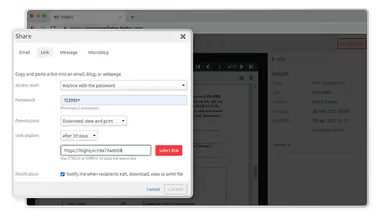
Files stay accessible anytime, anywhere, while maintaining data security through HighQ's storage and sharing tools. Users can share files and sync documents across mobile devices and desktops, keeping access to current information consistent no matter where they're working from. This helps cut down on reliance on outdated document versions when switching between devices.
Pros And Cons of HighQ
Pros
Centralized document management keeps project information well organized
Secure file sharing supports sensitive document exchanges safely
Collaboration tools make cross-team project work easier daily
Granular permissions provide control over shared information effectively
Version control helps teams avoid messy email chains
Cons
Initial setup can feel complex for new administrators
AI-supported workflows require human oversight to avoid mistakes
Some users feel the need for additional customization options
HighQ Pricing
HighQ Essentials | HighQ Advanced | HighQ Premium |
|---|---|---|
Custom quote | Custom quote | Custom quote |
|
|
|
Disclaimer: The pricing details were last updated on Sep 14, 2026 from the vendor's website. Please contact us for a tailored pricing list.
HighQ Reviews
Total 14 reviews
4.1
All reviews are from verified customers
Rating Distribution
5
Stars36%
4
Stars57%
3
Stars0%
2
Stars0%
1
Stars7%
Share your experience
E-Learning, 1-10 employees
Less than a year
“Improving collaboration enforcement”
Pros
I really appreciate how this all in one product lets me move quickly between tasks. It's been a huge help for team collaboration, making everything run a lot smoother.
Cons
The interface can feel a bit overwhelming at first but there aren't any major issues once you get used to it.
Rating Distribution
Ease of use
8
Value for money
6
Customer Support
6
Functionality
8
Legal Services, 500+ employees
More than a year
“HighQ is an outstanding software”
Pros
What I really like about this is how well it allows me to collaborate with my team on projects and share documents effortlessly.
Cons
It does take a bit of time to get the hang of, so it's important to allow some time for training at the beginning of a project or matter.
Rating Distribution
Ease of use
8
Value for money
8
Customer Support
10
Functionality
9
Real Estate, 1-10 employees
Less than 6 months
“Extremely poor service”
Pros
My experience with them wasn't great. I contracted for ISA services and while I was promised a clear start date and a set number of calls and hours, none of that was delivered. They kept coming up with excuses, canceling appointments and ignoring my questions. Even when I reached out they made many commitments that never came through.
Cons
They lied and made a lot of empty promises that were never delivered!
Rating Distribution
Ease of use
2
Value for money
2
Customer Support
2
Functionality
2
Frequently Asked Questions
Who are the typical users of HighQ?
HighQ is designed for legal professionals across various organization types, including legal, government, corporate, media, global trade and supply, accounting and finance, and audit organizations.
What level of support does HighQ offer?
HighQ software offers support through phone, chat, contact form, and a help center.
What language does HighQ support?
HighQ software supports several languages, including English, Dutch, German, French, Spanish, Japanese, Simplified Chinese, Brazilian Portuguese, and Italian.
Does HighQ have a mobile app?
Yes, HighQ provides a mobile application for both iOS and Android users.
What other apps does HighQ integrate with?
The software integrates with various third-party applications, including Microsoft SharePoint, eDoc, iManage, NetDocuments, Office 365, DocuSign, Adobe Sign, Kira Systems, and Leverton.
What types of pricing plans does HighQ software offer?
Its pricing is estimated to start at around $1,317/user/year, based on industry benchmarks. Actual costs may vary. HighQ also offers three custom-priced plans: HighQ Essentials, HighQ Advanced, and HighQ Premium. Optional add-ons include 'Connectors and integrations' and 'HighQ document automation.' Get a custom HighQ price quote as per your requirements.
Does HighQ offer an API?
Yes, HighQ provides API access.