


Legal Files
Last Updated
Key Takeaways
Generated from the text of customer reviews
Legal Files is a legal case and matter management platform used by law firms, corporate legal teams, government agencies, and other organizations. Users value its centralized case and document organization capabilities, although some report the software takes time to learn. In 2025, the software was acquired by Onit and became part of its broader legal technology ecosystem.
Our Verdict
Legal Files is suitable for firms managing high-volume legal matters across teams. Its customization and centralized information management can support government, insurance, corporate, and legal aid organizations. Pricing is quote-based, so firms should assess the cost against their needs and budgets. We recommend it for legal teams seeking a tailored matter management system that maintains oversight across cases.
Overall Rating
Based on 15 users reviews
4.3
Rating Distribution
Positive
80%
Neutral
20%
Negative
0%
Starting Price
$800
per uesr per year
Legal Files Specifications
- Case Management
- Document Management
- Court Calendaring & Scheduling
- Document Automation/Assembly
What Is Legal Files?
Legal Files by Onit is a legal case and matter management software designed for organizations where legal work spans multiple matters, stakeholders, and regulatory requirements. It brings together case records and related activity to help legal teams track how matters progress, understand their history, and identify outstanding obligations. This supports more consistent case handling across complex legal operations.
What Is Legal Files Best For?
Legal Files stands out for its no-code configuration tools, which let teams tailor how matter intake, document organization, calendaring, and reporting work for each type of case. This suits legal departments that handle varied matters, such as litigation, contracts, and investigations, and want their system to reflect those differences while keeping one consistent process across them. Because the platform is built to adapt to different organizational structures, teams can reshape their setup as their work changes.
How Much Does Legal Files Cost?
Legal Files' starting price is estimated at $800/user/year. The actual pricing may vary based on each organization’s size, configuration needs, and scope of implementation.
Firms should also consider the following potential additional costs when estimating their total investment:
- Implementation: $2,000-$10,000
- Data Migration: $1,500-$15,000
- Customization: $2,000-$8,000
- Integrations: $1,000-$5,000/integration
- Additional Training: $500-$2,000/session
Disclaimer: Pricing references are based on publicly available third-party information and industry benchmarks. Actual costs may vary.
Legal Files Integrations
Legal Files integrates with the following Microsoft applications:
- Outlook
- Office
- SharePoint
- Teams
How Does Legal Files Work?
Here’s how a legal team can access Legal Files software and use it to manage a matter from intake through ongoing case activity.
- Log in with your credentials to access the platform
- Adjust fields and workflows to match how your team handles each type of matter
- Attach documents and contracts to the relevant matter and link related email correspondence directly to its records
- Add deadlines and calendar items so important dates are tracked throughout the matter
- Log updates as the case moves forward, building a running history of what happened
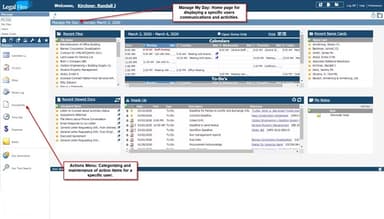
- Use reports and dashboards to monitor activity and pull up the records you need
Who Is Legal Files For?
Legal Files software supports legal teams across several types of organizations, including:
- Law firms
- Corporate legal departments
- Legal aid organizations
- Government agencies
- Universities
- Insurance firms
- Investigation agencies
Legal Files Use Cases
Based on Legal Files’ current capabilities, these are specific situations where the software can fit the needs of legal teams:
Public Law Offices Managing Litigation, Regulatory Matters, And Public Records Requests
Government legal teams may need to manage litigation alongside regulatory matters and public records requests, each with different documentation and deadlines. Legal Files can bring these matters into the same case management environment, while configurable processes allow legal personnel to adapt the system to the types of cases they handle. This can give government counsel a more structured way to manage varied legal obligations without treating each matter type as a separate system.
Insurance Legal Teams Coordinating Staff Counsel And Litigation Portfolios
Insurance organizations managing litigation through staff counsel often need visibility into cases, related documents, communications, and important dates. Legal Files organizes these records by matter, which can make it easier to track activity across a larger litigation portfolio. It helps insurers maintain clearer oversight of case developments and interactions with external counsel.
Legal Aid Organizations Managing High-Volume Intake And Casework
Legal aid organizations handling high volumes of cases might need to track intake, case activity, documents, and reporting requirements across different programs. Legal Files can be adapted to different case types while giving teams a shared structure for tracking matters and producing reports. Hence, it enables legal aid teams to follow each case from initial intake through ongoing casework.
Investigation Teams Protecting Sensitive Case Files
Investigations often involve sensitive information that has to stay tied to a specific matter while access is limited. Legal Files lets investigation teams restrict who can see sensitive case information and supports an audit trail of activity, which helps keep each case's history traceable.
Corporate Legal Teams Tracking Deadlines Across A Large Contract Portfolio
Corporate legal teams that handle contracts alongside other matters often end up with documents in one place, emails in another, and dates in a calendar elsewhere. Legal Files keeps contracts, related emails, and deadlines in one matter record, so counsel can see what is pending on each contract and when it is due. This ties each contract's history and upcoming dates to the matter instead of scattering them across inboxes and calendars.
Is Legal Files Right For You?
Legal Files is worth considering for legal teams that need to manage growing volumes of litigation, contracts, investigations, or compliance matters without losing visibility across their legal records. It could also be a suitable fit for organizations that handle different types of legal matters and need to keep their records organized and up to date.
Onit, Legal Files’ parent company, complies with SOC 2 Type 2, SOC 1 Type 2, and HIPAA standards. Some of its security measures include 256-bit SSL encryption, access controls, continuous firewall monitoring, and managed backups.
Still not sure if Legal Files software is right for you? Get in touch with us at (661) 384-7070, and we will help you make a confident decision.
Legal Files Features
Centralized Storage
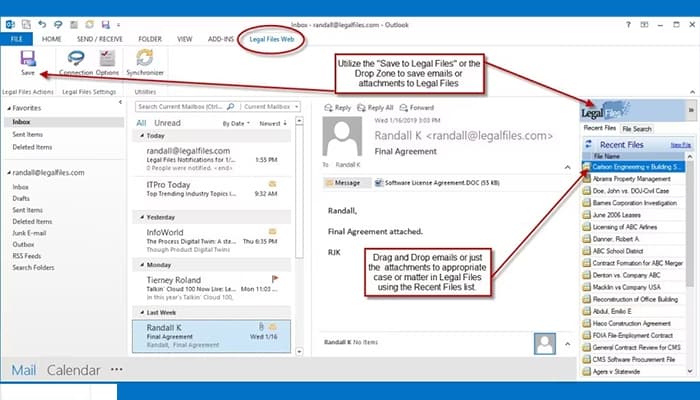
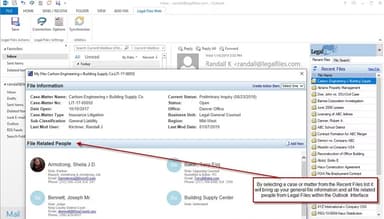
Legal Files stores matter records, documents, emails, and contract information in one secure location, linking related information to the relevant legal matter. It integrates with Microsoft applications, allowing users to manage documents and attach emails directly from their inbox. This way, correspondence remains linked to the relevant matter.
Automated Document Generation
The software generates standardized legal documents using predefined templates and information from matter records, which can reduce the time spent creating each document. It enables legal personnel to produce routine documents more consistently and with less manual work.
Mobile Access
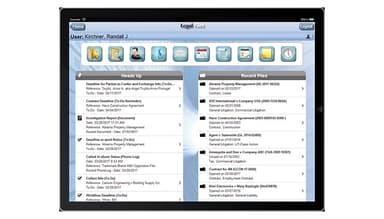
Legal Files lets users access their legal matter information from desktop computers and mobile devices through its iOS app. The app provides access to the Legal Files database through a portal view, allowing users to review matter information and stay informed when working across locations. However, using the app requires a separate mobile license and Legal Files Web version 10.0 Build 31 or later.
Built-In Calendaring And Deadline Management
The platform enables users to add and manage calendars, deadlines, and other important dates related to legal matters. This way, they can get better visibility of critical dates, which helps minimize the risk of missed deadlines.
Reporting And Analytics
Using the software, legal teams can generate reports from matter data to review case activity, deadlines, and other legal records. They can access this information without manually combining data from different sources.
Pros And Cons of Legal Files
Pros
Microsoft Outlook and Word integration makes it easier to save correspondence and documents directly to the relevant matter
Centralized matter information can help team members quickly understand a case when taking over work or covering for colleagues
Users find the document organization useful for keeping large volumes of case information structured and accessible
Its customization options allow organizations to adapt documents and matter structures to their own processes
Users report that the software can support collaboration across teams and, in some cases, across multiple offices
Cons
The interface can feel dated compared with newer legal software
Occasional performance delays have been reported when working with larger case databases
Some tasks involve several clicks, which can make simple actions take longer
Legal Files Reviews
Total 15 reviews
4.3
All reviews are from verified customers
Rating Distribution
5
Stars53%
4
Stars27%
3
Stars20%
2
Stars0%
1
Stars0%
Share your experience
Legal Services, 1-10 employees
Less than 6 months
“Locates and organizes files simply”
Pros
I've really been enjoying this app. It makes locating my files so simple and being able to organize PDFs into categories has truly simplified my workflow and daily tasks.
Cons
the biggest drawback is when the app doesn't connect smoothly, so I can end up wasting hours trying to get it to work properly, which is frustrating.
Rating Distribution
Ease of use
9
Value for money
8
Customer Support
8
Functionality
8
Law Practice, 11-50 employees
Free Trial
“Eliminates paper and organizes well”
Pros
I appreciate how it has essentially eliminated our reliance on paper files and made physical records unnecessary. It's a fantastic organizational tool.
Cons
Unfortunately, we couldn't run it on Mac computers and that caused issues for a number of people in our office. It also needs to handle much larger file sizes.
Rating Distribution
Ease of use
9
Value for money
7
Customer Support
9
Functionality
7
Financial Services, 11-50 employees
Less than a year
“No errors but a bit hard to learn”
Pros
I didn't face any errors while installing it and I appreciate that it supports working with multiple different databases as well.
Cons
Honestly, learning this software wasn't simple for me. Also, the user interface needs an update since it feels quite dated now.
Rating Distribution
Ease of use
7
Value for money
9
Customer Support
8
Functionality
8
Frequently Asked Questions
Does Legal Files offer a free trial or free plan?
The vendor has not listed details of a free plan or free trial. Legal Files' pricing is generally tailored to the organization's needs.
Does Legal Files offer customer support?
Yes, Legal Files' users can access Onit’s support services to get help with product questions and technical issues. They can submit a support ticket through the Onit Support Portal to contact the support team.
Is Legal Files suitable for small law firms?
Yes, Legal Files can be suitable for smaller firms that need structured case and matter management. However, firms should assess whether its capabilities, implementation requirements, and quoted price fit their size and needs.
Does Legal Files include billing and trust accounting?
No, Legal Files focuses primarily on case and matter management. Buyers that require built-in billing or trust accounting should confirm which financial capabilities are included in their specific setup.
Is Legal Files available on-premises or in the cloud?
Legal Files supports both on-premises and cloud deployment. Interested buyers should confirm current deployment options and hosting arrangements with the vendor before purchasing.