


Lexzur
Last Updated
Overview
Lexzur offers AI-driven legal practice management, including case handling, client data centralization, task automation, and financial tracking. While its extensive features may require training for new users, Lexzur's comprehensive capabilities can greatly enhance legal operations.
Lexzur Specifications
- Case management
- Document management
- Client management (CRM)
- Billing & Invoicing
What Is Lexzur?
Lexzur is a cloud-based legal practice management software designed to streamline operations for law firms and legal departments. It offers solutions that address challenges such as managing case files, tracking billable hours, handling client communications, and ensuring regulatory compliance. The platform integrates with various legal tools to create a centralized system for efficiency. Its AI-driven capabilities help reduce administrative workload, allowing legal professionals to focus more on case strategy and client service.
Lexzur Pricing
The software offers two products, Core and Contra, both with the same pricing plans. These plans come with 2 weeks free trial. The plans include:
- Basic: $8/user/month
- Business: $18/user/month
- Enterprise: $25/user/month
- Enterprise+: Custom pricing
Disclaimer: The pricing is subject to change.
Lexzur Integrations
Lexzur software seamlessly integrates with various business applications, including:
- Outlook Connect
- Google Workspace
- Microsoft Teams
- Microsoft Word
- Webex
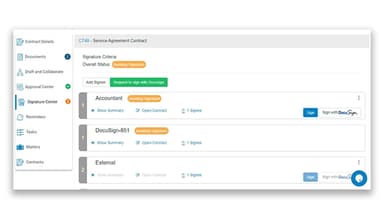
- DocuSign
- Adobe Sign
Who Is Lexzur For?
The software is designed for businesses of all sizes across various industries, such as:
- Telcos
- Banking and finance
- Real estate
- Governments
- IT
- Legal services
- Law practice
Is Lexzur Right For You?
Lexzur enhances efficiency by automating workflows, reducing administrative workload, and improving document collaboration. It streamlines client and case management, ensuring accuracy and compliance. With AI-driven insights, it helps legal professionals make informed decisions, save time, and increase productivity. Lexzur empowers professionals to work smarter, not harder, by optimizing legal operations.
Still not sure if Lexzur is right for you? Get in touch with our customer support team at (661) 384-7070, and they will help you make a confident decision.
Lexzur Features
Case And Matter Management
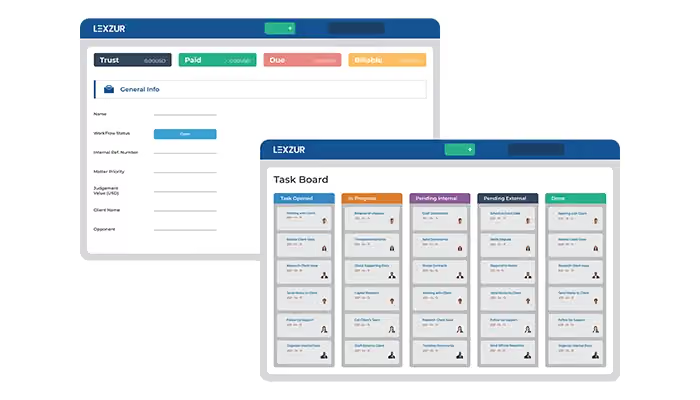
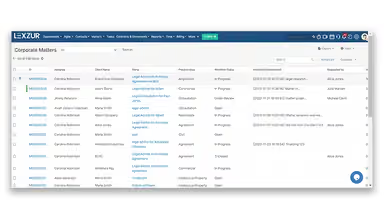
Lexzur's ‘Case and Matter’ management centralizes corporate matters and litigation cases, enabling users to add stakeholders, assign tasks, collaborate, manage documents, and set deadlines with reminders. This structured approach ensures organized workflows and enhances team collaboration.
Client Intake (CRM)
The client intake feature centralizes all client information, streamlining the onboarding process and maintaining comprehensive client records. This ensures efficient client management and enhances service delivery by providing quick access to essential client data.
Task And Workflow Automation
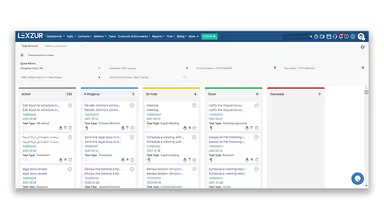
Lexzur automates repetitive tasks and standard workflows, reducing manual intervention and minimizing errors. This automation enhances operational efficiency, enabling legal professionals to focus on more strategic activities and improving overall productivity.
Lexa – AI Legal Assistant
Lexa, Lexzur's AI legal assistant, helps in analyzing risks, summarizing complex contracts, and evaluating compliance. By providing precise insights, Lexa helps legal professionals make informed decisions and enhances the accuracy of legal work.
Collaborate And Redline
Lexzur features a collaborate and redline tool that enables multiple users to work on documents simultaneously, tracking real-time changes and comments. This fosters seamless collaboration, ensures version control, and accelerates the document review process.
Pros And Cons of Lexzur
Pros
Comprehensive features cover daily legal tasks
Advanced reporting system aids decision-making
Mobile app provides on-the-go access
Cons
Terminology may not align with all regions
Requires customization to fit specific workflows
Lexzur Reviews
Total 17 reviews
4.2
All reviews are from verified customers
Rating Distribution
5
Stars47%
4
Stars41%
3
Stars6%
2
Stars0%
1
Stars6%
Share your experience
Legal Services, 1-50 employees
Less than 6 months
“Lexzur Review: How AI Makes Task Management Easy”
Pros
It simplifies task tracking, ensuring nothing gets missed. The Lexzur support team is incredibly responsive and helpful. Tasks are well-organized, making it easy to see what's new, in progress, or pending. The ability to add summaries helps everyone quickly grasp the task's purpose and any updates. It also keeps track of time spent on tasks, making workload management much smoother. The new AI powered feature is a great addition, helping to generate ideas and speed up processes.
Cons
All the info cannot be entered into a single document at once and the process happens in multiple steps.
Rating Distribution
Ease of use
8
Value for money
6
Customer Support
9
Functionality
8
Legal Services, 1-50 employees
Less than 6 months
“Good for task management”
Pros
The layout is very structured, making task management clear and easy to follow.
Cons
I would prefer if tasks were arranged chronologically.
Rating Distribution
Ease of use
8
Value for money
8
Customer Support
10
Functionality
8
Legal Services, 1-10 employees
More than a year
“Fantastic design, great support, and easy to use”
Pros
What stands out the most about Lexzur for me is its smooth and intuitive interface. It seamlessly brings together all the essential tools a legal team needs. The reporting and automation features are incredibly handy and make workflows much more efficient.
Cons
There are missing important modules for accounting and HR, such as payroll, fixed assets and HR management.
Rating Distribution
Ease of use
10
Value for money
10
Customer Support
10
Functionality
7
Frequently Asked Questions
Does Lexzur offer an API?
Yes, Lexzur offers an API.
What language does Lexzur support?
Lexzur supports several languages, including English, Spanish, and French. English, Russian, Spanish and French.
What other apps does Lexzur integrate with?
Lexzur integrates various third-party applications, including Microsoft Word, Microsoft Teams, Webex, and DocuSign.
Does Lexzur have a mobile app?
Yes, Lexzur has a mobile app.
What types of pricing plans does Lexzur offer?
Lexzur price depends on two products, Core and Contra, each with 2 weeks free trial. Both plans offer the same pricing: Basic plan starts at $8/user/month, Business plan starts at $18/user/month, and Enterprise plan starts at $25/user/month. Users can get a custom quote for the Enterprise+ plan.
Who are the typical users of Lexzur?
The typical users of Lexzur are those in the legal services, law firms, and telcos industries. are the legal services, law firms and telcos industries.
What level of support does Lexzur offer?
Lexzur offers support through email, phone, live chat, knowledge base, and FAQs.