



Last Updated
Overview
Nextpoint offers robust eDiscovery and trial preparation software tailored to legal teams of any size. While users suggest self-paced learning tutorials for newcomers, the platform is overall user-friendly and accessible for both partners and paralegals. Moreover, users laud Nextpoint as a one-stop solution for data uploading, reviewing, and collaboration.
Nextpoint Specifications
- Case Management
- Document Management
- Client Management (CRM)
- Billing & Invoicing
What Is Nextpoint?
Overview
Nextpoint facilitates legal operations for all types of legal teams. Its streamlined eDiscovery processes and simplified case management enhance litigation efficiency, safeguard client data, and reduce costs. Nextpoint covers all the aspects, from initial data assessment to deposition handling, visual timeline creation, and presentation. With over two decades of services, Nextpoint is a trustworthy name in the industry, providing users with unlimited data access capabilities and top-tier tools.
Nextpoint Pricing
Nextpoint pricing depends on a per-user structure, with a focus on three pricing plans:
- Essential
- Advance
- Apex
Nextpoint Integrations
Nextpoint integrates with various applications, including:
- OneDrive
- Dropbox
- Zoom
Who Is Nextpoint For?
Nextpoint facilitates the eDiscovery process across various industries, such as:
- Legal
- Corporate
- Finance
- Healthcare
- Insurance
Is Nextpoint Right For You?
Nextpoint optimizes and automates the intricate workflows of eDiscovery and case preparation. It simplifies data management for contemporary legal teams and is accessible from any location and device. Nextpoint offers lightning-fast processing, virtually limitless storage, and top-tier security measures to streamline legal operations. For its security compliance and seamless tools, thousands of organizations, such as Morgan & Morgan, WhatleyKallas, LLP, and Clyde & Co., trust Nextpoint as their go-to solution.
Are you still unsure about Nextpoint? Contact us at (661) 384-7070 and get expert assistance from our team regarding any further queries.
Nextpoint Features
Simple And Secure Upload
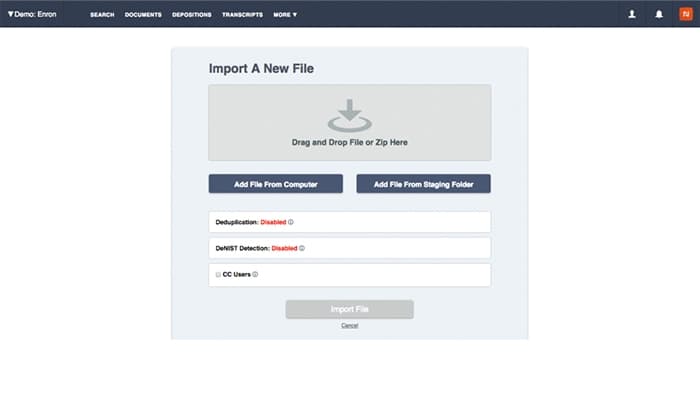
The quick drag-and-drop uploader simplifies importing and organizing files within minutes. The software automates database configuration and all intricate and crucial tasks (such as deduplication, OCR, imaging, and metadata extraction) with zero data charges involved.
Modern Evidence Exchange
Nextpoint eliminates the need for downloads, DVDs, FTP sites, and shipping hardware. It enables the exchange of evidence online. This process is more secure with encryption, free of paper costs, and as simple as emailing. Users can now share or export files to collaborators or experts within seconds.
Post-Review Case Building Tools
The software enhances collaboration within your team during case preparation for hearings or trials. This tool can also encompass pre- to post-production data such as depositions, videos, and transcripts. It provides a secure, cloud-based workspace for the administrator of all your evidence.
Dynamic 360º Views
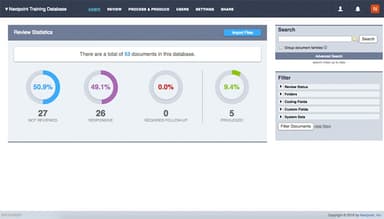
Its customizable visualization of the complete database provides essential "big picture" insights for prompt decision-making post-upload. Nextpoint helps swiftly carry out bulk culling or coding and effectively structures the review process from the start.
Depositions Management
This streamlined process allows for quick and organized management of all deposition-related information, ensuring a comprehensive record of the proceedings. Users can now handle depositions by promptly documenting designations, objections, transcripts, and video recordings.
Pros And Cons of Nextpoint
Pros
Nextpoint is user-friendly and easy to get used to
Allows for flexible organization of discovery materials
Handles native files, especially emails, efficiently
Offers bulk coding, unlimited data storage, and document organization
Cons
More self-paced learning resources could be helpful, according to some users
Exported PDFs lose searchability sometimes
As per some software users, the redaction process needs improvement
Nextpoint Reviews
Total 23 reviews
4.7
All reviews are from verified customers
Rating Distribution
5
Stars70%
4
Stars30%
3
Stars0%
2
Stars0%
1
Stars0%
Share your experience
Legal, 51-100 employees
More than a year
“Nextpoint�s Support Team is Exceptional”
Pros
What truly sets Nextpoint apart is not just its many greaty features, but the personalized support provided by its skilled and approachable team. For small firms like ours, feeling appreciated by our software partner is just as critical as the software itself meeting our needs. The Nextpoint team consistently finds creative solutions for the challenging situations we've faced. We've never encountered a complex issue that didn't have a resolution, even when it went beyond the typical scope of eDiscovery tools. If you're looking for a service that offers a white-glove, personalized experience, Nextpoint is hands down the best choice out there.
Cons
I believe the pricing for near-duplicate searches could definitely use some updates.
Rating Distribution
Ease of use
8
Value for money
9
Customer Support
10
Functionality
10
Legal, 1-10 employees
More than a year
“A Great Option That Won�t Break the Bank”
Pros
The software is simple to use. It's designed with ease in mind, making searches swift, and the bulk tagging feature is incredibly practical.
Cons
Some important metadata fields are not easily accessible, and there's no way to get into the backend of the database to make edits, like adjusting productions or re-uploading load files. Also, there's a cap on certain tasks, like processing a maximum of 5,000 documents, which becomes difficult when managing large datasets.
Rating Distribution
Ease of use
7
Value for money
10
Customer Support
10
Functionality
6
Legal, 11-50 employees
More than a year
“Document Review Made Simple With Nextpoint”
Pros
The design of the software makes finding and reviewing documents easy. Navigating through a document and conducting searches is both quick and easy.
Cons
I found reviewing or marking multiple documents at once to be a bit challenging. Also, printing a PDF of a specific document was not as easy as I would have liked.
Rating Distribution
Ease of use
8
Value for money
8
Customer Support
8
Functionality
8
Frequently Asked Questions
Does Nextpoint offer an API?
The official website does not specify whether or not Nextpoint provides an API.
What language does Nextpoint support?
Nextpoint supports the English language only.
What other apps does Nextpoint integrate with?
It offers various integrations, including OneDrive, Dropbox, Zoom, and Google. Watch the Nextpoint demo to learn more about its integration options.
What types of pricing plans does Nextpoint offer?
Although the Nextpoint pricing varies based on a per-user basis, it has three main plans: Essential, Advance, and Apex. Get a comprehensive analysis of Nextpoint cost to find the best fit for your business.
Who are the typical users of Nextpoint?
The typical users of Nextpoint come from the legal, healthcare, insurance, finance, and corporate industries.
What level of support does Nextpoint offer?
Nextpoint offers support through phone, email, chat, a knowledge base, a video library, and form submissions.